43
j) Frequency Measurement (electronic)
The DMM can be used to measure and indicate signal voltage frequencies up to 1 MHz.
The maximum input range is 20 Vrms. This measuring function is not suitable for mains
voltage measurements. Please observe the input values in the technical data.
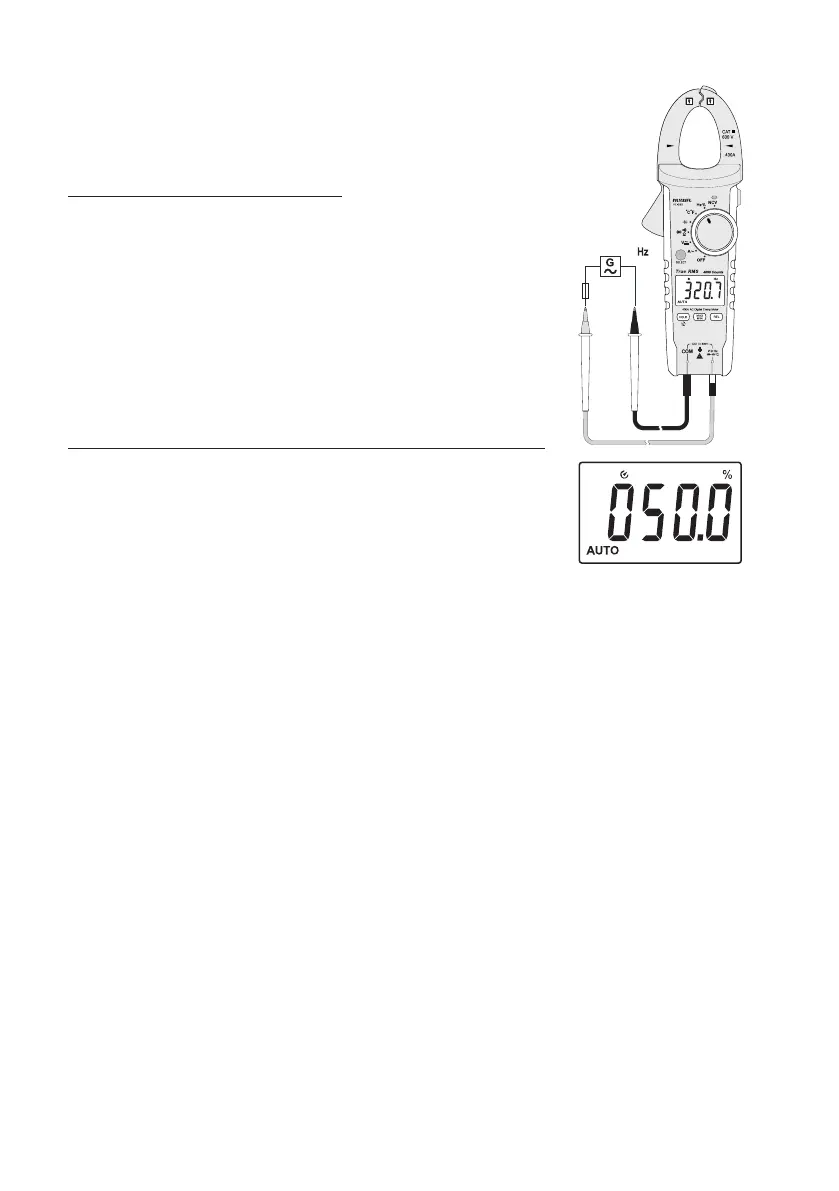
Proceed as follows to measure frequencies:
- Turn the DMM on and select measuring function "Hz". The display reads "Hz".
- Plug the red measuring line into the Hz measuring jack (10) and the black measuring
line into the COM measuring jack (9).
- Connect the two measuring prods to the object to be measured in parallel (signal
generator, circuit, etc.).
- The frequency and corresponding unit are displayed.
- Remove the measuring lines from the object to be measured after completion of the
measurement and switch off the DMM.
Proceed as follows to measure the pulse ratio of the positive half-wave in %:
- Switch on the DMM and select measurement range "Hz". The display reads "Hz".
Push the button "SELECT". The display indicates "%".
- Plug the red measuring line into the Hz measuring jack (10) and the black measuring
line into the COM measuring jack (9).
- Connect the two measuring prods to the object to be measured in parallel (signal
generator, circuit, etc.).
- The pulse duration of the positive half wave is displayed as a percentage. 50% is
displayed for a symmetrical signal.
- Remove the measuring lines from the object to be measured after completion of the
measurement and switch off the DMM.





 To Next Page