21
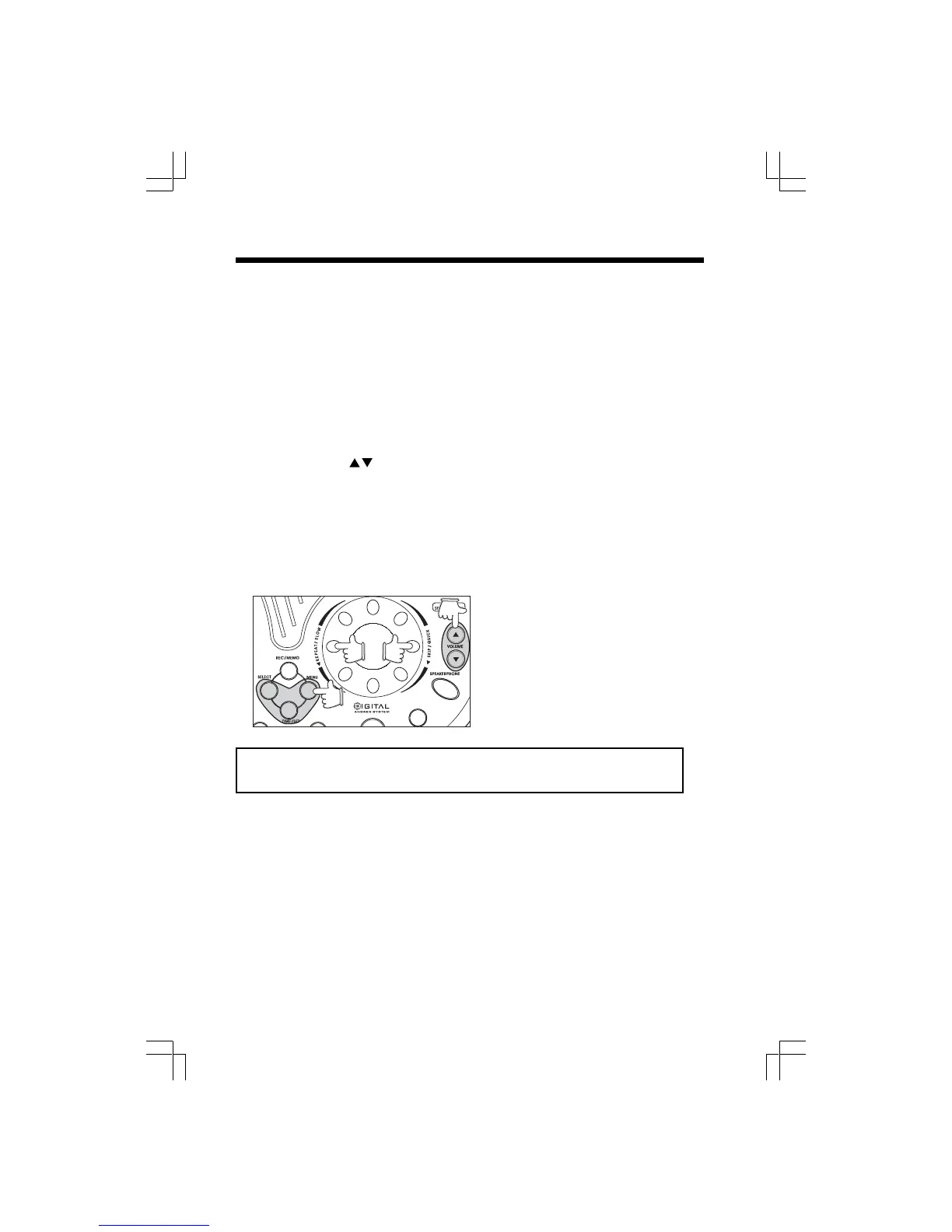
REPEAT/SLOW
• During message playback, turn the shuttle to the left (counter-clockwise) briefly and
then release to return to the beginning of the message.
• To slow down playback, turn the shuttle wheel to the left ( conuter-clockwise) and hold
it in that position.
SKIP/QUICK
• During message playback, turn the shuttle wheel to the right (clockwise) briefly and
then release to skip to the next message.
• To speed up playback, turn the shuttle to the right (clockwise) and hold it in that
position.
VOLUME UP/DOWN
• These keys control the loudness of the Base Unit speaker. At the lowest setting (1), you
will not hear incoming messages. To screen calls as they come in, raise the volume level
from the minimum setting ( 1). 8 is the loudest setting.
MENU, SELECT,TIME/SET Keys
• These keys are used for answering system setup. See “Setting up your gz 2456
Digital Answering System”.
Operating your gz 2456 Answering System
Total record time is approximately 15 minutes.
Incoming messages and memos can be up to 4 minutes in length.











 To Next Page