EasyManua.ls Logo

VTech gz 2456 - Handset Features

VTech gz 2456
36 pages
Print Icon
To Next Page IconTo Next Page
To Previous Page IconTo Previous Page
Loading...
6
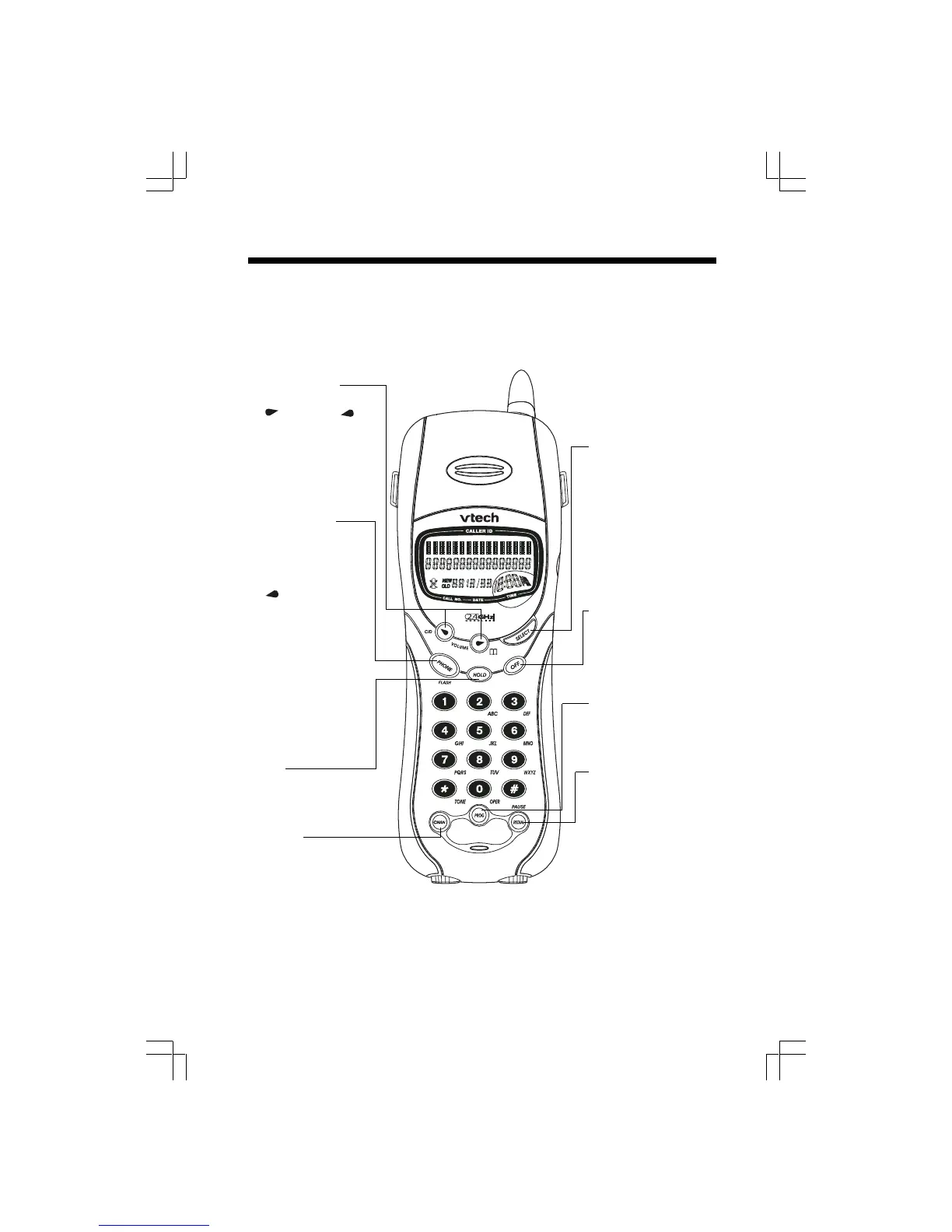
Handset Features
Volume keys
While on a call, press
to raise or to
lower the volume. A
double beep will
sound when you
reach maximum or
minimum level.
PHONE/FLASH
Press PHONE/
FLASH then dial the
number to make a call.
Dial the number (use
to backspace and
correct digits),
then press PHONE
/FLASH to make a call.
While on a call, when
you receive a Call
Waiting alert, press
PHONE/FLASH to
switch between calls.
Press PHONE/FLASH
or any key except
OFF to answer a call.
HOLD
Press this key to put
a call on hold, press
again to release
hold.
CHANNEL
If you experience
noise or interference
while on a call,
press CHAN to
switch to clear
channel.
SELECT
Press to select a
displayed function;
press to confirm a
programming operation.
OFF
Press this key to end
a call. The OFF key is
also used to exit all
modesof operation.
PROGRAM
This key is used to
enter Programming
mode.
REDIAL/PAUSE
Press PHONE, then
press REDIAL/PAUSE
to call last number
dialed (up 32 digits)
-OR-
Press REDIAL/
PAUSE, then press
PHONE to call last
number dialed. In the
idle mode, press
REDIAL/PAUSE twice
to delete the last
number dialed.

Table of Contents

Related product manuals