4
Connecting Power to Base Unit
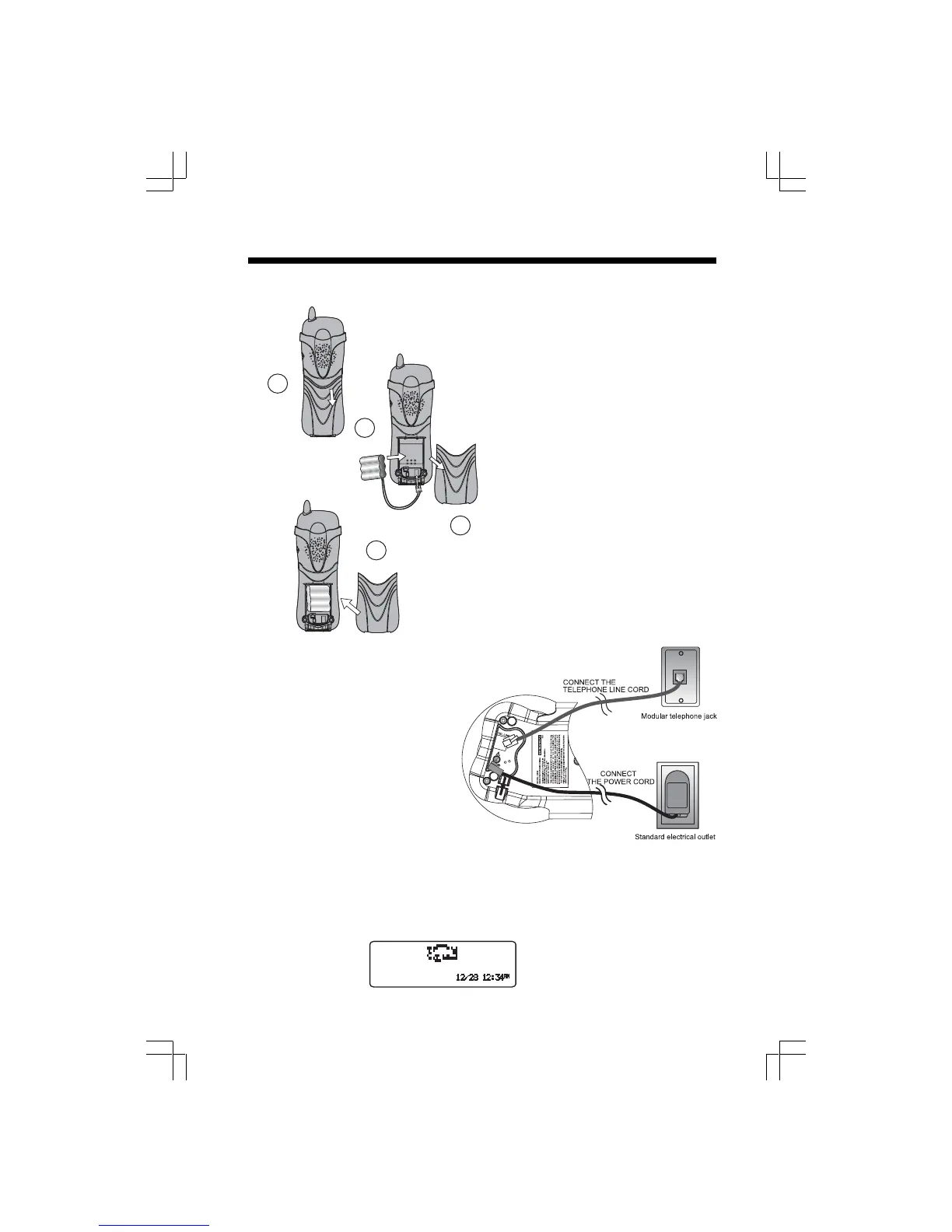
Choose a location for the Base near
an electrical outlet and a telephone
jack.
This phone requires a modular
telephone jack and a standard
electrical outlet (110v AC) not
controlled by a wall switch. Plug the
AC power adaptor into the electrical
outlet and the DC connector to the
jack on the bottom of the Base Unit.
Installation of Battery Pack in Handset
Setup
Follow the steps below:
1. Remove battery compartment
cover by pressing on the
indentation and sliding
downward.
2. Align the two holes in the plug
with the socket pins, then
snap the plug into place.
3. Place the battery pack in the
compartment, with the wires
in the lower left corner, along
the bottom of the pack. Angle
the top half of the pack in first,
under the 2 claws. Then snap
the lower portion of the pack
into place. Place the wires
under the guide, located
below the battery pack.
4. Replace cover by sliding it up
into place.
2
3
1
4
Charge the Battery Pack
The Handset should be charged initially for 12 hours. Afterwards, a maintenance charge of
at least 10 hours is sufficient. Maximum talk time on a full charge is approximately 5 hours.
Maximum standby time is 5 days. Look for the charging bull animation on the Handset as it
charges.











 To Next Page