11
Vu User Manual
+
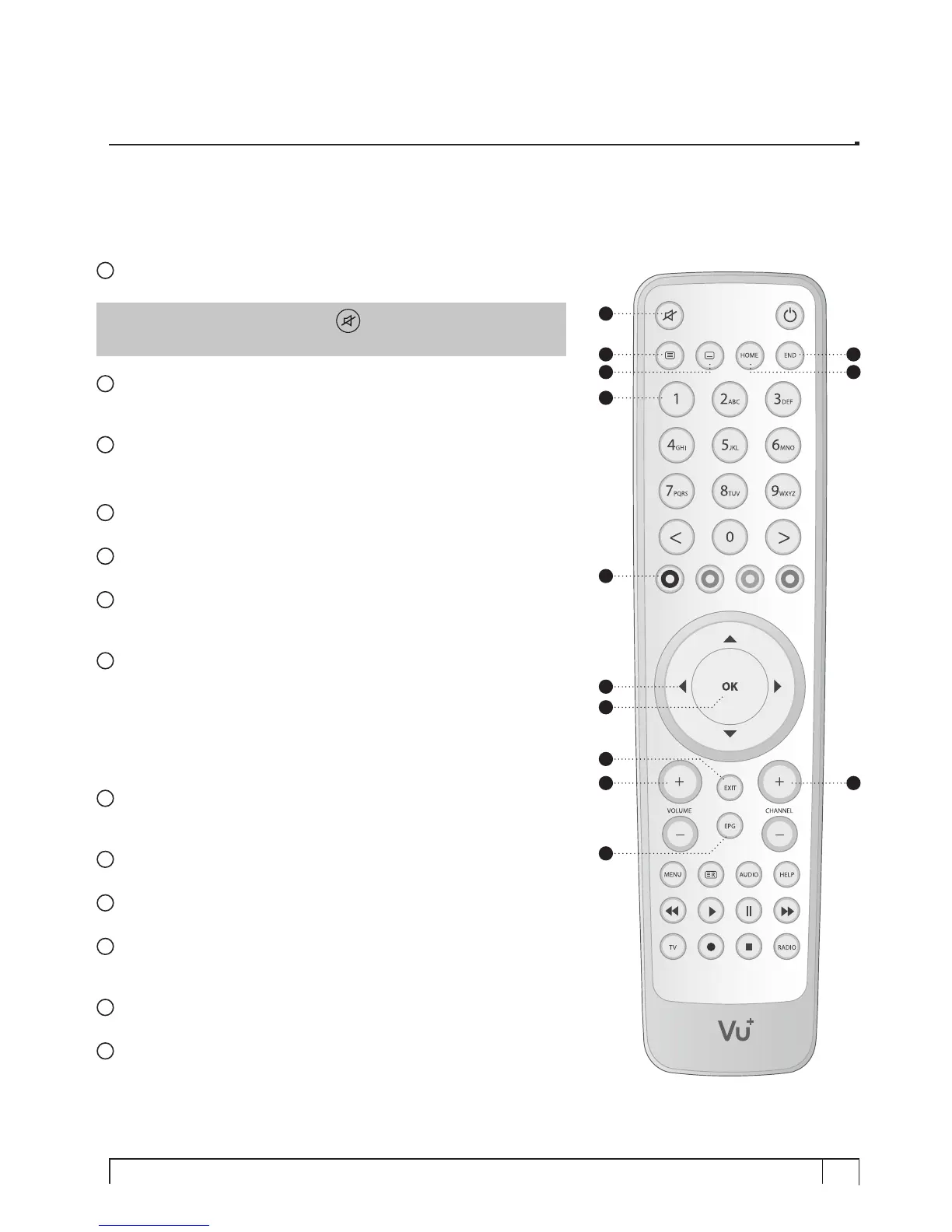
(E) Remote Control
1
MUTE
Silences the audio temporarily.
NOTE : when Teletext is activated, key is also used when
toggling between the Teletext page and the live mode.
2
Teletext
Displays the teletext information of the current channel, if the channel
provides teletext data.
3
Subtitle
Displays the subtitle of the current channel if the channel provides
subtitle.
4
HOME
Instantly moves to the top of the menu list.
5
END
Instantly moves to the bottom of the menu list.
6
Numeric Keys
Enters a channel number or numbers required to be input according
to menu options.
7
Color Keys
Each key is assigned a specific function that may be different in
each menu.
• Red – mainly used for REC, Cancel, etc.
• Green – mainly user for OK
• Yellow
• Blue
8
Navigation Keys
Navigates up/down and left/right on the menu options.
Up/down keys are used to call up the channel list.
9
OK
Confirms the selected menu option.
10
Volume + / -
Adjusts the audio volume.
11
EXIT
Exits the current menu option into the live mode, or switches
one step back of the menu.
12
EPG
Displays the Electronic Program Guide (EPG) information if provided.
13
Channel + / -
Navigates through the scanned channel list.
1
2
3
4
5
6
7
8
9
10
11
12
13



 To Next Page