54
Vu :
Your Smart Linux TV Player
+
Vu User Manual
+
G. Network Setup
[
i
: MENU > Setup > System > Network]
Vu+ is integrated with standard 10/100Mbps Ethernet with RJ 45 connector standard. You are
recommended to use this network capability of Vu+ to fully enjoy the system. You can set up the network
settings through this
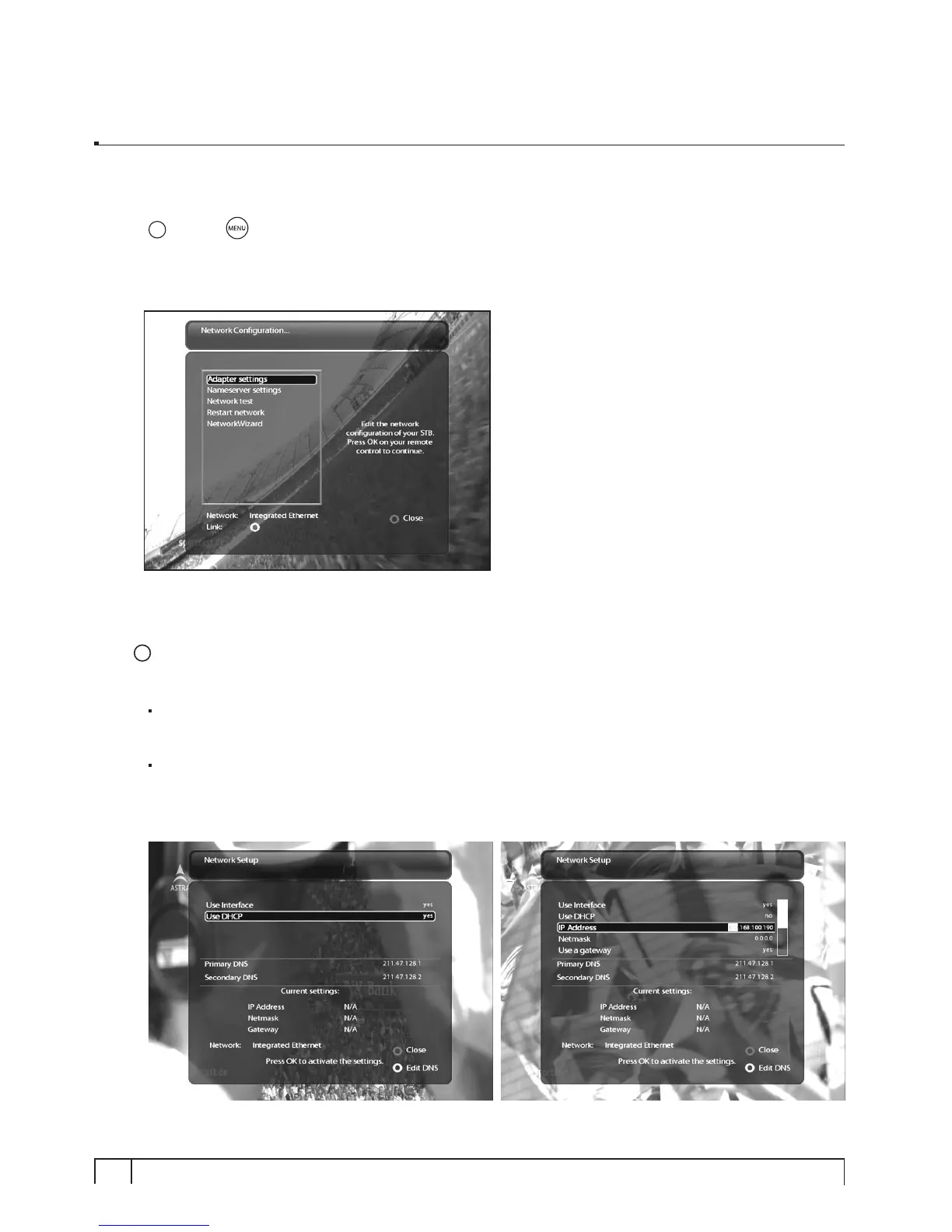
Network Conguration
menu.
In the
Network Conguration
menu, you will see five sub menus as follows:
1
Adapter settings
Through this menu, you can set the basic Ethernet configuration.
User Interface
YES
is used to activate the Ethernet. If you set this option at
NO
, the Ethernet will not work.
Use DHCP
YES
is used to use
DHCP (Dynamic Host Conguration Protocol)
. If you set this option at YES, it
will automatically detect the correct IP address.
NO
is used when you want to use a certain fixed IP
address. In this case, you need to enter correct addresses in each field.


 To Next Page