8
Vu :
Your Smart Linux TV Player
+
Vu User Manual
+
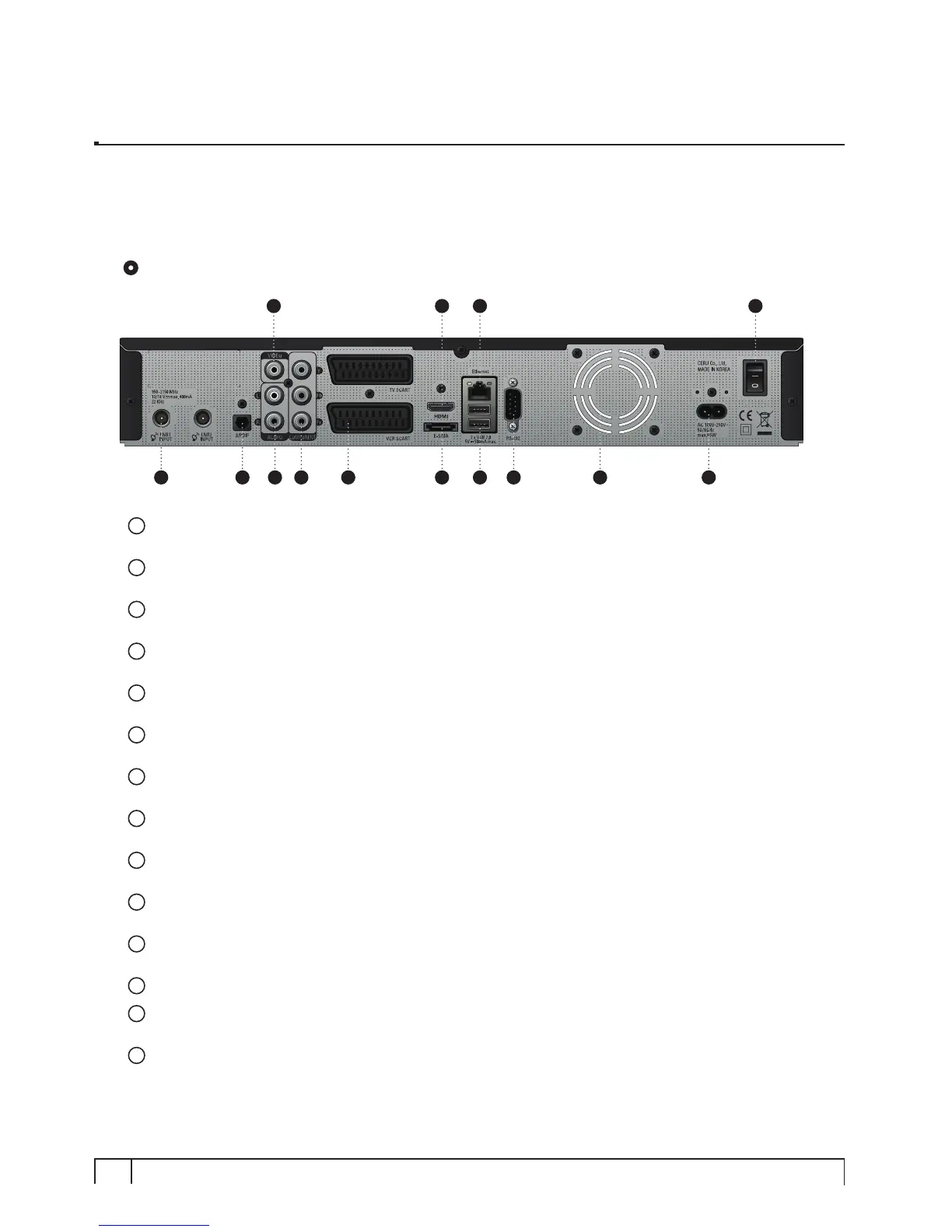
Rear Panel
1
LNB 1 In / LNB 2 In
Two Satellite cables can be connected.
2
S/PDIF
Connects to a digital audio system using S/PDIF cable.
3
Video output
Connects to TV using RCA cable.
4
Audio output
Connects to TV using RCA cable.
5
Component (YPbPr)
Connects to TV using a component cable
6
SCART
Two SCART connectors are provided for TV and/or VCR using SCART cables.
7
HDMI
Connects to TV using a HDMI cable for both audio and video signals.
8
e-SATA
Connects the external HDD using e-SATA cable.
9
Ethernet
Connects the PC or another set top box of Vu
+.
10
USB
Connects the USB memory stick or external HDD.
11
RS232
RS232 data port is provided.
12
FAN
13
Power Inlet
Connects the detachable power cord.
14
On/Off Switch
Powers on/off.
3
1 2 4 5 6 8
7 9
10 11 12
14
13


 To Next Page