EasyManua.ls Logo

VWR Puranity TU3+ - Setting the Limiting Value for Temperature

Default Icon
84 pages
Print Icon
To Next Page IconTo Next Page
To Previous Page IconTo Previous Page
Loading...
| System control
46
|
Puranity TU+ VWR
Chapter 12
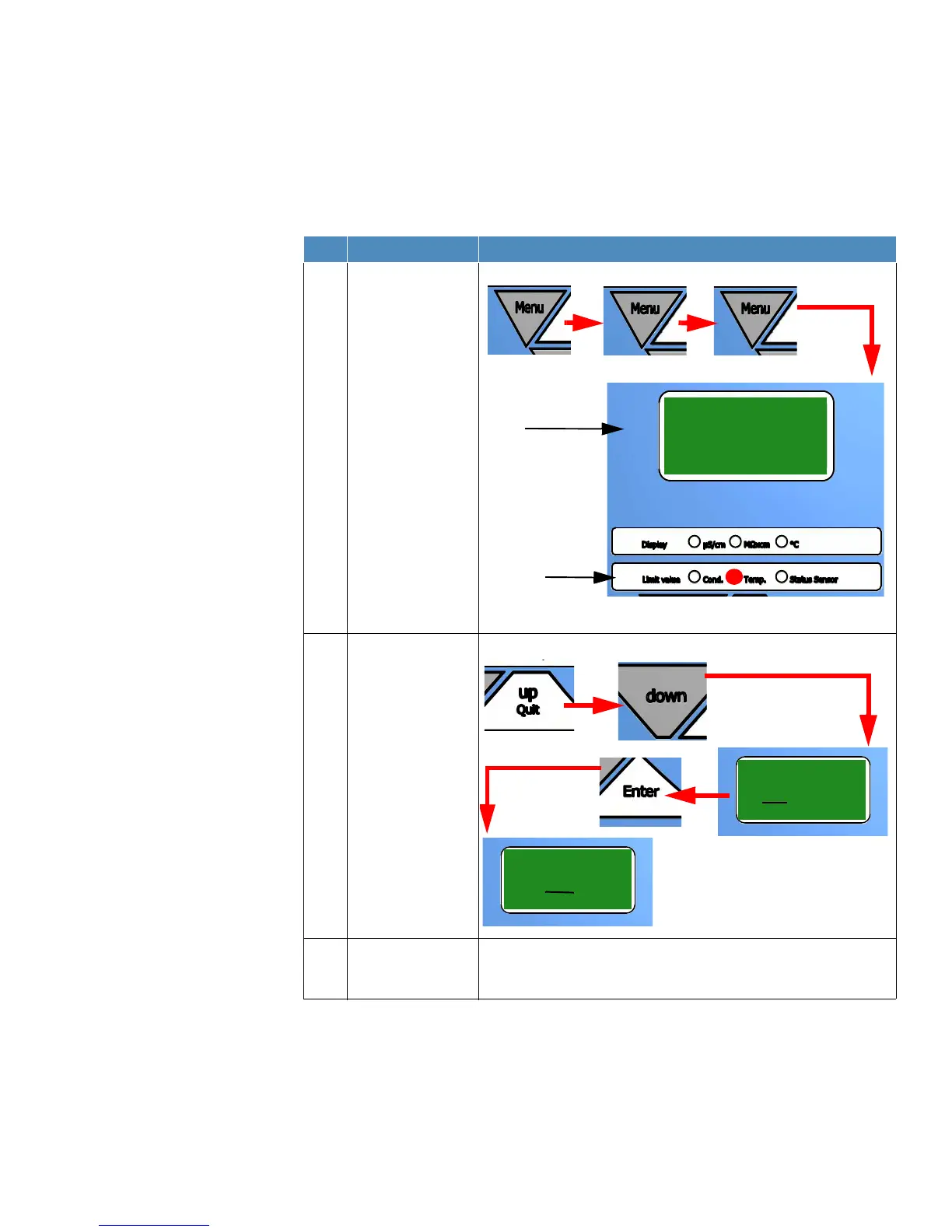
Setting the limiting value for temperature
NOTE!
The limiting value is factory adjusted to a value of +35 °C.
Setting range: 10 °C - 40 °C, basic setting: 35 °C.
Step Action Figure
1 Press the “Menu“
button three times to
enable the limiting
value for the
temperature to be set
(red LED lights up).
2 Use the “Up/quit“ and
“down“ button to
increase or reduce the
value. With the “Enter“
button you switch to
the next digit. After
finishing adjustment
press “Enter“ to
confirm the value.
3 Press the “Menu”
button once to return
to the operating mode.
Display
shows
Second line
Display
35°C
Cond. Temp.
Limit value
Status Sensor
or
Display shows
35°C
35°C
Display shows

Table of Contents