EasyManua.ls Logo

VWR Puranity TU3+ - Setting the Limiting Value for Conductivity

Default Icon
84 pages
Print Icon
To Next Page IconTo Next Page
To Previous Page IconTo Previous Page
Loading...
VWR Puranity TU+ | 45
System control |
Chapter 12
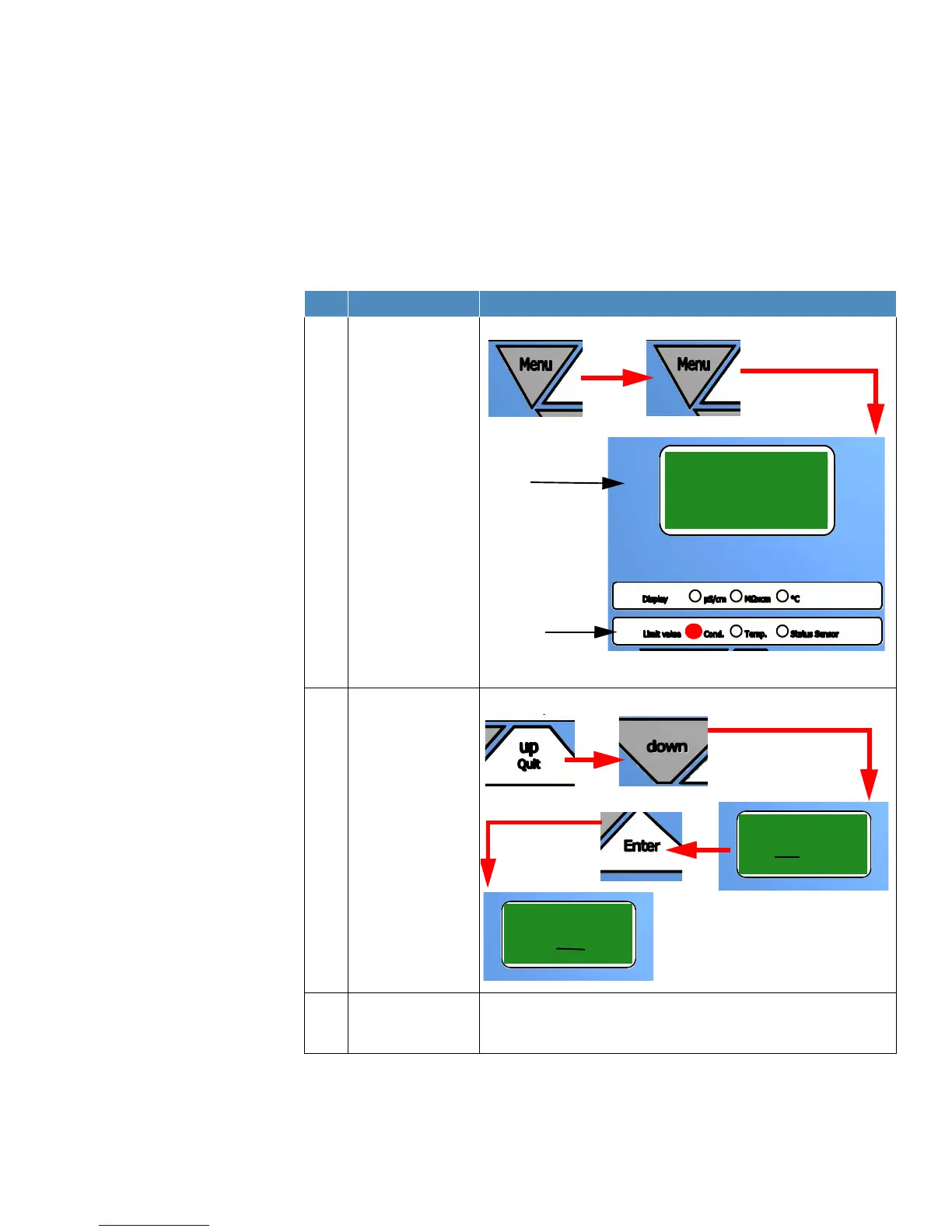
Setting the limiting value for conductivity
NOTE!
The limiting value can only be set in µS/cm and is factory adjusted to a value of 0.1
µS/cm.
Setting range: 0.055 - 30 µS/cm, basic setting: 0.1 µS/cm
Step Action Figure
1 Press the “Menu”
button twice to enable
the limiting value for
the conductivity to be
set (red LED lights up).
2 Use the “Up/quit” and
“down” button to
increase or reduce the
value. With the “Enter”
button you switch to
the next digit. After
finishing adjustment
press “Enter” to
confirm the value.
3 Press the “Menu“
button twice to return
to the operating mode.
Display shows
Cond. Temp.
Status Sensor
Second line
Display
0.10
Limit value
or
Display shows
0.10
0.10
Display shows

Table of Contents