18 vwr.com I Instruction manual VWR
®
PCR Cycler XT
96
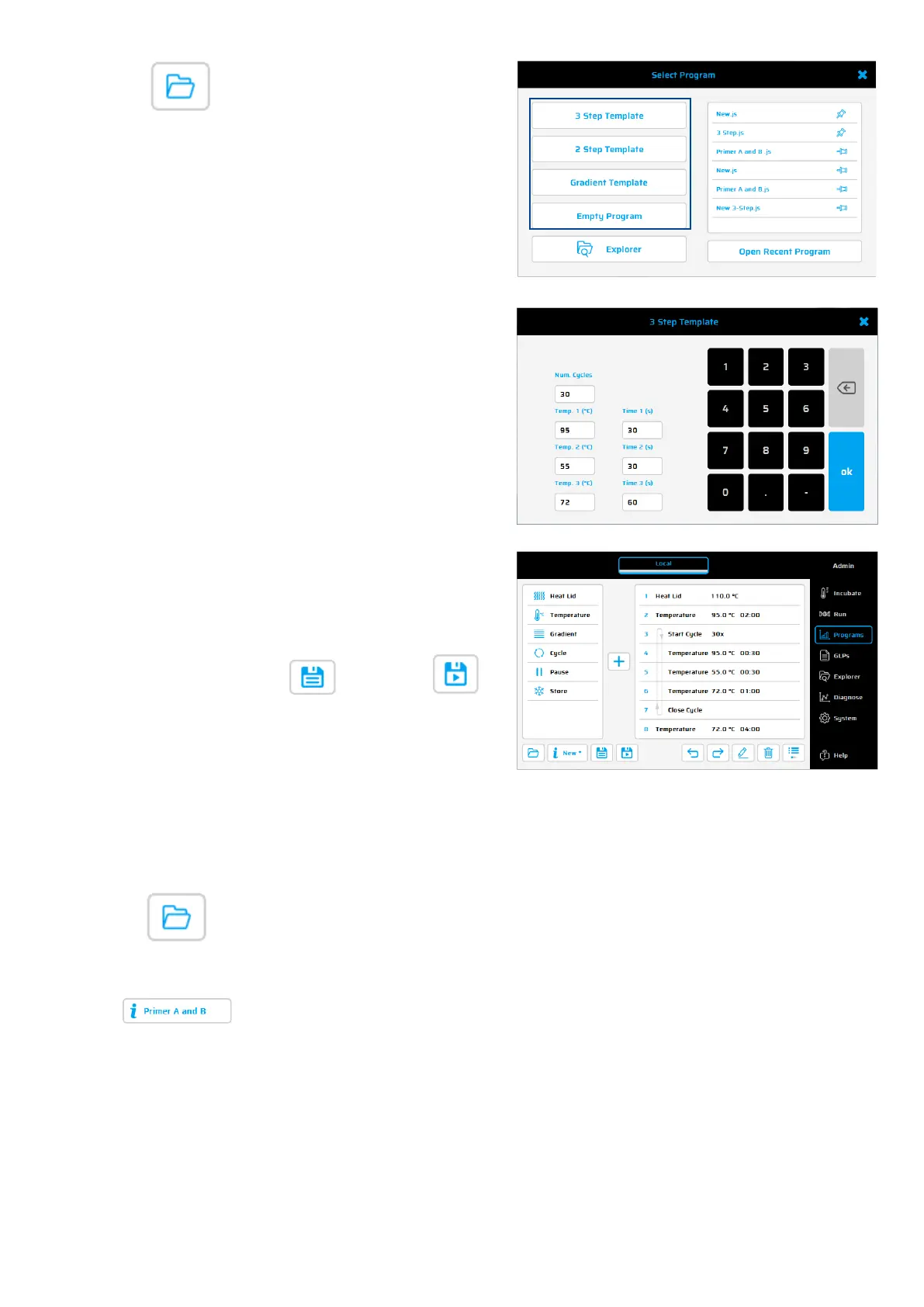
Protocol Wizard
The Wizard is a
useful tool for a fast
and automatic creation of PCR
programs
like 3-Step, 2-
Step and
Gradient Programs.
three-step program consists of a
s
nnealing (priming) and elongation.
-
step program, the
annealing
and
elongation steps are
combined
in a single step.
How to use the 3-Step Wizard:
1. Enter the number of cycles
Enter the denaturation temp
(recommendation 95°C) and time (s)
Enter the primer annealing
Note: In general, the annealing
temperature is about 5°C below the
calculated average primer pair
melting temperature (Tm)
Enter the
elongation Temp (72°C
recommended) and time.
Elongation time (s) = product
1000 [bases] * 60 s
to create a 3-step-PCR
with the selected settings.
Press
to save or to
save and start the new protocol.
Run dialogue: Operating elements – “Expert Mode”
Using this button,
a stored or recently used PCR protocol can be selected and loaded.
Also, the Protocol Wizard can be used to create new Protocols.
Use this button to display details of a PCR protocol (name, program options, author,
settings and comments).


 To Next Page