10
DASHBOARD
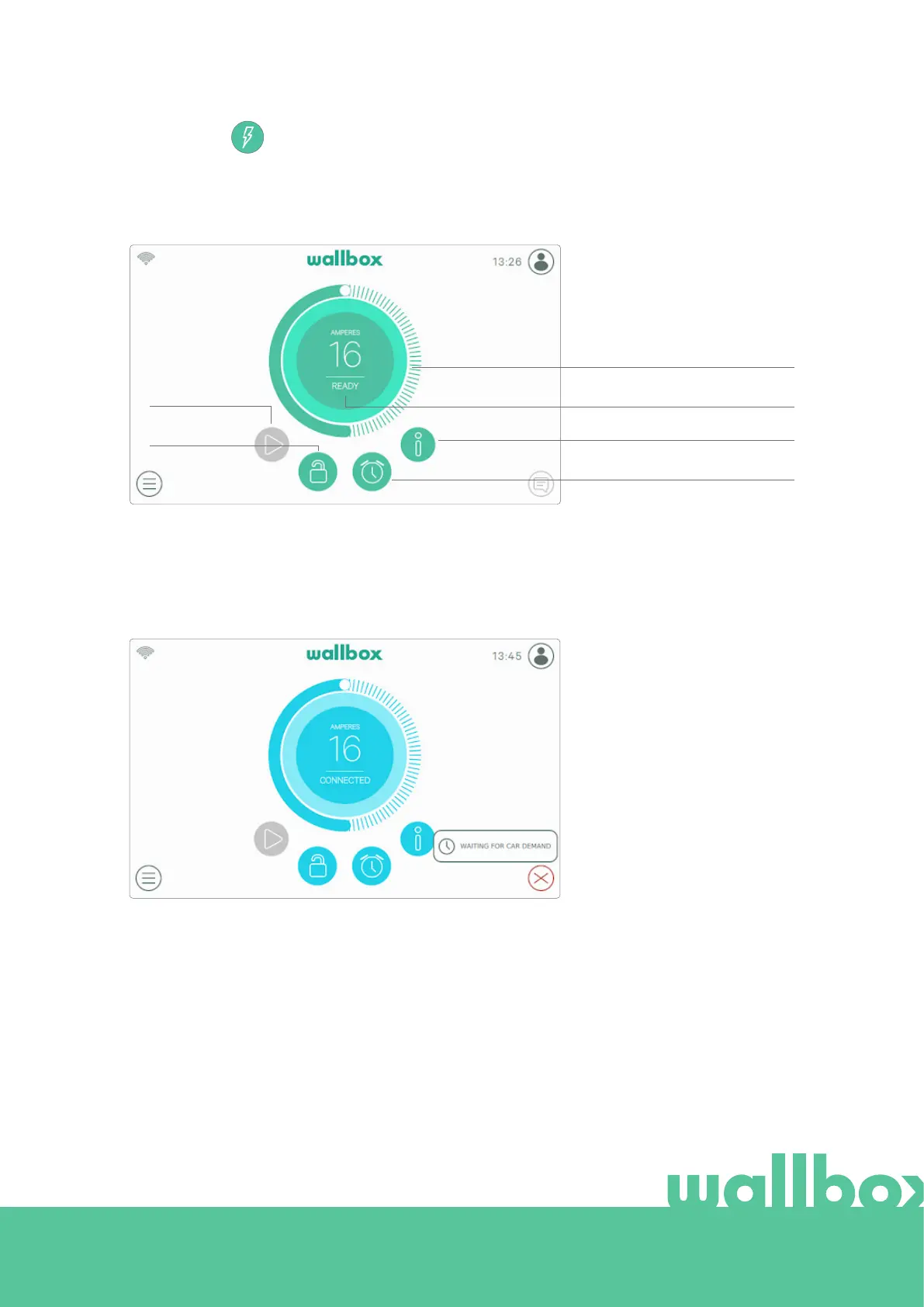
This screen shows at-a-glance information about the state of the charger . The state can be easily identified
thanks to the colour signalling code in which each colour has a specific meaning. Additionally, the state of
the charger can be found in the Notification area after pressing the Notification button.
READY STATE
The charger stays in ready state
when it is not connected to a
car and ready to be used. This is
shown in green.
CONNECTED STATE
The charger detects that it is connected to a car. This is shown in turquoise. There are a few situations
where the charger can remain in this state.
Waiting for car demand: this
situation occurs when the car is
not available to charge but the
charger is ready. This is due to
one of the following situations:
• The car battery is fully
charged.
• The transition between
connecting the car and the
start of charging.
• The transition between
resuming the charge and
the start of charging.
CHARGER STATUS
SCHEDULES
LOCK/UNLOCK
CURRENT SELECTOR
CURRENT SESSION INFO
PLAY/PAUSE



 To Next Page