EasyManua.ls Logo

Wavetek 3000 - FM Modulation Procedures; Vernier Control Operations; Programming Interface

Wavetek 3000
225 pages
Print Icon
To Next Page IconTo Next Page
To Previous Page IconTo Previous Page
Loading...
OPERATION
this
is
the
case,
add
10
dB of
fixed
attenuationand
turn
the
RF
vernier
control
toward
maximum
.
The
unlevel
light
should
then
go
out
.
2
.7
.6
FM Modulation
-
Internal
Set
the
modeswitch
to
FMxl
or
FMx100
and the
frequency
to
400
or 1000 Hz
.
Adjust
the
AM/FM
vernier
to
the
desired
peak
deviation
.
2.7.7
FM
Modulation
-
External
CAUTION
:
Input
voltages
greater
than
t10 VDC
or
10
VRMS
should
not
be applied
to
the
external
modulation
input
con-
nector
or
damage
.may
occur
to
internal
circuitry
of
the
Model
3000
.
Set
the
modeswitch
to
FMxl
or
FMx100
and the
frequency
switch
to
external
.
Apply
a 1O
V
p-p
signal
into
600
ohms
to
the
external
modulation
input
connector
.
This
calibrates
the
AM/FMverniercon-
trol
.
The
desired
peak
deviation
canbe
set
.
For
FM modulation
the
upper
fre-
quencylimit
is 25
kHz
.
33
29
25
21
17
13
9
5
MOD
T
.
P
7
.3V
PIN
CONNECTION
1
N
.C
.
2
400
3
200
4
100
5
80
6
40
7
20
8
10
9
8
10
4
11
2
12
1
13
.8
14
.4
15
.2
16
.1
17
.08
18
.04
19
.02
20
.O1
21
.
oo8
22
.004
23
.002
24
.001
25
ground
26 - 31
N
.C
.
32
7.3V
33
-
35
N
.
C
.
36
MOD
.
T
.P
.
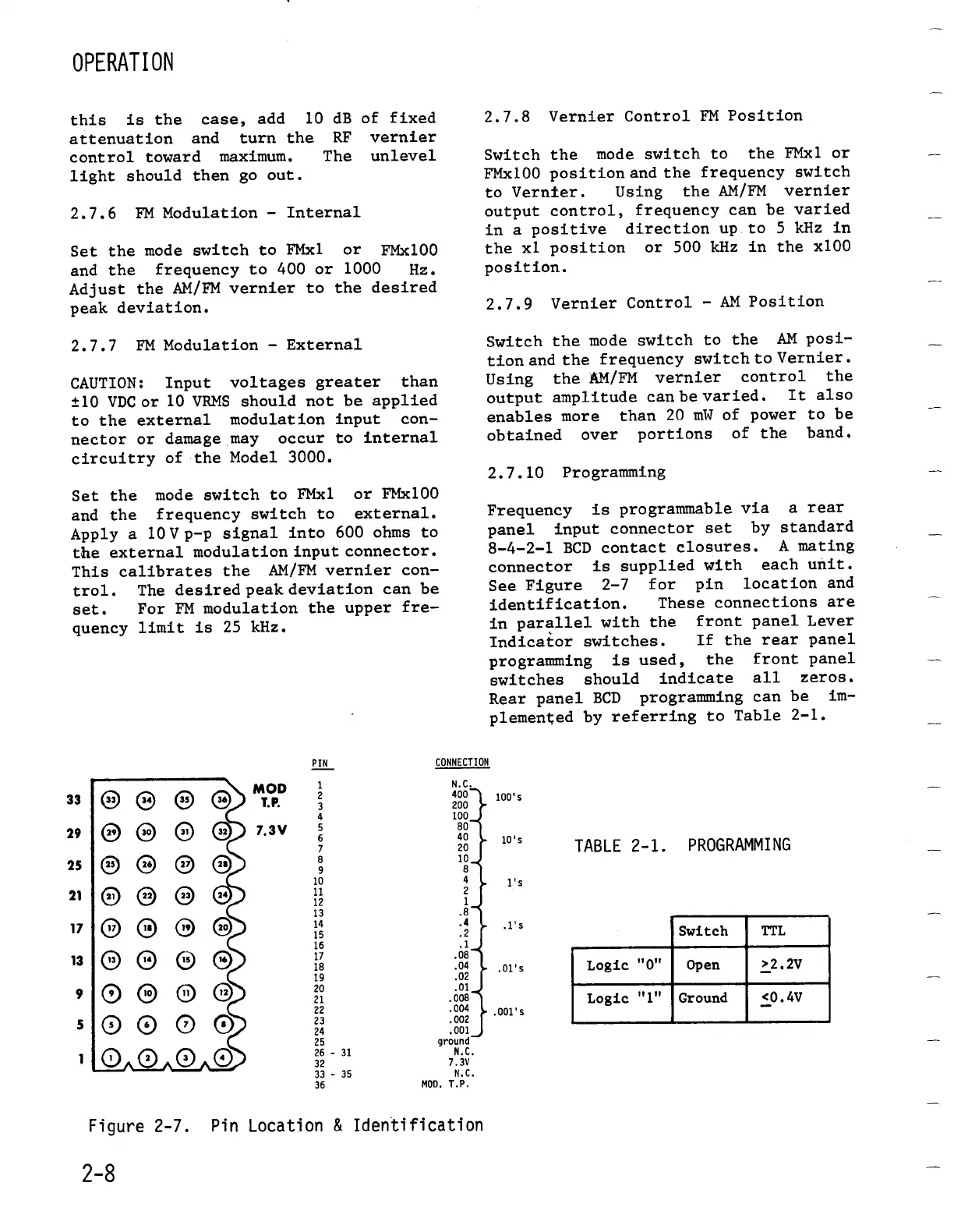
Figure
2-7
.
Pin
Location
&
Identification
2-8
2.7.8
VernierControl
FM
Position
Switch
the
mode
switch
to
the
FMxl or
FMx100
position
and the
frequency
switch
to
Vernier
.
Using
the
AM/FM
vernier
output
control,
frequency
can
be
varied
in
a
positive
direction
up to
5
kHz
in
the
xl
position
or
500 kHz
in
the
x100
position
.
2.7.9
Vernier
Control
-
AM
Position
Switch
the
mode
switch
to
the
AM posi-
tion
and
the
frequency
switch
to
Vernier
.
Using
the
AM/FM
vernier
control
the
output
amplitudecan
be
varied
.
It
also
enables
more
than
20
mW
of
power
to
be
obtained
over
portions
of
the
band
.
2.7
.10
Programming
Frequency
is
programmable
via
a
rear
panel
input
connector
set
by
standard
8-4-2-1
BCD
contact
closures
.
A
mating
connector
is
supplied
with
each
unit
.
See
Figure
2-7 for
pin
location
and
identification
.
These
connections
are
in
parallel
with
the
front
panelLever
Indicatorswitches
.
If
the
rear
panel
programming
is
used,
the
frontpanel
switches
should
indicate
all
zeros
.
Rear
panel
BCD
programming
canbe
im-
plemented
by
referring
to
Table
2-1
.
100's
10's
1's
.O1's
.001's
TABLE
2-1
.
PROGRAMMING
Switch
TTL
Logic
"0"
Open
>2
.2V
Logic
"1"
Ground
<0
.4V

Table of Contents

Related product manuals