EasyManua.ls Logo

Wavetek 3000 - RFI Test

Wavetek 3000
225 pages
Print Icon
To Next Page IconTo Next Page
To Previous Page IconTo Previous Page
Loading...
4
.18 RFI
TEST
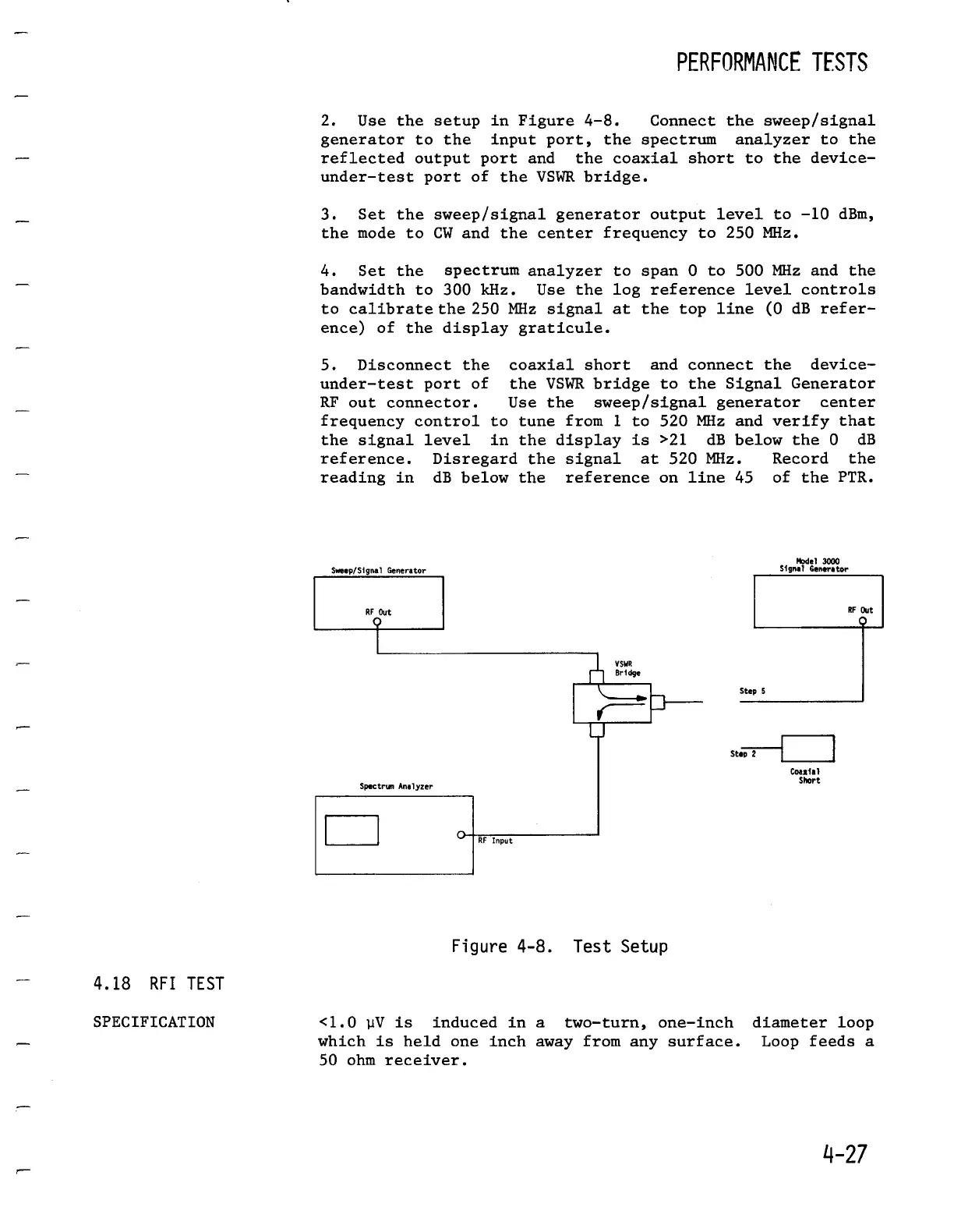
2
.
Use
the
setup
in
Figure
4-8
.
Connect
the
sweep/signal
generator
to
the
input
port,
the
spectrum
analyzer
to
the
reflected
output
port
and the
coaxial
short
to
the
device-
under-test
port
of
the
VSWR
bridge
.
3
.
Set the
sweep/signal
generator
outputlevel
to
-10
dBm,
the
mode
to
CW
and the
center
frequency
to
250
MHz
.
4
.
Set the
spectrumanalyzer
to
span
0
to
500
MHz
and the
bandwidth
to
300 kHz
.
Use the log
reference
level
controls
to
calibrate
the250
MHz
signal
at
the
top
line
(0
dB
refer-
ence)
of
the
displaygraticule
.
5
.
Disconnect
the
coaxial
short
and
connect
the
device-
under-test
port
of
the
VSWRbridge
to
the
Signal
Generator
RF
out
connector
.
Use
the
sweep/signal
generator
center
frequency
control
to
tune
from
1
to
520
MHz
and
verify
that
the
signallevel
in
the
display
is
>21
dB
below
the
0
dB
reference
.
Disregard
the
signal
at
520
MHz
.
Record
the
reading
in dB
below
the
referenceon
line
45 of
the
PTR
.
Model
3000
Sweep/Signal
Generator
Signal
Generator
Figure4-8
.
Test
Setup
PERFORMANCE
TESTS
Step
2
Coaxial
SMrt
SPECIFICATION
<1
.0
pV
is
induced
in
a
two-turn,
one-inch diameter
loop
which
is
held
one
inch away
fromany
surface
.
Loop
feeds
a
50
ohmreceiver
.

Table of Contents

Related product manuals