EasyManua.ls Logo

Wavetek 3000 - Frequency Accuracy Test

Wavetek 3000
225 pages
Print Icon
To Next Page IconTo Next Page
To Previous Page IconTo Previous Page
Loading...
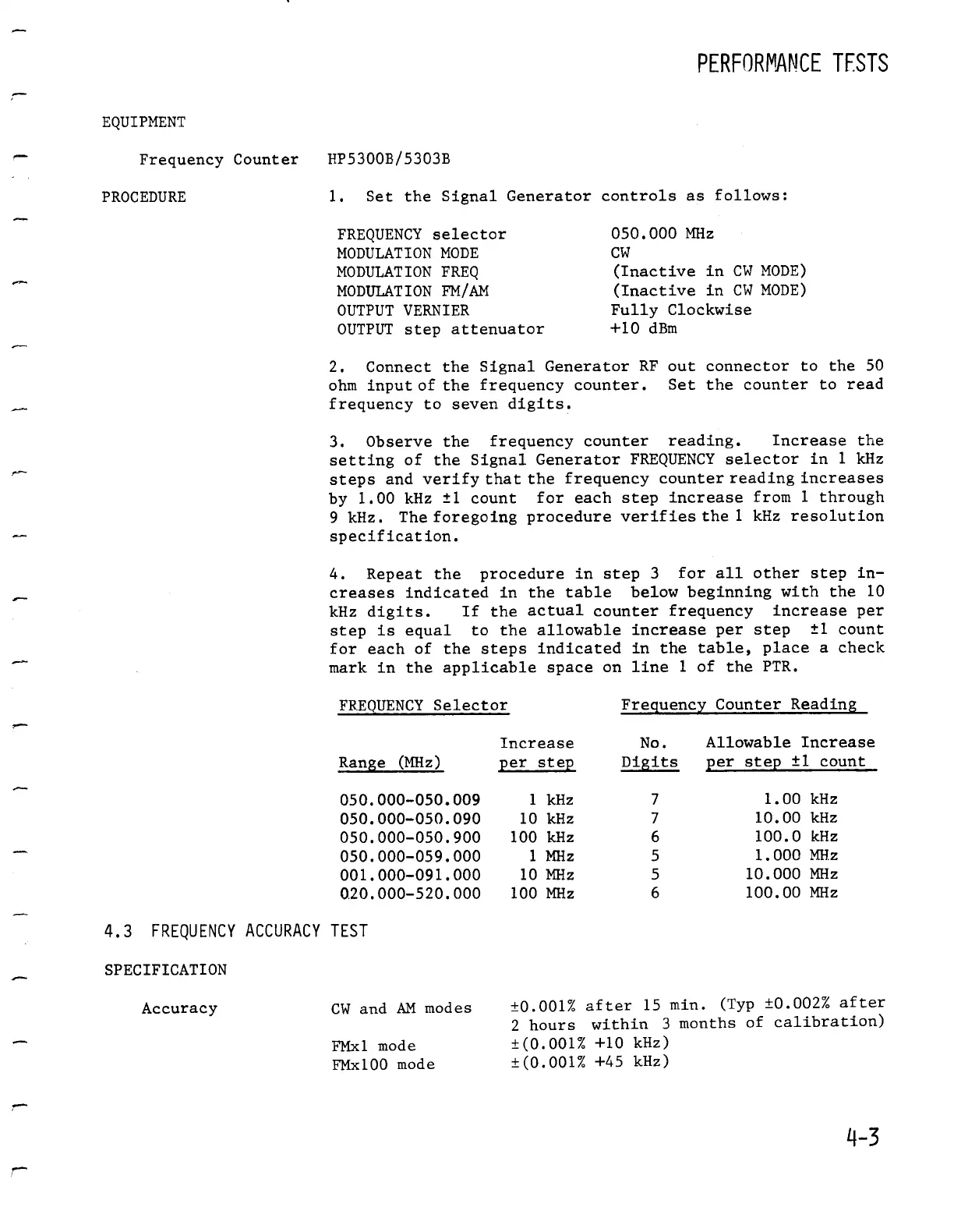
EQUIPMENT
Frequency
Counter
HP5300B/5303B
PROCEDURE
1
.
Set the
Signal
Generatorcontrols
as
follows
:
4
.3
FREQUENCYACCURACY
TEST
SPECIFICATION
PERFORMANCE
TESTS
FREQUENCY
selector
050
.000
MHz
MODULATIONMODE
CW
MODULATION
FREQ
(Inactive
in
CW
MODE)
MODULATIONFM/AM
(Inactive
in
CW
MODE)
OUTPUTVERNIER
Fully
Clockwise
OUTPUT
step
attenuator
+10
dBm
2
.
Connect
the
Signal
Generator
RF
out
connector
to
the
50
ohm
inputof
the
frequency
counter
.
Set the
counter
to
read
frequency
to
seven
digits
.
3
.
Observe
the
frequencycounter reading
.
Increase
the
setting
of
the
Signal
Generator
FREQUENCY
selector
in
1
kHz
steps
and
verify
that
the
frequencycounter
reading
increases
by
1
.00
kHz
±1
count
for
each step
increasefrom
1
through
9
kHz
.
Theforegoingprocedureverifies
the
1
kHz
resolution
specification
.
4
.
Repeat
the
procedure
in step
3
for
all
other
step
in-
creases
indicated
in
the
table
belowbeginningwith
the
10
kHz
digits
.
If
the
actual
counterfrequency increase
per
step
is
equal
to
the
allowable
increase
per
step
±1
count
for
each
of
the
steps
indicated
in
the
table,
place
a
check
mark
in
the
applicable
space
on
line
1
of
the
PTR
.
Accuracy
CW
and
AM
modes
±0
.001%
after
15
min
.
(Typ
±0
.002%
after
2
hours
within
3
months
of
calibration)
FMxl
mode
±(0
.001%
+10
kHz)
FMxl00mode
±(0
.001%
+45
kHz)
4-3
FREQUENCY
Selector
FrecLue
ncy
Counter
Reading
Ran_&e
(MHz
)
Increase
per
step
No
.
Digits
Allowable
Increase
per
step
±1
count
050
.000-050
.009
1
kHz
7
1
.00
kHz
050
.000-050
.090
10
kHz
7
10
.00
kHz
050
.000-050
.900
100
kHz
6
100
.0
kHz
050
.000-059
.000
1
MHz
5
1
.000
MHz
001
.000-091
.000
10
MHz
5 10
.000
MHz
0
.20
.000-520
.000
100
MHz
6
100
.00
MHz

Table of Contents

Related product manuals