EasyManua.ls Logo

Wavetek 3000 - Harmonics Test

Wavetek 3000
225 pages
Print Icon
To Next Page IconTo Next Page
To Previous Page IconTo Previous Page
Loading...
4.6
HARMONICS
TEST
SPECIFICATION
METHOD
EQUIPMENT
Spectrum
Analyzer
PROCEDURE
PERFORMANCE
TESTS
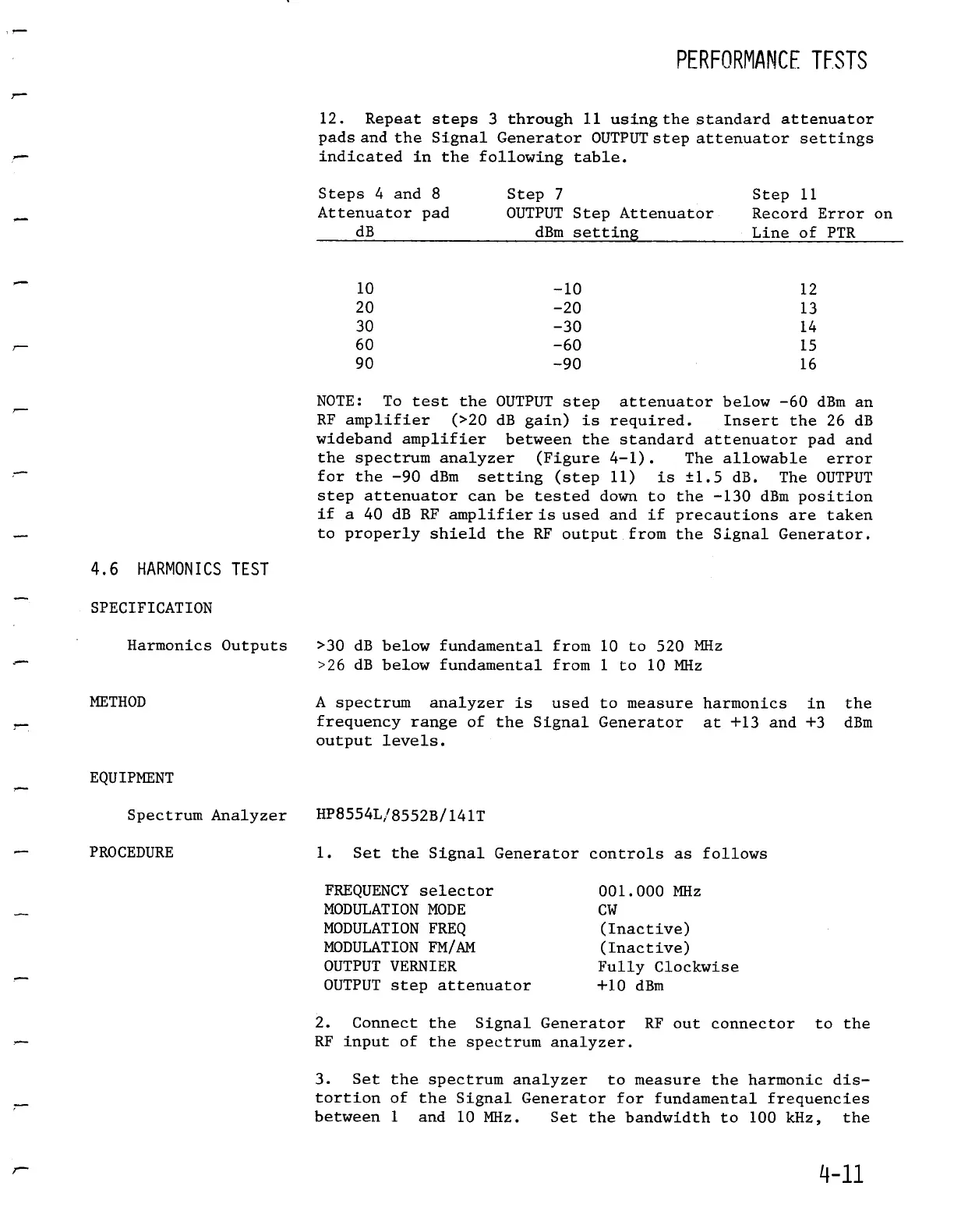
12
.
Repeat
steps
3
through
11
using
the
standard
attenuator
pads
and
the
Signal
GeneratorOUTPUT
step
attenuator
settings
indicated
in
the
following
table
.
NOTE
:
To
test
the
OUTPUT
step
attenuator
below-60dBm
an
RF
amplifier
(>20 dB
gain)
is
required
.
Insert
the
26
dB
wideband
amplifier
between
the
standard
attenuator
pad and
the
spectrumanalyzer
(Figure
4-1)
.
The
allowable
error
for the
-90 dBm
setting
(step
11)
is
±1
.5
dB
.
The
OUTPUT
step
attenuator
can
be
tested
down
to
the
-130
dBmposition
if
a
40 dB
RF
amplifier
is
used
and
if
precautions
are
taken
to
properly
shield
the
RF
output
from
the
Signal
Generator
.
Harmonics
Outputs
>30
dB
below
fundamental
from
10
to
520
MHz
>26
dB
below
fundamental
from
1
to
10
MHz
A spectrumanalyzer
is
used
to
measure
harmonics
in
the
frequency
range
of
the
Signal
Generator
at
+13
and
+3 dBm
output
levels
.
HP8554L/8552B/141T
1
.
Set the
Signal
Generatorcontrols
as
follows
FREQUENCY
selector
001
.000
MHz
MODULATION
MODE
CW
MODULATION
FREQ
(Inactive)
MODULATION
FM/AM
(Inactive)
OUTPUTVERNIER
Fully
Clockwise
OUTPUT
step
attenuator
+10 dBm
2
.
Connect
the
Signal
Generator
RF
out
connector
to
the
RF
input
of
the
spectrumanalyzer
.
3
.
Set the
spectrumanalyzer
to
measure
the
harmonic
dis-
tortion
of
the
Signal
Generator
for
fundamental
frequencies
between
1
and
10
MHz
.
Set
the
bandwidth
to
100
kHz,
the
4-
11
Steps
4
and
8
Attenuator
pad
dB
--
-
Step
7
OUTPUT
Step
Attenuator
dBm
setting
Step
11
RecordError
on
Line
of
PTR
10
-10
12
20
-20
13
30
-30
14
60
-60
15
90
-90
16

Table of Contents

Related product manuals