EasyManua.ls Logo

Wavetek 3000 - SECTION 5 MAINTENANCE; Introduction to Maintenance; Service Information; Disassembly Procedures

Wavetek 3000
225 pages
Print Icon
To Next Page IconTo Next Page
To Previous Page IconTo Previous Page
Loading...
5
.1
INTRODUCTION
This
sectionprovides
information
for
disassembling,
calibrating
and
trouble-
shooting
the
Model
3000
Signal
Generator
.
Measurements
and
adjustments
will
be
facilitated
by
placing
instrument
on
its
right
side,
as
access
is
required
to
top and
bottom
of
unit
for
adjust-
ments
and
test
points
.
5
.2
SERVICE
INFORMATION
5
.2 .1
Disassembly
Information
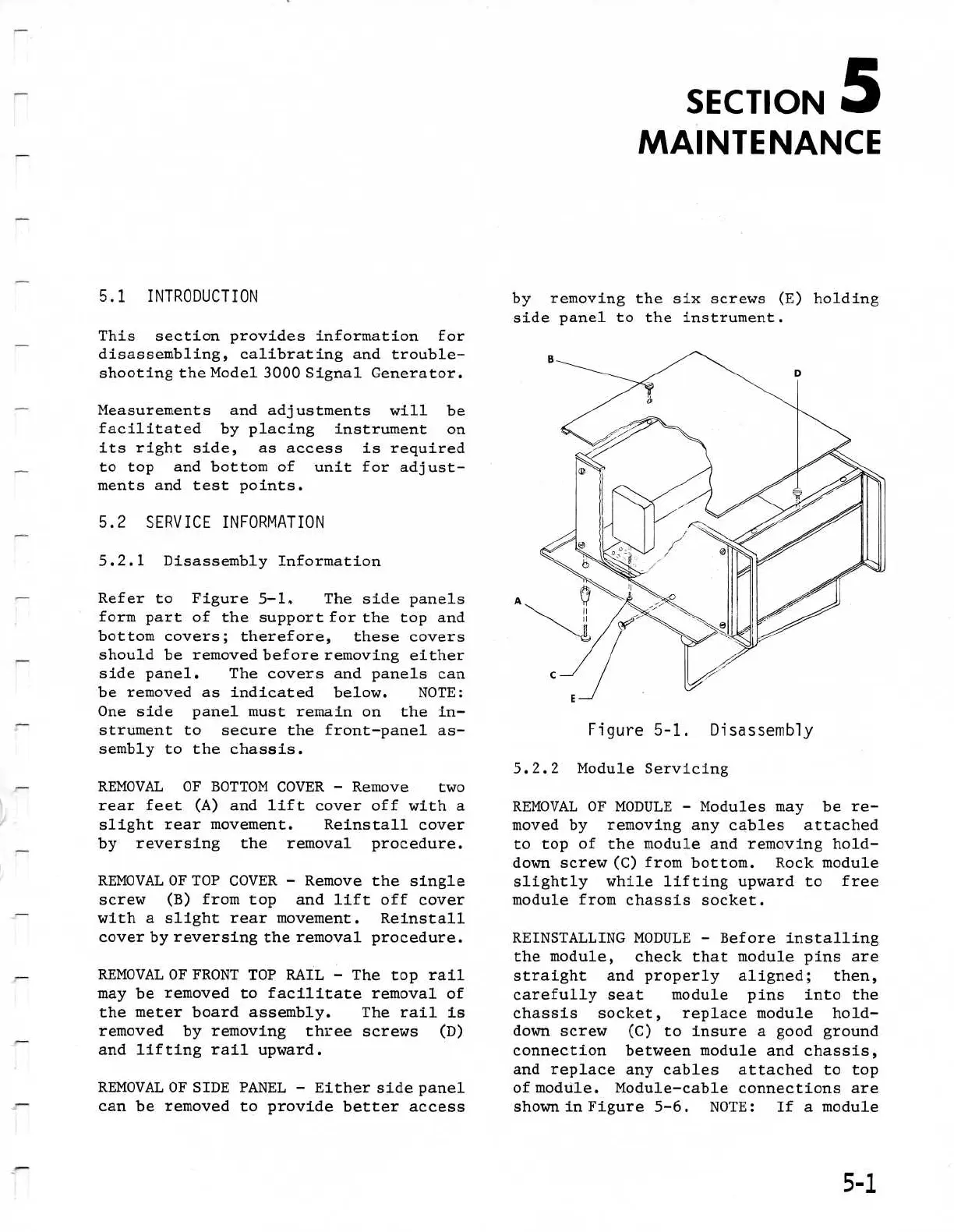
Refer
to
Figure
5-1
.
The
side
panels
form part
of
the
support
for
the top and
bottom
covers
;
therefore,
these
covers
should
be
removed
before
removing
either
side
panel
.
The
covers
and
panels
can
be
removed
as
indicated
below
.
NOTE
:
One
side
panel
must
remain
on
the in-
strument
to
secure
the
front-panel
as-
sembly
to
the
chassis
.
REMOVAL
OF
BOTTOMCOVER
-
Remove
two
rear feet
(A)
and
lift
cover
off
with
a
slight
rear
movement
.
Reinstall
cover
by
reversing
the
removal procedure
.
REMOVAL
OF
TOP
COVER
-
Remove
the
single
screw
(B)
from
top
and
lift
off
cover
with
a
slight
rear
movement
.
Reinstall
cover
by
reversing
the
removal
procedure
.
REMOVAL
OF
FRONT
TOP
RAIL
-
The
top
rail
may
be
removed
to
facilitate
removal
of
the
meter
board
assembly
.
The
rail
is
removed
by
removing
threescrews
(D)
and
lifting
rail
upward
.
REMOVAL
OF
SIDE
PANEL
-
Either
side
panel
can
be
removed
to
providebetter
access
SECTION
S
MAINTENANCE
by
removing
the six
screws
(E)
holding
side
panel
to
the
instrument
.
Figure
5-1
.
Disassembly
5
.2 .2
Module
Servicing
REMOVAL
OF
MODULE
-
Modules
may
be
re-
moved
by
removing
any
cables
attached
to
top
of
the
module
and
removing
hold-
down
screw
(C)
from
bottom
.
Rock
module
slightly
while
lifting
upward
to
free
module
from
chassis
socket
.
REINSTALLINGMODULE
-
Beforeinstalling
the
module,
check
that
module
pins
are
straight
and
properly aligned
;
then,
carefully
seat
module
pins
into
the
chassis
socket,
replace
module
hold-
down
screw
(C)
to
insure
a
good
ground
connectionbetweenmodule
and
chassis,
and
replace
any
cables
attached
to
top
of
module
.
Module-cable
connections
are
shown
in
Figure
5-6
.
NOTE
:
If
a
module

Table of Contents

Related product manuals