EasyManua.ls Logo

Wavetek 3000 - SECTION 2 OPERATION; Introduction to Operation; Mechanical Installation

Wavetek 3000
225 pages
Print Icon
To Next Page IconTo Next Page
To Previous Page IconTo Previous Page
Loading...
2
.1
INTRODUCTION
This
sectionprovides
complete
instal-
lation
and
operating
instructions
for the
Wavetek
Model
3000
signal
generator
.
The
instructions
consist
of
mechanical
installation,
electrical
installation,
front
and
rear
panel
features,
instal-
lationchecks
and
operatingprocedures
.
2.2
MECHANICAL
INSTALLATION
2.2
.1
Initial
Inspection
After
unpacking
the
instrument,
visually
inspect
the
external
parts
for
damage
to knobs,
connectors,
surface
areas,
etc
.
The
shippingcontainer
and
packing
mat-
erialshould
be
saved
in
case
it is
necessary
to
reship
the
unit
.
2.2.2
DamageClaims
If
the
instrument
is
receivedmechanically
damaged
in
transit,
notify
the
carrier
and
either
the
nearest
Wavetek
area
representative
or
the
factory
in
Indiana
.
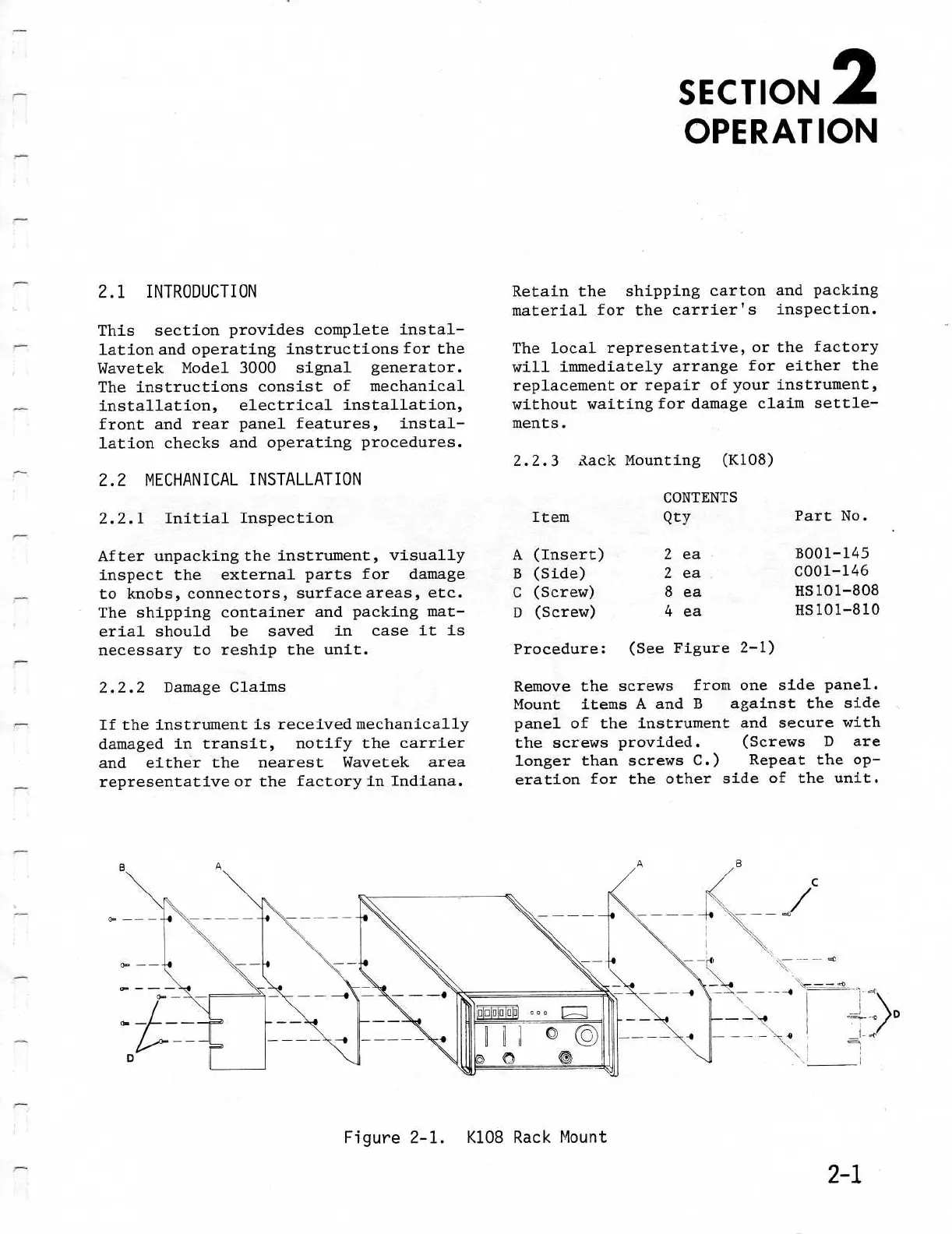
Figure
2-
1
.
K108 Rack
Mount
Retain
the
shipping
carton
and
packing
material
for the
carrier's
inspection
.
The
local
representative,
or
the
factory
will
immediately
arrange
for
either the
replacement
or
repair
of
your
instrument,
without
waiting
for
damage
claim
settle-
ments
.
2
.2 .3
ZackMounting
(K108)
CONTENTS
Procedure
:
(See
Figure
2-1)
SECTION
2
OPERATION
Remove
the
screws
from
one
side
panel
.
Mount
items
A
and
B
against
the
side
panel
of
the
instrument
and
secure
with
the
screws
provided
.
(Screws
D
are
longer
than
screws
C
.)
Repeat
the
op-
eration
for the
other
side
of
the
unit
.
Item
Qty
PartNo
.
A
(Insert)
2
ea
B001-145
B
(Side)
2
ea
0001-146
C
(Screw)
8
ea
HS101-808
D
(Screw)
4
ea
HS101-810

Table of Contents

Related product manuals