EasyManua.ls Logo

Wavetek 3000 - Page 64

Wavetek 3000
225 pages
Print Icon
To Next Page IconTo Next Page
To Previous Page IconTo Previous Page
Loading...
PERFORMANCE
TESTS
PROCEDURE
1
.
Set
the
Signal
Generator
controls
as
follows
:
4-
24
FREQUENCYselector
520
.000
MHz
MODULATION
MODE
FMx100
MODULATION
FREQ
EXT
MODULATION
FM/AM
0
kHz
OUTPUT
VERNIER
+3 dBmreadingonOUTPUTmeter
OUTPUT
step
attenuator
+10
dBm
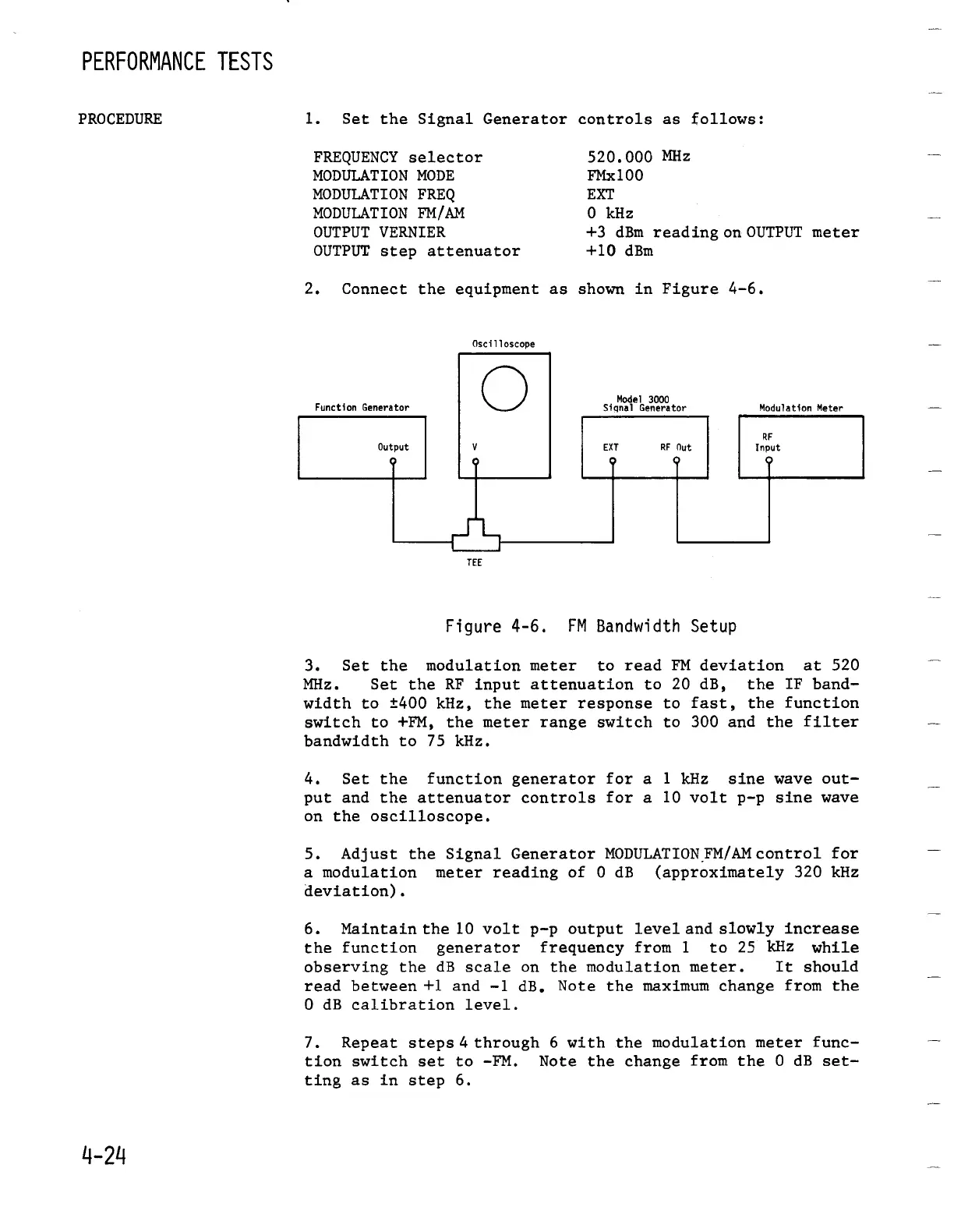
2
.
Connect
the
equipment
as
shown
in
Figure
4-6
.
Oscilloscope
TEE
Figure
4-6
.
FM
Bandwidth
Setup
3
.
Set the
modulationmeter
to
read
FM deviation
at
520
MHz
.
Set the
RF
input
attenuation
to 20
dB,
the
IF
band-
width
to
±400
kHz,
the
meter
response
to
fast,
the
function
switch
to
+FM,
the
meter
range
switch
to
300 and
the
filter
bandwidth
to
75
kHz
.
4
.
Set the
function
generator
for
a
1
kHz
sine
wave
out-
put
and the
attenuator
controls
for
a 10
volt
p-p
sine
wave
on
the
oscilloscope
.
5
.
Adjust
the
Signal
Generator
MODULATION
FM/AMcontrol
for
a modulation
meter
reading
of 0
dB
(approximately
320
kHz
deviation)
.
6
.
Maintain
the
10
volt
p-p
output
level
and
slowly
increase
the
function generator frequency
from
1
to 25
kHz
while
observing
the
dB
scale
on
the
modulation
meter
.
It
should
read
between
+1
and
-1
dB
.
Note
the
maximum
change
from
the
0
dB
calibration
level
.
7
.
Repeat
steps
4
through
6
with
the
modulationmeter
func-
tion
switch
set
to
-FM
.
Note
the
change
from
the
0
dB
set-
ting
as in step
6
.

Table of Contents

Related product manuals