EasyManua.ls Logo

Wavetek 3000 - BCD Frequency Switches; Modulation Troubles; Module Replacement Guidelines

Wavetek 3000
225 pages
Print Icon
To Next Page IconTo Next Page
To Previous Page IconTo Previous Page
Loading...
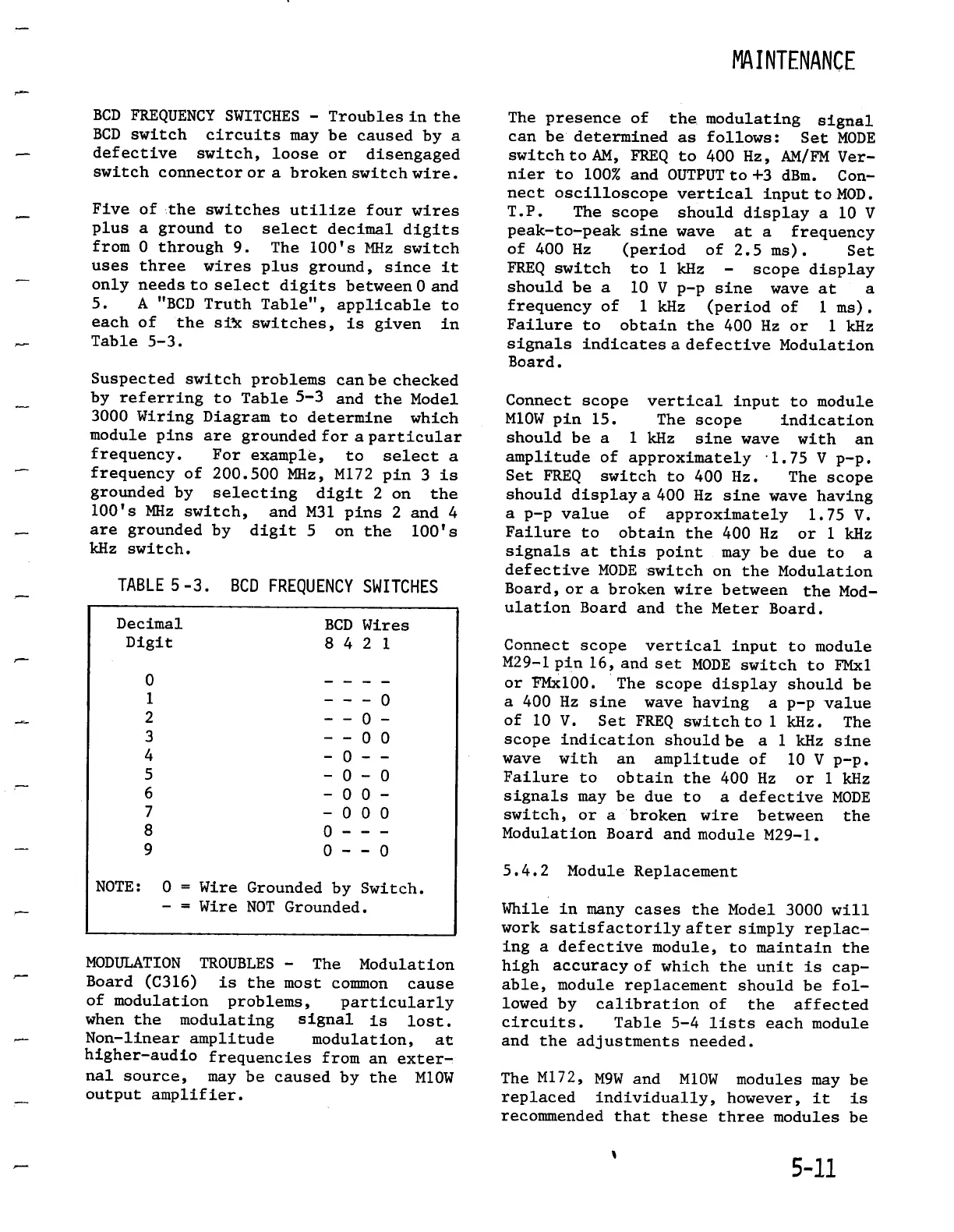
BCDFREQUENCY
SWITCHES
-
Troubles
in
the
BCD
switch
circuits
maybe
caused
by
a
defective
switch,
looseor disengaged
switch
connector
or
a
broken
switchwire
.
Five
of
.the
switches
utilize
four
wires
plus
a
ground
to
select
decimal
digits
from
0
through
9
.
The
100's
MHz
switch
uses
three
wires
plus
ground,
since
it
only
needs
to
select
digits
between
0
and
5
.
A
"BCD
Truth
Table",
applicable
to
eachof
the
silk
switches,
is
given
in
Table
5-3
.
Suspected
switch
problems
canbe
checked
by
referring
to
Table
5-3 and the
Model
3000
Wiring
Diagram
to
determine
which
module
pins
are
grounded
for
a
particular
frequency
.
For
example,
to
select
a
frequency
of
200
.500 MHz,
M172
pin
3
is
grounded
by selecting
digit
2
on
the
100's
MHz
switch,
and M31
pins
2
and
4
are
grounded
by
digit
5
on
the
100's
kHz
switch
.
NOTE
:
0
Wire
Groundedby
Switch
.
Wire
NOT
Grounded
.
MODULATIONTROUBLES
-
The
Modulation
Board
(C316)
is
the
mostcommon
cause
of
modulation
problems,
particularly
when
the
modulating
signal
is
lost
.
Non-linearamplitude
modulation,
at
higher-audio
frequenciesfrom
an
exter-
nal
source,
may
be
caused
by the
M10W
output
amplifier
.
MAINTENANCE
Thepresence
of
the
.
modulating
signal
can
be
determined
as
follows
:
Set
MODE
switch
to
AM,
FREQ
to
400
Hz,
AM/FM
Ver-
nier
to
100%
and
OUTPUT
to
+3 dBm
.
Con-
nect
oscilloscope
vertical
input
to
MOD
.
T.P
.
The
scope
should
display
a 10
V
peak-to-peak
sine
wave
at
a
frequency
of
400
Hz
(period
of
2
.5
ms)
.
Set
FREQ
switch
to
1
kHz
-
scopedisplay
should
be
a 10
V p-p
sine
wave
at
a
frequency
of
1
kHz
(period
of
1
ms)
.
Failure
to
obtain
the 400
Hz
or
1
kHz
signalsindicates
a
defectiveModulation
Board
.
Connect
scope
vertical
input
to
module
M10Wpin
15
.
The
scope
indication
should
be a
1
kHz
sine
wave
with
an
amplitude
of
approximately
-
1
.75
V p-p
.
Set
FREQ
switch
to
400
Hz
.
The
scope
should
display
a
400
Hz
sine
wave
having
a
p-p
value
of
approximately
1
.75
V
.
Failure
to
obtain
the
400
Hz
or
1
kHz
signals
at
this
point
maybe
due
to a
defectiveMODEswitch
on
the
Modulation
Board,
or
a
broken
wire
between
the
Mod-
ulation
Board
and
theMeter
Board
.
Connect
scope
vertical
input
to
module
M29-1
pin
16,
and set
MODEswitch
to
FMxl
or
FMx100
.
The
scope
displayshouldbe
a
400
Hz
sine
wavehaving a
p-p
value
of
10
V
.
Set
FREQ
switch
to
1
kHz
.
The
scope
indication
should
be
a
1
kHz
sine
wave with
an
amplitude
of
10
V
p-p
.
Failure
to
obtain
the
400
Hz
or
1
kHz
signals
maybe
due
to
a
defective
MODE
switch,
or
a
brokenwire
between
the
Modulation
Board
and
moduleM29-1
.
5.4.2
Module
Replacement
While
in
many
cases
the
Model
3000
will
work
satisfactorily
aftersimply
replac-
ing
a
defective
module,
to
maintain
the
high accuracy
of
which
the
unit
is
cap-
able,
module
replacement
should
be
fol-
lowed
by calibration
of
the
affected
circuits
.
Table
5-4
lists
each
module
and
theadjustmentsneeded
.
The
M172,
M9Wand
M10W
modules
maybe
replaced
individually,
however,
it is
recommended
that
thesethree
modules
be
5-
11
TABLE
5-3
.
BCD
FREQUENCYSWITCHES
Decimal
BCD
Wires
Digit
8 4 2
1
0
-
- - -
1
-
- - 0
2
- -
0 -
3
-
-
0 0
4
- 0 -
-
5
- 0 - 0
6
- 0 0
-
7
- 0 0 0
8
0
- - -
9 0 - - 0

Table of Contents

Related product manuals