Troubleshooting and Maintenance
English
6 TROUBLESHOOTING AND MAINTENANCE
6.1 FAULTS AND ALARMS
NOTE!
Refer to the CFW100 quick reference and the programming manual for further
information on each fault or alarm.
6.2 SOLUTION FOR THE MOST FREQUENT PROBLEMS
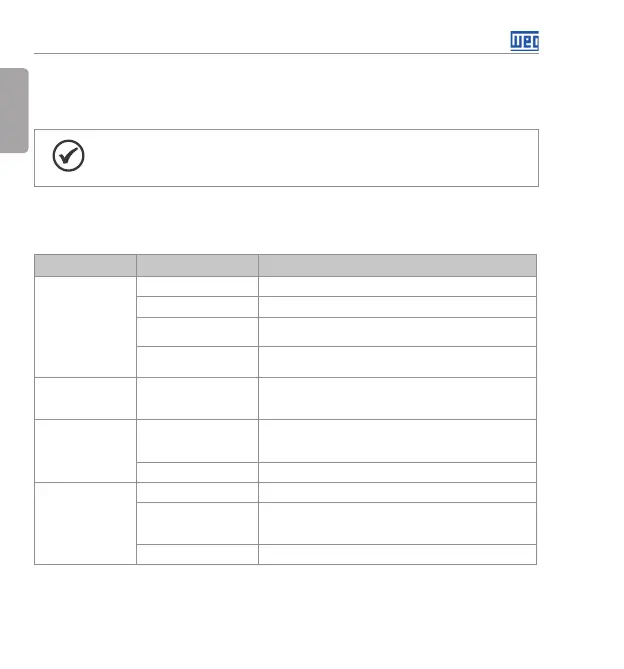
Tab l e 6 .1: Solution for the most frequent problems
Problem Point to be Verified Corrective Action
Motor will not start Incorrect wiring 1. Check all power and control connections.
Incorrect settings 1. Check if the parameter values are correct for the application.
Fault 1. Check whether the inverter is disabled due to a fault
condition.
Motor stall 1. Decrease the motor overload.
2. Increase P136, P137 (V/f).
Motor speed
oscillates
Loose connections 1. Stop the inverter, turn off the power supply, check and tighten
all the power connections.
2. Check all the internal connections of the inverter.
Too high or too low
motor speed
Incorrect settings
(reference limits)
1. Check whether the values of P133 (minimum speed) and
P134 (maximum speed) are properly set for the used motor
and application.
Motor nameplate 1. Check whether the used motor matches the application.
Display is off Keypad connections 1. Check the inverter keypad connection.
Power supply voltage 1. Rated values must be within the limits specified below:
200-240 V power supply: - Minimum: 170 V
Maximum: 264 V.
Mains supply fuses open 1. Replace the fuses.
Buy: www.ValinOnline.com | Phone 844-385-3099 | Email: CustomerService@valin.com




 To Next Page