47
ProCommander
®
AX Wi-Fi Configuration
5.4 WLAN Profile Configuration
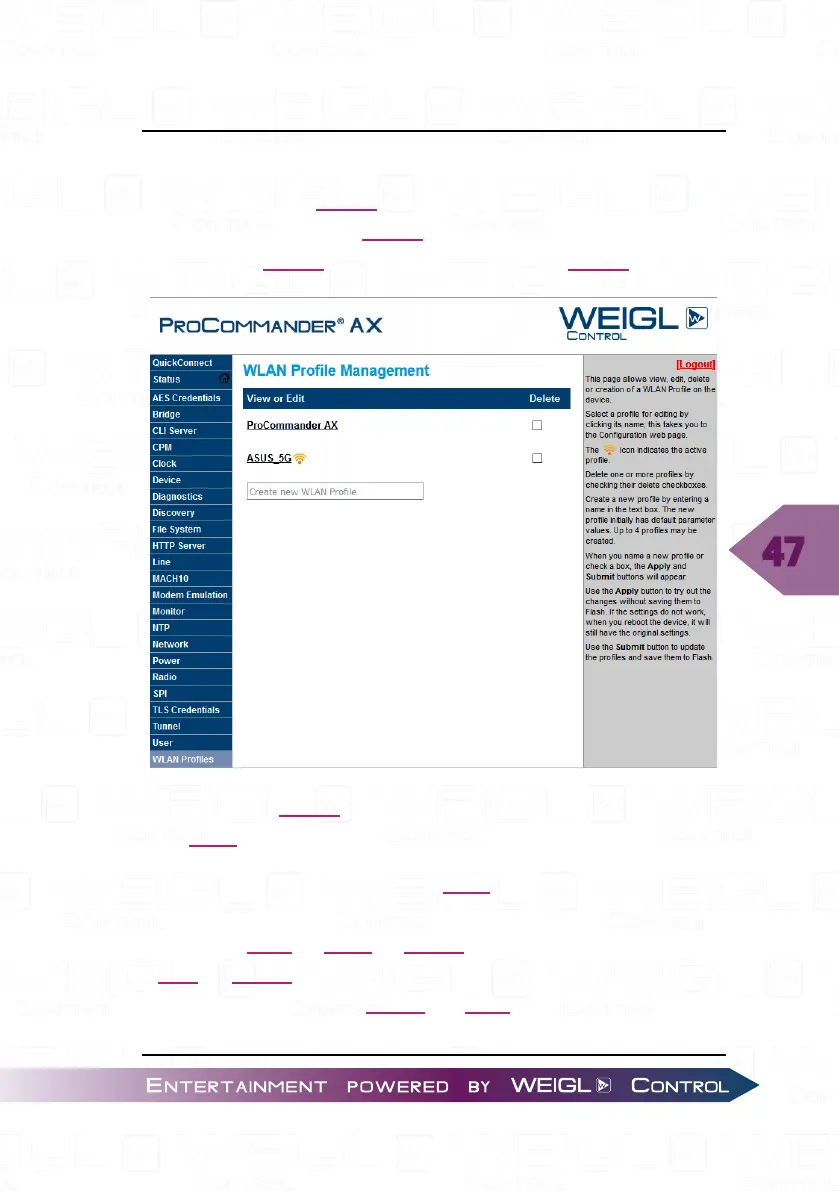
To add a new WLAN profile to your ProCommander
®
AX
select in the left menu "WLAN Profiles" and type in the text file
"Create new WLAN Profile" the name of your WLAN.
Select your WLAN and change all the settings accordingly to
your Wi-Fi network.
Type in the network name (SSID) into the field "Network
Name". Choose your security preference such as "Suite"
("NONE", "WEP", "WPA", "WPA2"), "WPAx Authentification"
("PSK", "8021X"), "WPAx Key Type" ("Passphrase", "Hex"),
"WPAx Encryption" ("CCMP", "TKIP") and type in your
password in the "WPAx Passphrase" field.


 To Next Page