ONE
16
SERVICE PROGRAMMING_2B
· User interface 2B
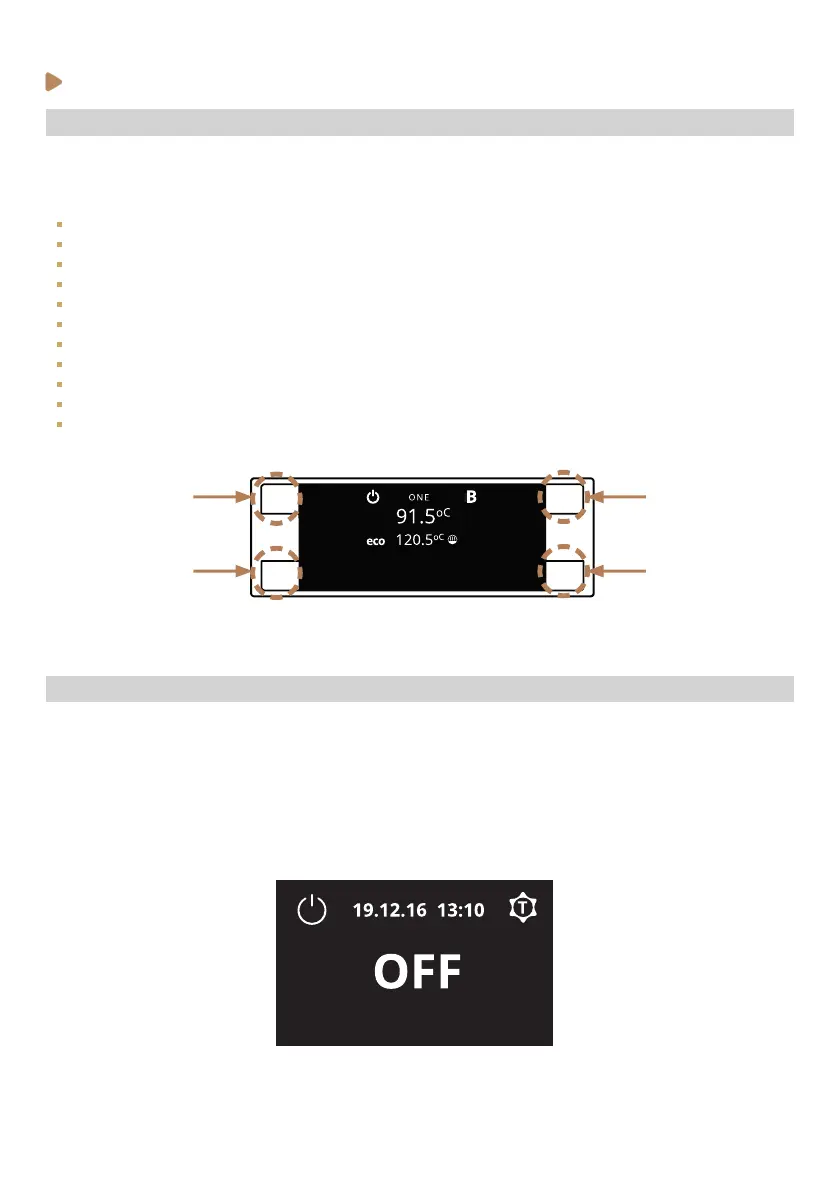
The ONE 2B machines are equipped with a programmable ’Barista’ interface that allows users to set
or adjust the following features and parameters with guidance from the digital display:
ECO & Stand-by mode settings (set up energy saving mode timers).
Adjust the steam and group boiler temperatures.
Clock settings (adjust current time and date).
Power o/on (without using the main switch).
GSP (Gradual Soft Preinfusion) settings. (Rotary Pump versions only).
Shot screen time.
Counters (volume of water cycled, service intervals, and number of coees dispensed, etc.).
Temperature units
Date format
USB interface (LFPP version only)
Barista knob resolution (LFPP version only)
K2
K4
Selection buttons K1 - K2 - K3 - K4
K1
K3
· Stand-by status (OFF)
To put the machine on electronic Stand-by mode (OFF), just press (K1) for 5s until message ‘OFF’ is
shown on the display.
On this mode, the heating elements will remain disconnected.
To exit from the Stand by mode, just press (K1) to come back to the main screen.



 To Next Page