ONE
19
SERVICE PROGRAMMING_2B
· Adjusting ECO mode temperature setting
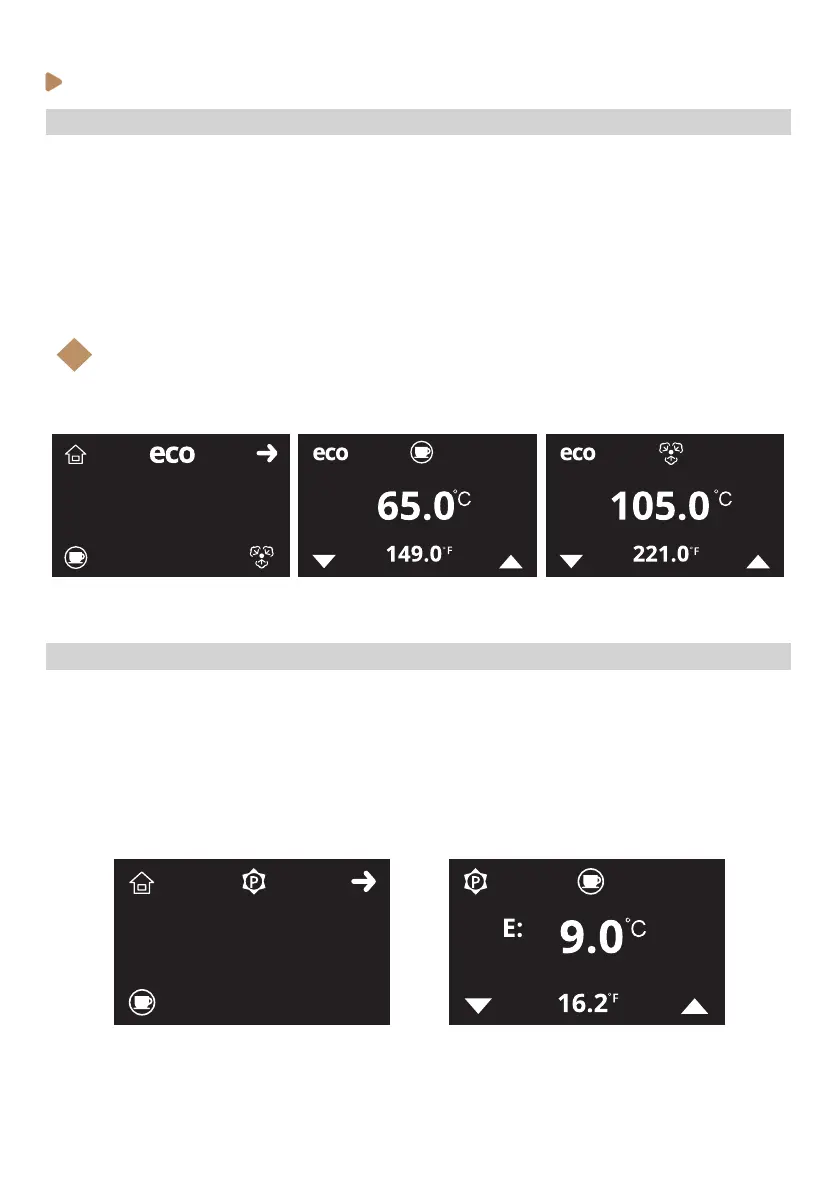
To change the machine’s steam and group boilers ECO mode temperatures setting, follow the steps
below:
1. Enter the service programming and browse through the menu (see previous instructions).
2. When ECO temperature mode icon (X) is shown on the display, select with K3 and K4 buttons
to choose submenus Group boiler or Steam boiler.
3. Adjust the ECO temperature values with K3 and K4 and accept with K2.
4. Press K1 (home icon) to come back to Stand-by mode (OFF)
Note:
The ECO mode allows the machine to reduce its electrical demand by lowing the boilers
temperatures to: 65ºC(149ºF) the group boiler and 105ºC(221ºF) the steam boiler.
i
· Programming group boiler dispensing temperature oset
To change the machine’s group boiler temperature oset (the dierence in temperature between the
group boiler and group brewing head), follow the steps below:
1. Enter the service programming and browse through the menu (see previous instructions).
2. When group boiler oset icon (X) is shown on the display, enter with K3.
3. Select with K3 and K4 buttons to adjust the setting up or down. Accept with K2.
4. Press K1 (home icon) to come back to Stand-by mode (OFF)



 To Next Page