i12 Manual Page 34 - Revision: 6-13-2023
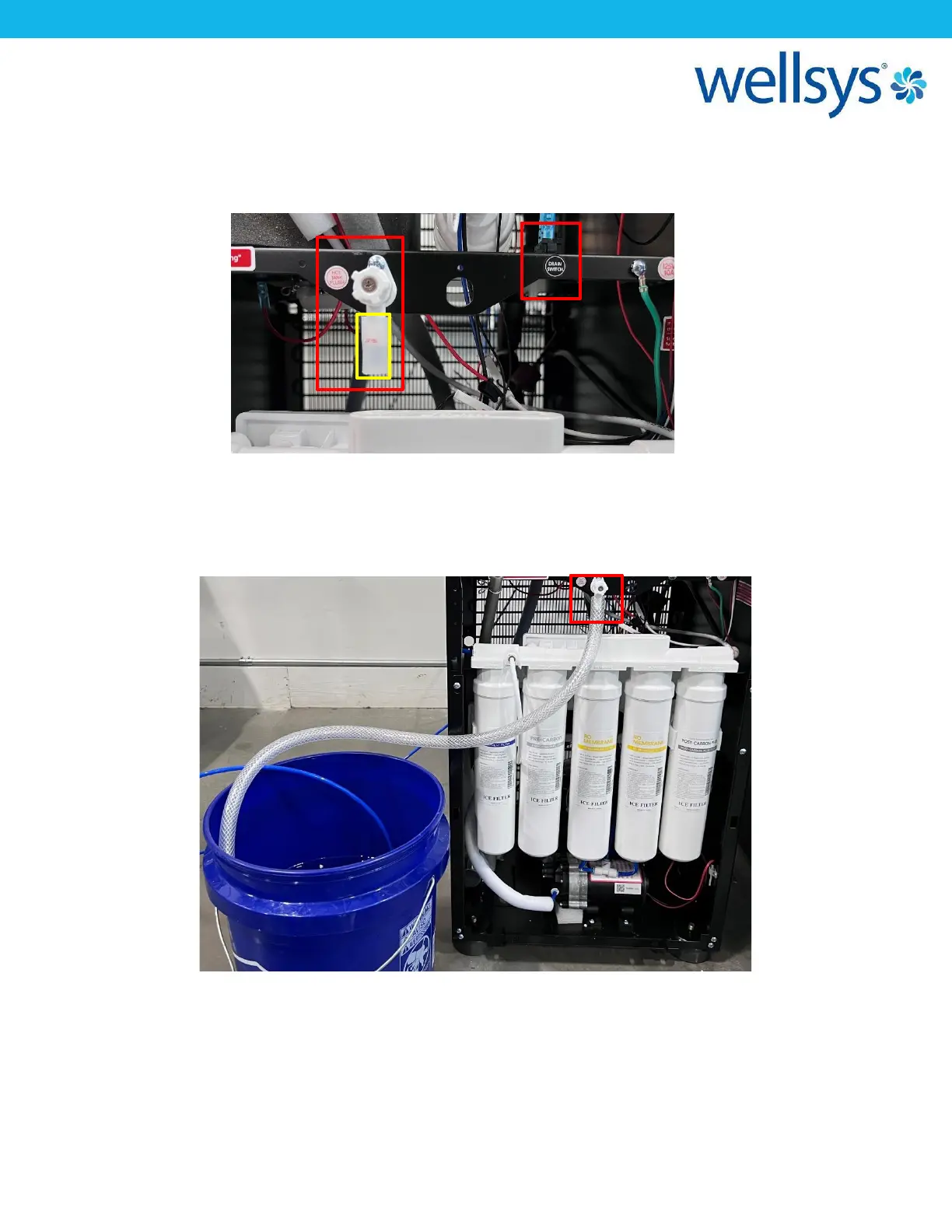
5. Locate the Drain Valve, just above the filter manifold. Locate the Drain Switch located on
the underside of the shelf that the Drain Valve is mounted to and turn the switch “ON.” The
unit should begin a repetitive chime indicating it is in Drain Mode. The unit will not
replenish water while this switch is activated.
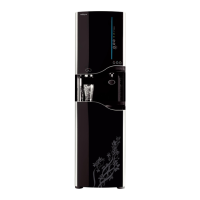
6. Remove the silicone cap covering the Drain Valve. Using 3/8” poly-hose, attach the hose to
the Drain Valve nipple and run to drain or a bucket. Open the Drain Valve (turn counter
clock-wise) and allow the water and cleaner mixture to drain into the bucket. Close the
Drain Valve when water has drained. Empty the bucket into the drain.
7. Using the bucket, or the water supply line, refill the Ambient Tank from the top. Repeat step
6, and allow fresh water to drain from the Ambient Tank through the Hot Tank and into the
bucket. Repeat this process 1 more time with fresh water. Once finished, close the Drain
Valve.


 To Next Page