i12 Manual Page 35 - Revision: 6-13-2023
8. Fill the Ambient Tank with fresh water again from the top. Now dispense Cold Water using
the front panel interface until the Cold Tank is depleted. Repeat this step one more time.
Once complete, turn the Drain Switch “OFF,” and allow the machine to refill with RO water.
9. Check all water temperatures for taste and smell before reassembly. Return lower front
panel, the ambient tank lid, and the top cover to original positions.
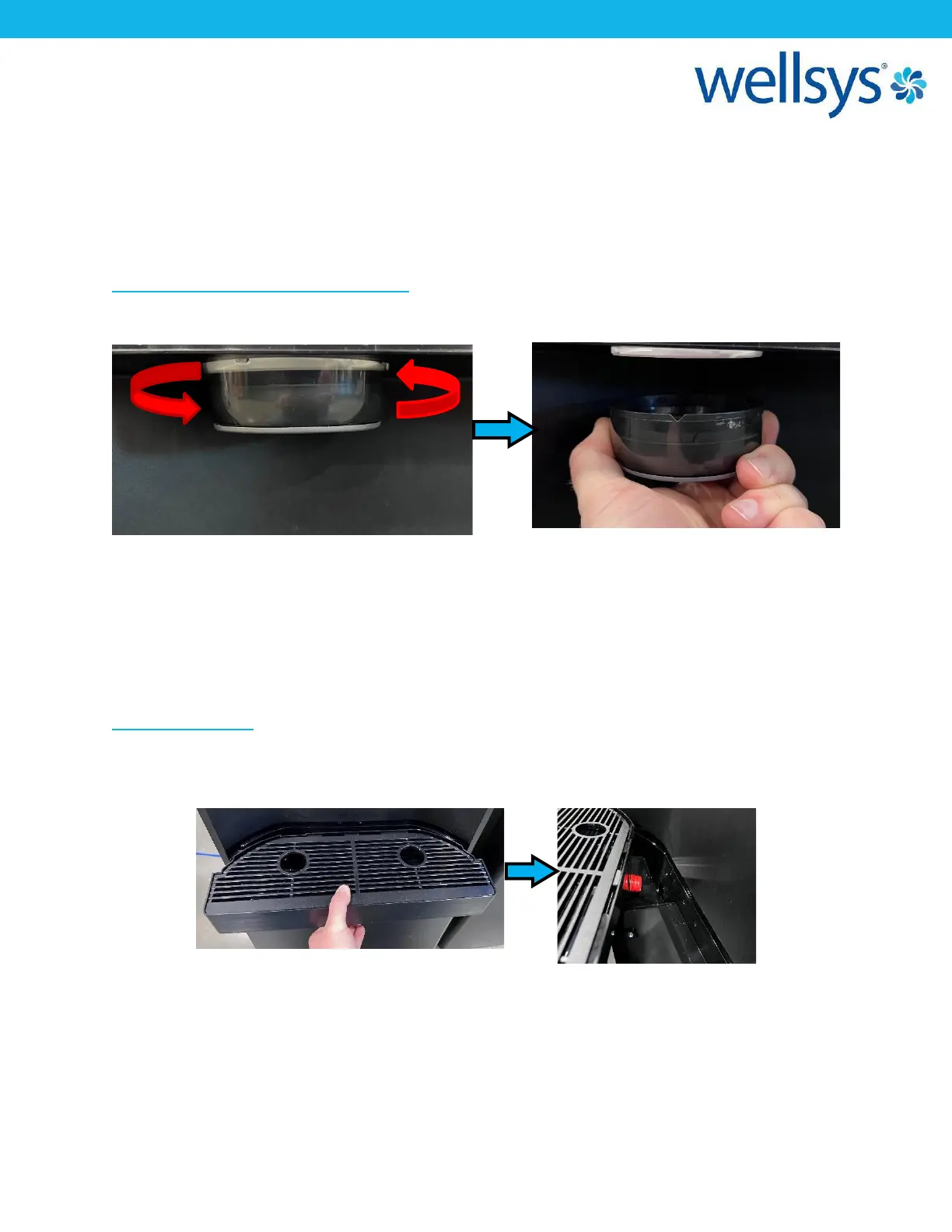
Ice Dispensing Spout Cleaning Method
1. Turn the ice dispense faucet to the left, unscrew from spout and remove.
2. Wipe the inside of the faucet with a soft cloth and cleaning agent.
*DO NOT use detergents, thinners, benzene, or wax for cleaning. This may cause
discoloration or peeling off and may cause health problems.
3. After cleaning, assemble the ice dispense spout by turning it to the right and screwing it
back on.
Drip Tray Cleaning
1. Pull the drip tray out for cleaning. The rear nozzle of the drip tray has a double gasket and
may require a firm pull to remove.
2. Clean the drip tray and grill with a soft cloth or sponge with hot running water and
approved cleaning agent. Dry off.
3. Push the drip tray back into the unit.


 To Next Page