30
WHILL Model C2/Ci2 User Manual
3
5.
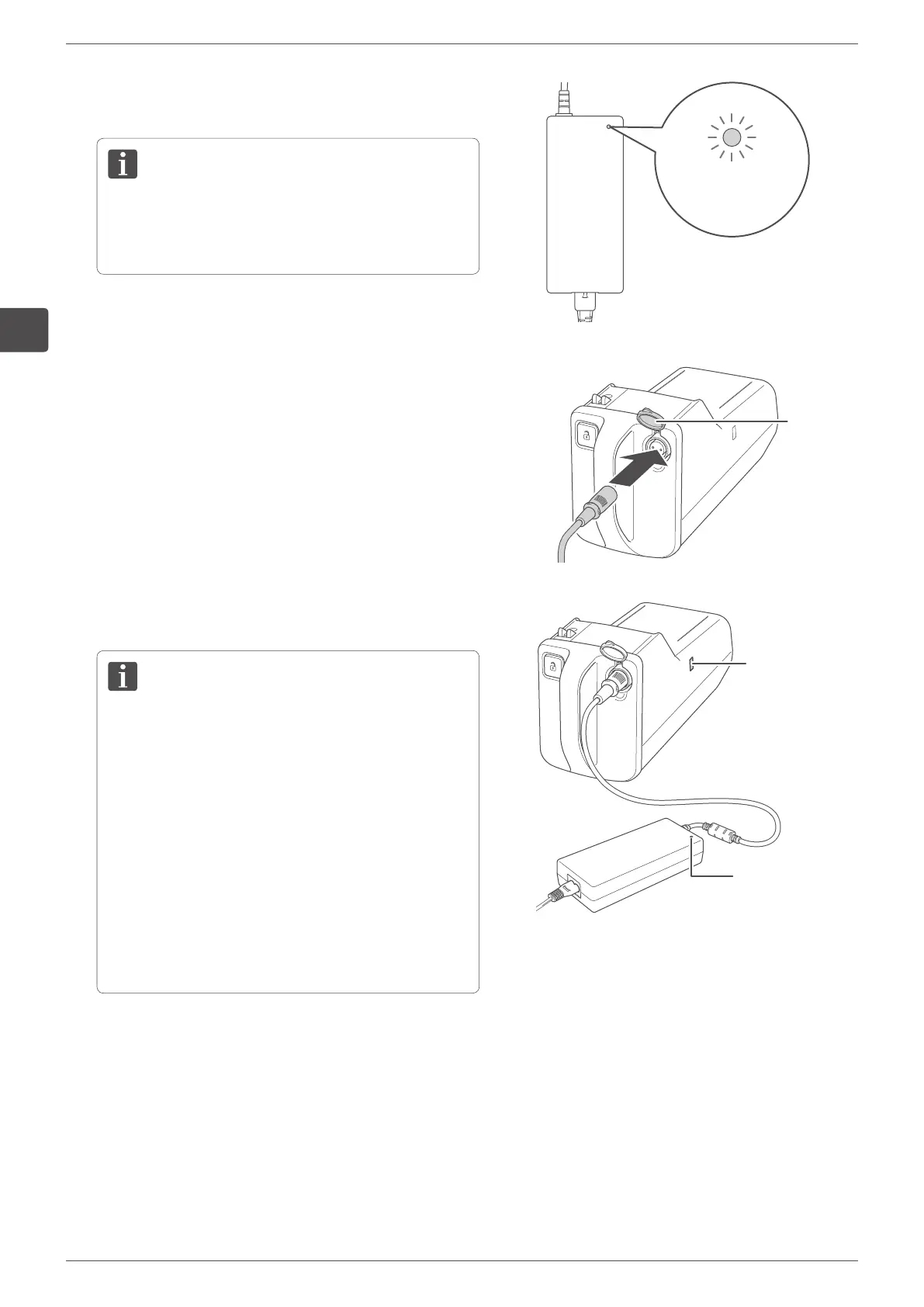
Plug the charger into the wall outlet.
The charger indicator illuminates red.
When the charger indicator is red, it means that
the charger is connected to the wall outlet and not
connected to the battery.
Charger indicator
6.
Remove the cap of the battery charging port and
connect the DC connector to the battery charging port.
Check the orientation of the DC connector and then
connect it.
The charger indicator begins flashing green,
and charging starts.
You can check the charge level of the battery on the
battery LED.
• Full charge: green
• Approx. between 30% to full charge: orange
• Approx. less than 30%: red
• No charge: purple
• If the charger indicator flashes red, the charger is
not properly connected. In this case, disconnect
and reconnect again.
• If the charger indicator flashes in red even though
you attempt to establish a connection several
times, a battery or charger malfunction may have
occurred.
• If the charger indicator turns green right away
even though the battery is not charged fully, a
battery other than the battery provided with the
device may have been used.
Cap
Charger indicator
Battery LED
7.
Charging is completed when the charger indicator and
battery LED turn green.



 To Next Page