31
WHILL Model C2/Ci2 User Manual
3
3. Charging the battery
8.
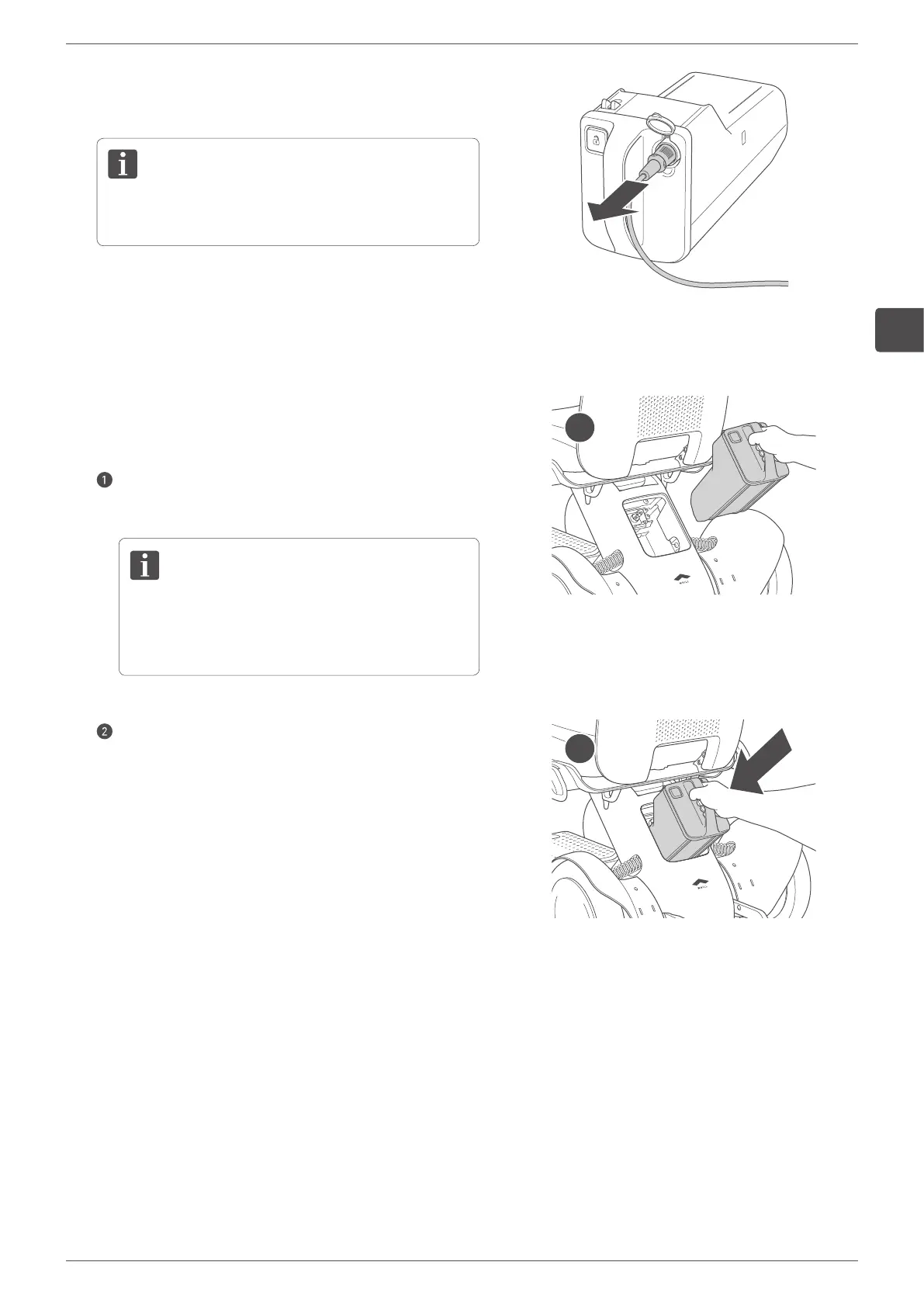
Disconnect the DC connector from the battery, then
disconnect the plug from the wall outlet.
The battery LED turns off a while after charging
completes.
9.
Close the cap of the battery charging port.
10.
Install the battery onto the device.
Be sure that the battery lock release button is not
pressed.
Grasp the battery handle and insert the battery into
the battery compartment.
The battery weighs 6.0 lbs (2.7 kg). Handle the
battery with care – dropping it will increase a risk
of injury and damage to the battery.
1
Insert the battery straight and press it until it clicks.
When it is difficult to insert the battery, push it from
the front with force.
If the battery does not easily set in place, there may be
a foreign object inside the compartment. Shine a light
inside the compartment and check. If there is a foreign
object, ensure you remove it with a small brush, etc.
before trying again.
2


 To Next Page