68
WHILL Model C2/Ci2 User Manual
5
5.3.2. Switching the position of the control pad
The control pad can be installed on the right or left arm.
CAUTION
Do not sit on the control pad, place the removed seat assembly upside down, or apply an
excessive load to the control pad. Do not press the control pad or switches with excessive force
or operate them with a sharp object.
There is a risk that the control pad may be damaged, rendering the device inoperable.
Do not throw, step on, drop the control pad, or immerse it in water.
There is a risk that the control pad may be damaged from strong impact, rendering the device
inoperable.
Do not press forcefully, scratch or touch the display with dirty hands.
There is a risk that the display may become damaged or illegible.
Do not disassemble the control pad.
Doing so may cause malfunction of the control pad.
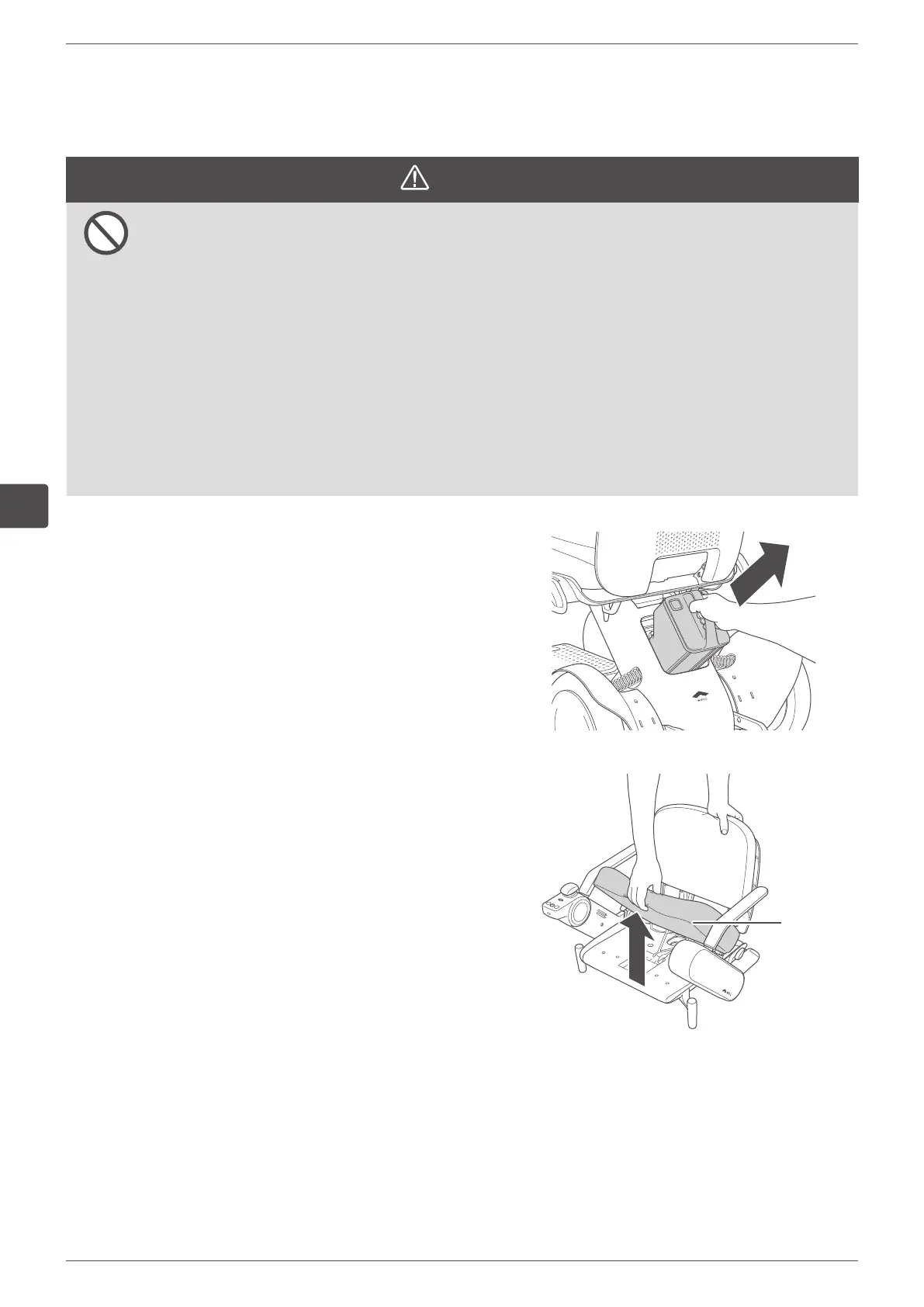
1.
Remove the battery.
For the removal procedure, refer to “5.4.1. Removing
the battery” on page 84.
2.
Remove the seat cushion.
Seat
cushion


 To Next Page