29
WHILL Model F User Manual
3
3. Assembly and adjustment
3.2.3. About installing the arm rests
The space between arm rests and the position of the controller can be selected to meet the user's seating needs.
For the required specifications, refer to the following items.
Space between arm rests
Standard
Wide
Position of controller
Right side
“Installation pattern 1”
on page 31
“Installation pattern 2”
on page 32
Left side
“Installation pattern 3”
on page 37
“Installation pattern 4”
on page 42
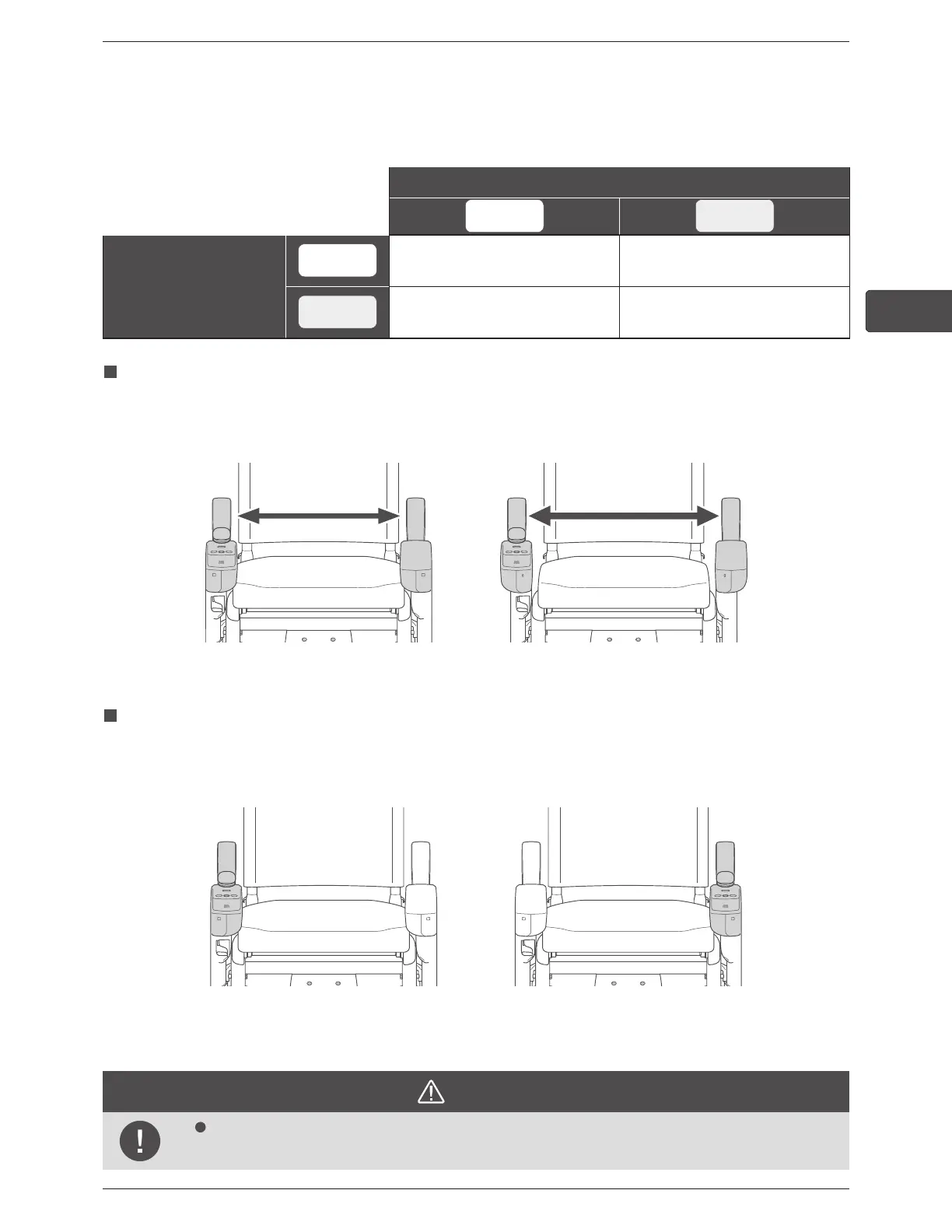
Space between arm rests
Two settings "Standard" and "Wide" can be selected for the space between arm rests.
The figures below introduce an example where the controller is installed on the right arm.
Standard: Controller facing inwards
(inside width 430 mm)
Wide: Controller facing outwards
(inside width 480 mm)
Position of controller
The controller can be installed on the left side or the right side.
When installing or removing the controller, be careful that your fingers do not become caught.
Right side Left side
* Figures show “Standard” space between arm rests
CAUTION
When installing the arm rests, be careful that your ngers do not become caught.
There is a risk of injury.



 To Next Page