15
List of common questions from customer / end consumer
LCD – version
How works........ ? Answer
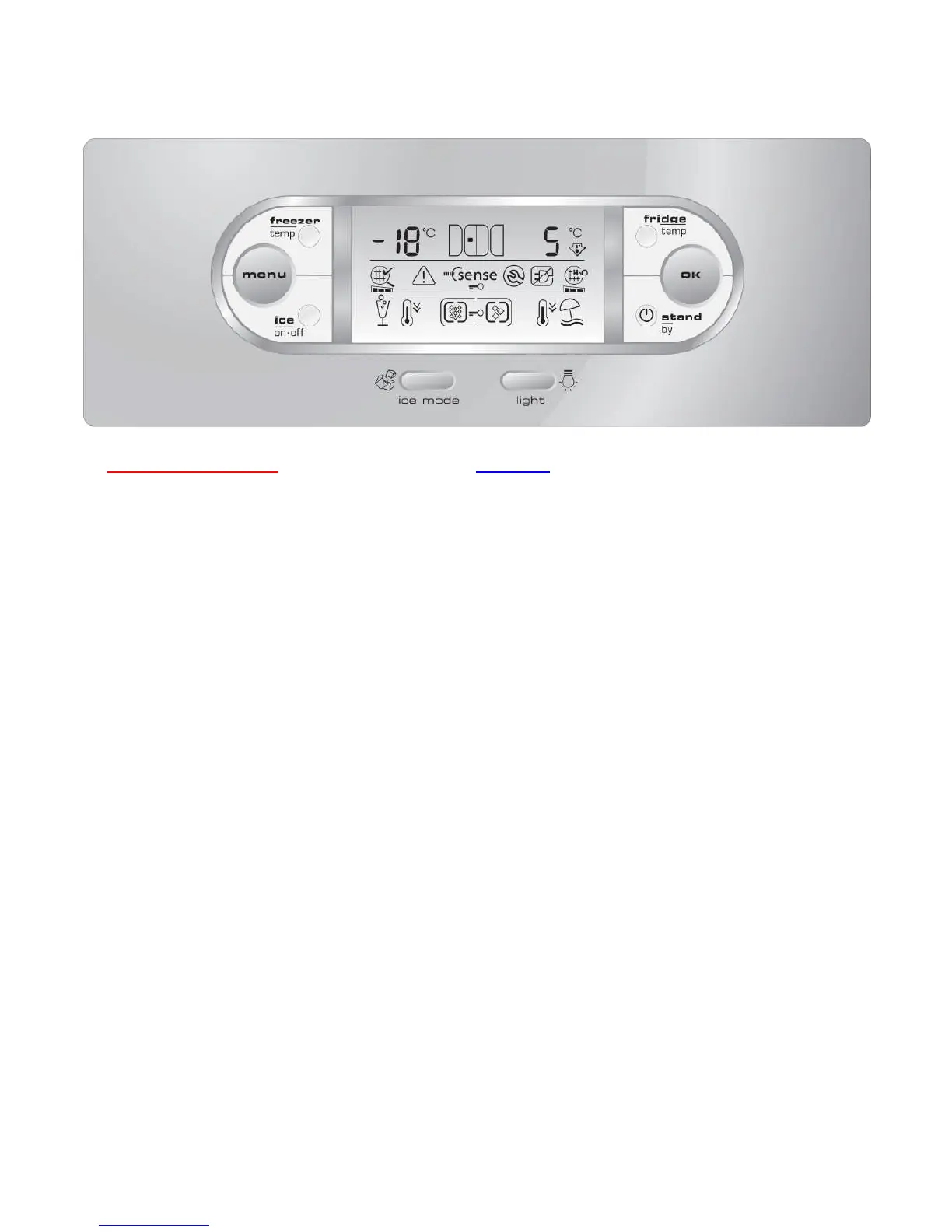
Freezer Temperature button: Freezer compartment temperature control
button
Fridge Temperature button: Fridge compartment temperature control
button
Menu button: This button is used to select the various
optional functions. Each time the button is
pressed, a different option is highlighted.
OK button: The OK button is used to confirm the
selected function and to deactivate the
acoustic signal
Ice On/Off: Use the Ice On/Off button to switch the ice
maker on or off. When the ice maker is on,
the display show on icon light
Ice mode button: Press this button to select the type of ice
desired: crushed or cubes
Light button: Ice and water light can be switched On and
Off by pressing the Light button on the
control panel or pressing one of the two
dispenser levers; the light will switch off
automatically once the water or ice has been
dispensed.
Stand-by button: This button needs to switch ON/OFF the
appliance without remove the power supply.
It must be pressed during 3 seconds.





 To Next Page