Chapter 5: Panel Console Management
EN-102
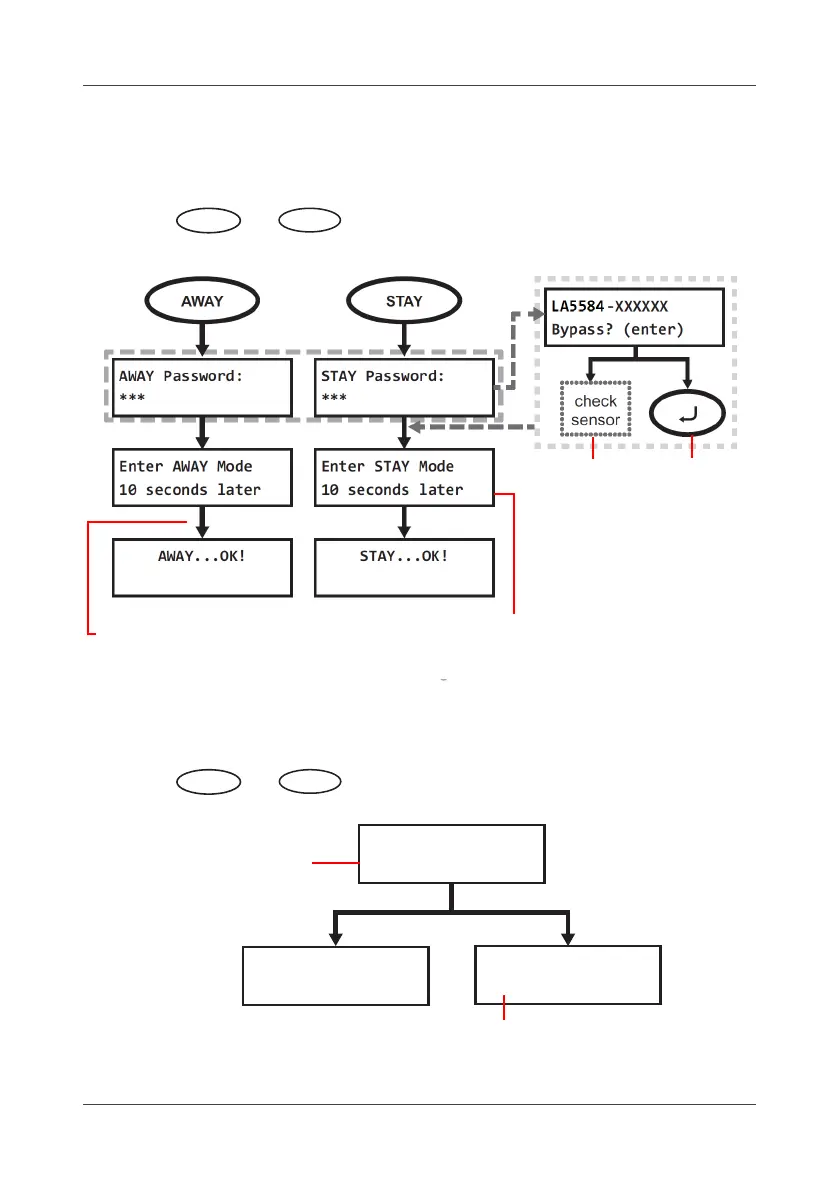
5.4 Using the AWAY/STAY Button
To activate the alarm:
Press the or
button to enable choose the arm mode (AWAY
means Full ARM, STAY means Partial ARM) mode.
To deactivate the alarm:
Press the or
button again to disable the respective arm
mode
AWAY
Press CANCEL key to
cancel the setting
while counting down
Fix the
error state
on-site.
Set the 0/10/20/30 seconds of
the Delay Time in Alarm Delay
configuration mode.
Press
ENTER
key to
bypass.
DISARM Password:
***
DISARM Password:
False!
DISARM...OK!
Enter password
to disarm
Wrong password,
please try it again



 To Next Page