Chapter 5: Panel Console Management
EN-101
5.3 Menu Navigation
Press the button and key in the password to enter the menu mode.
Menu options
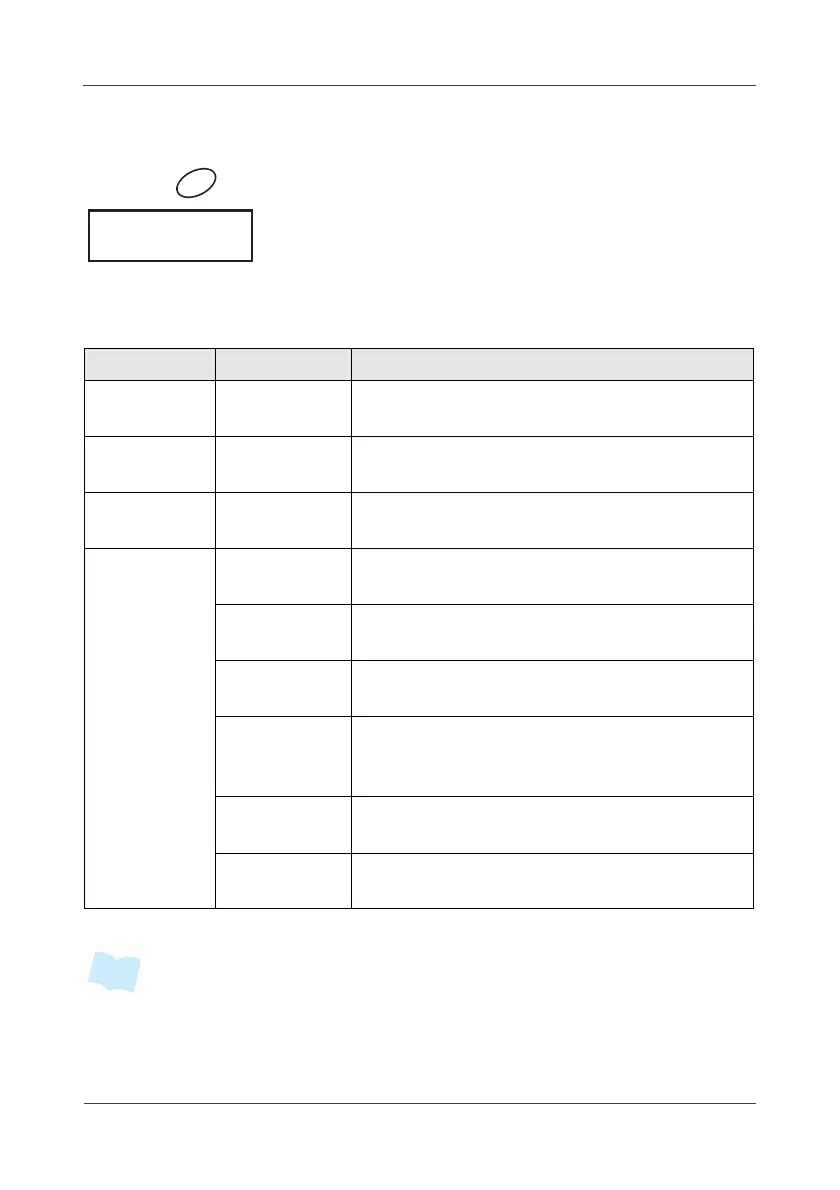
The following table describes the available menu options:
• Please refer to 5.9 Device Operation Detail on page 106 for more information.
Menu Sub-menu Description
Automation
Automation
List
Display a list of binding automation-type
devices and display the device status.
Sensor Sensor List
Display a list of binding sensors and
display the device status.
Siren Siren List
Display a list of binding sirens and display
the device status.
System
Password
Change the password. By default, the
password is “123”.
System
Clock
Adjust the date and time.
Security
Zone
Display the available zone list and display
the zone status.
Arm Delay
Setup
Set the alarm delay time while triggering
the selected sensors. Give you an option
to add or remove the selected sensor.
Event Logs
Display the latest 50 entries of system
event logs.
Information
Display the system version and network
settings.



 To Next Page