22 | MULTI- ZONE / FROZEN FOOD VENDOR • 3576 • 4222618A
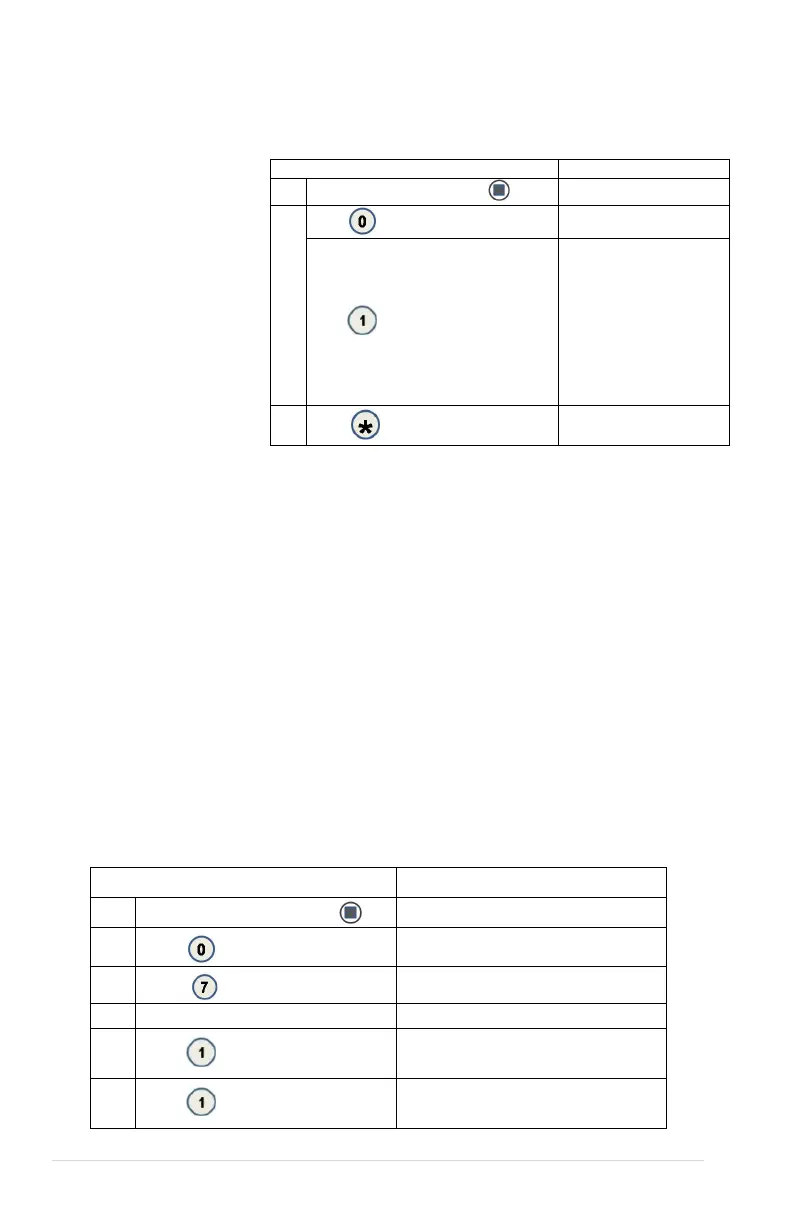
0 DIAGNOSTICS
0.1 DIAGNOSTIC
perform a self-diagnostics
check and display results.
Press Service Mode Button
2.
Diagnostic...
Press to start test
Temp Sensor
Optical
Coin Acceptor
Bill Validator
Card Reader1
Card Reader2
3.
(Sales Mode)
0.2 TEST RELAY
Testing of Relays - This menu provides functions that allow the operator to test
the operation of the individual relay lines 1 through 6.
See GVC2 Programming Manual (P/N 4215507) for more information.
0.3 LOG
Engineering download for service technician ONLY!
0.4 COIN REJECT RATE
This feature tracks the percentage of coins that have been rejected by the coin
mech. This will be reset when in accounting “ALL” has been cleared.
0.5 BILL REJECT RATE
0.6 IVEND ALIGNED
0.7 ADVANCED DIAGNOSTICS
See GVC2 Programming Manual (P/N 4215507) for more information.
0.7.1 REFRIG LOG
Press Service Mode Button
2.
Diagnostics
3.
Password:
Enter Password (default-2314)
5.
Press
Refrig Log (Current Status)
6.
Press
to toggle ON/OFF
Refrig Log (Choice Flashing)



 To Next Page