18 | MULTI- ZONE / FROZEN FOOD VENDOR • 3576 • 4222618A
See GVC2 Programming Manual (P/N 4215507) for more information.
4.0.6 SET DEFAULTS
See GVC2 Programming Manual (P/N 4215507) for more information.
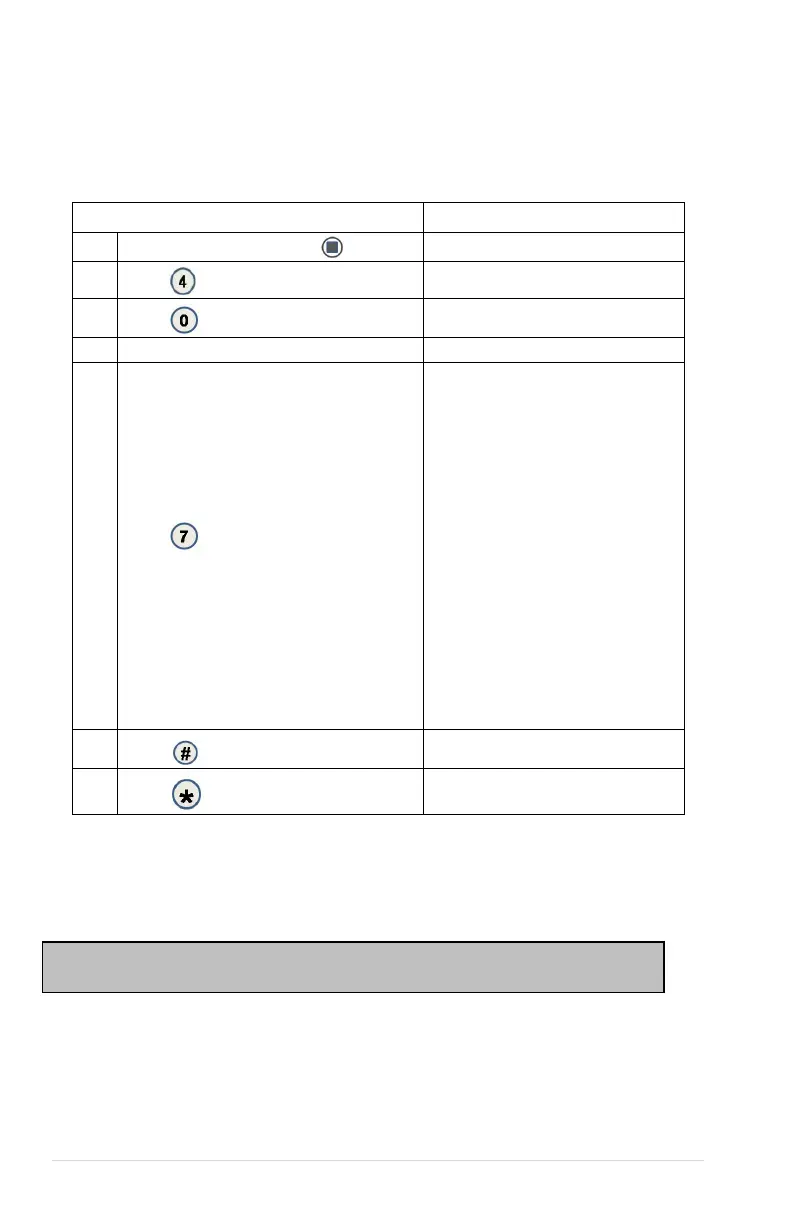
4.0.7 REFRIGERATION CONFIGURATION SETTINGS
4.0.9 OPEN DOOR MOTOR HOMING
With the Open Door Motor Homing feature set to ON every time the door of the machine is
opened all motors not at the home position will be moved to the home position. This feature
requires the machine to have a door switch assembly. To purchase a door switch assembly
please contact Vendnet Parts by phone at 1-800-833-4411.
Press Service Mode Button
2.
Configuration
3.
Password
Enter Password (default 2314)
5.
Press
to edit Refrigeration Type.
Default is Snack
FROZEN (Not used)
Dual Zone (Not used)
Dual Upper -6 (Not used)
Chilled (Not used)
MZF Multi-zone -10F & 36F
MZF -2 Multi-zone -12F & 36F
MZF -5 Multi-zone -15F & 36F
SZ Frozen Single zone -10F
SZ Frozen-2 Single zone -12F
SZ Frozen-5 Single zone -15F
SZ Cold Single zone 36F
SZ Cold-1 Single zone 35F
Snack (Not used)
Cold (Not used)
6.
MZF-5
7.
Sales Mode
CAUTION: When motors are homed, product may be vended from tray location.



 To Next Page