36 | MULTI- ZONE / FROZEN FOOD VENDOR • 3576 • 4222618A
and move second turning vane to top
8. Remove air curtain from bottom side of tray four (Fig. 11)
9. Replace trays to proper locations and connect harnesses
10. Turn power switch on and reconfigure control board to either single
zone cold food or single zone frozen mode (See Configuration
Instructions).
Every 3 Months
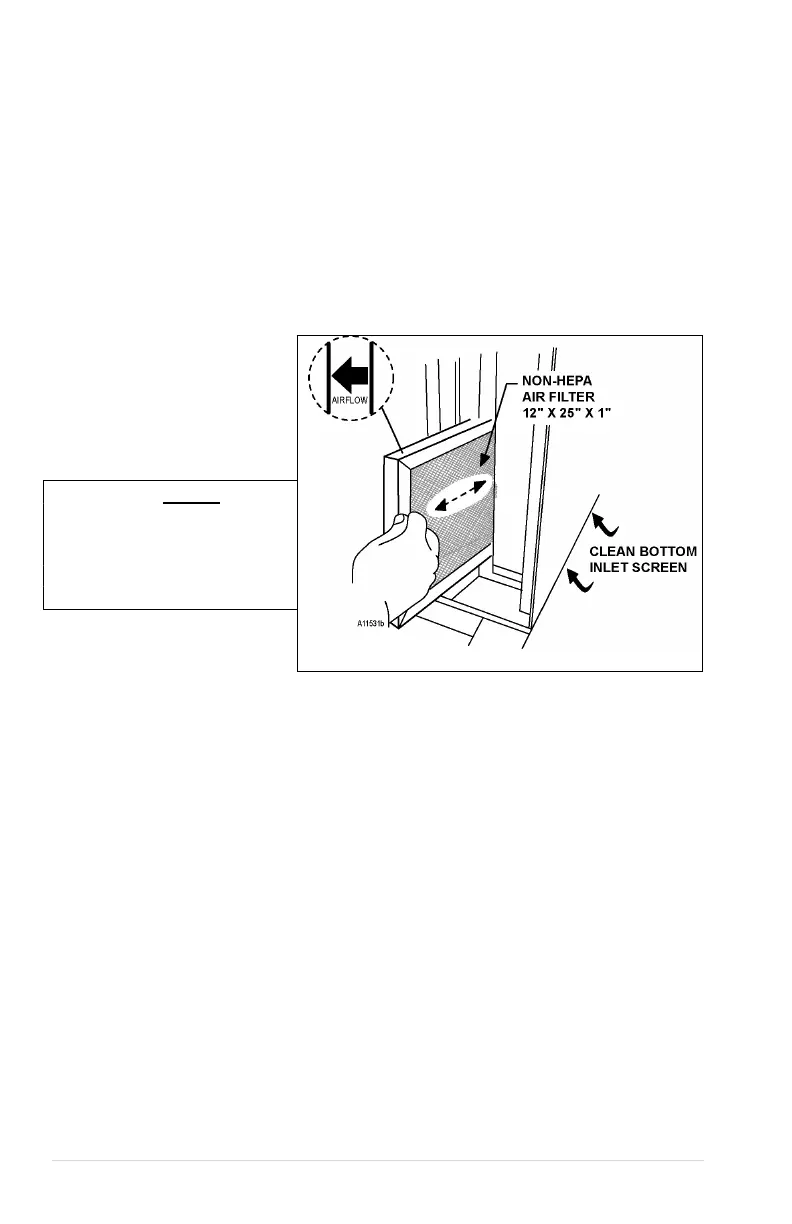
REPLACE AIR FILTER
The refrigeration air filter is to prevent dust from building up on the condenser coils and
allows the refrigeration system to operate efficiently.
• Pull the filter and check the
air filter.
• If filter is dirty, replace it with
the same size and type filter.
• Airflow arrow on filter must
point to the left (towards the
inside of vending machine).
WARNING: Do not
replace with a HEPA
type filter. This type may
not allow the correct
amount of air to flow
through.
Figure 12. Air Filter & Bottom Inlet Screen
CLEAN BOTTOM INLET SCREEN
The inlet screen is a long narrow screen located on the bottom right side. It can only be
accessed from underneath the cabinet. See Figure 12 on page 36. Remove dust and
debris from the inlet screen to allow air to flow to the condenser coils.



 To Next Page