MULTI- ZONE / FROZEN FOOD VENDOR • 3576 • 4222618A | 13
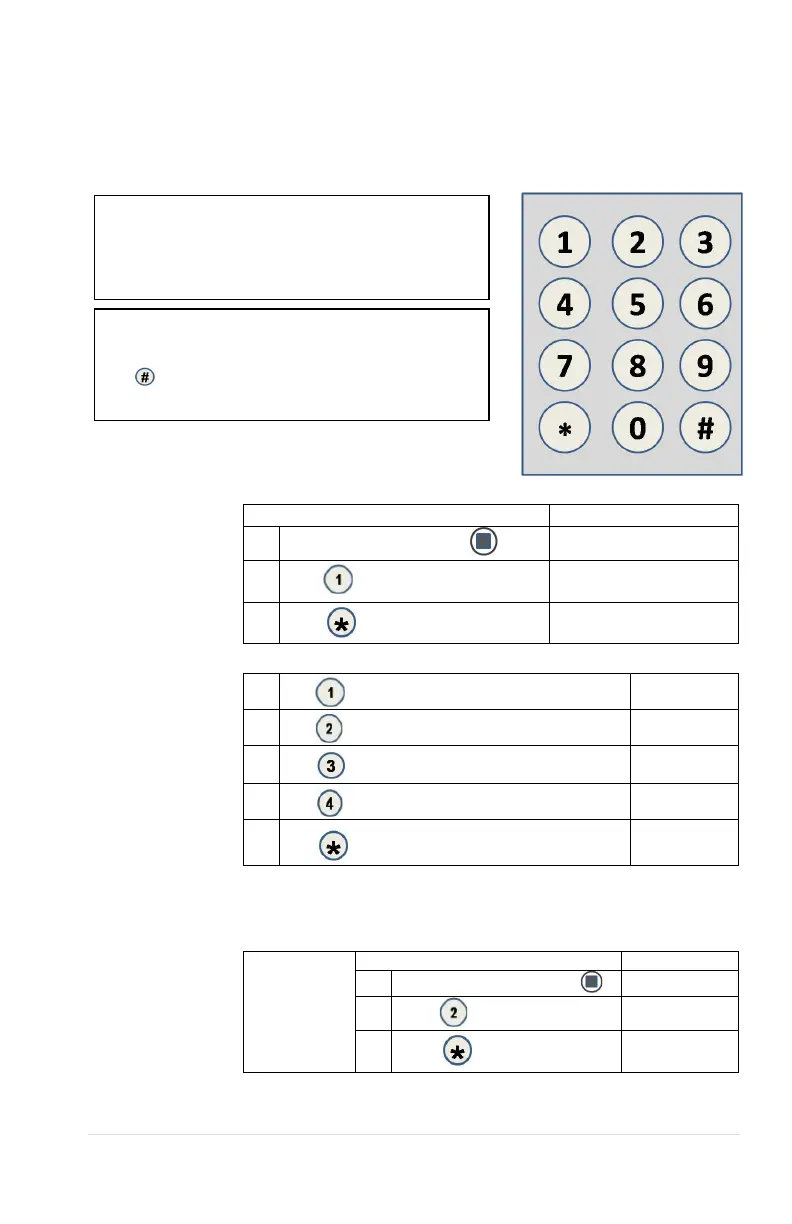
Buttons 0-9 are used to move between the
various modes, menus and sub-menus; while
the
button is used to enter a menu, confirm or
save a setting. See Figure 7
Check the display after pressing the Service Mode
Button and/or Keypad Buttons to make sure that
the program is responding correctly.
BASIC PROGRAMMING SETUP
KEYPAD
Use the buttons on the keypad as directed in the step-by-step instructions in this manual in
programming the vendor.
1 TUBE FILL/ DISPENSE COINS
Tube Fill counts
coins as they are
deposited and
Shows the dollar
amount.
Tube Dispense
Pays out coins
from the coin mech
coin tubes.
This mode will also
display the current
quantity of coins in
the coin mech
tubes.
1.
Press Service Mode Button
Motor Count 60
2.
Press
and begin depositing coins
At least 15 of each
denomination
3.
(Sales Mode)
1.
Press to dispense dollar coin or highest denomination
$1.00/coins
2.
Press to dispense quarters or next highest denomination
0.25/coins
3.
Press to dispense dimes or next highest denomination
0.10/coins
4.
Press to dispense nickels or next highest denomination
0.05/coins
5.
(Sales Mode)
**Note: For dispensing more than a 4 denomination coin mech. use keys greater in the
same sequence as shown above.**
2 MOTOR COUNT
Displays the
total count
of working
motors.
Press Service Mode Button
**Note: Actuating a motor count sends all motors to their home
positions. If product is loaded in selections when this occurs, they



 To Next Page