MULTI- ZONE / FROZEN FOOD VENDOR • 3576 • 4222618A | 29
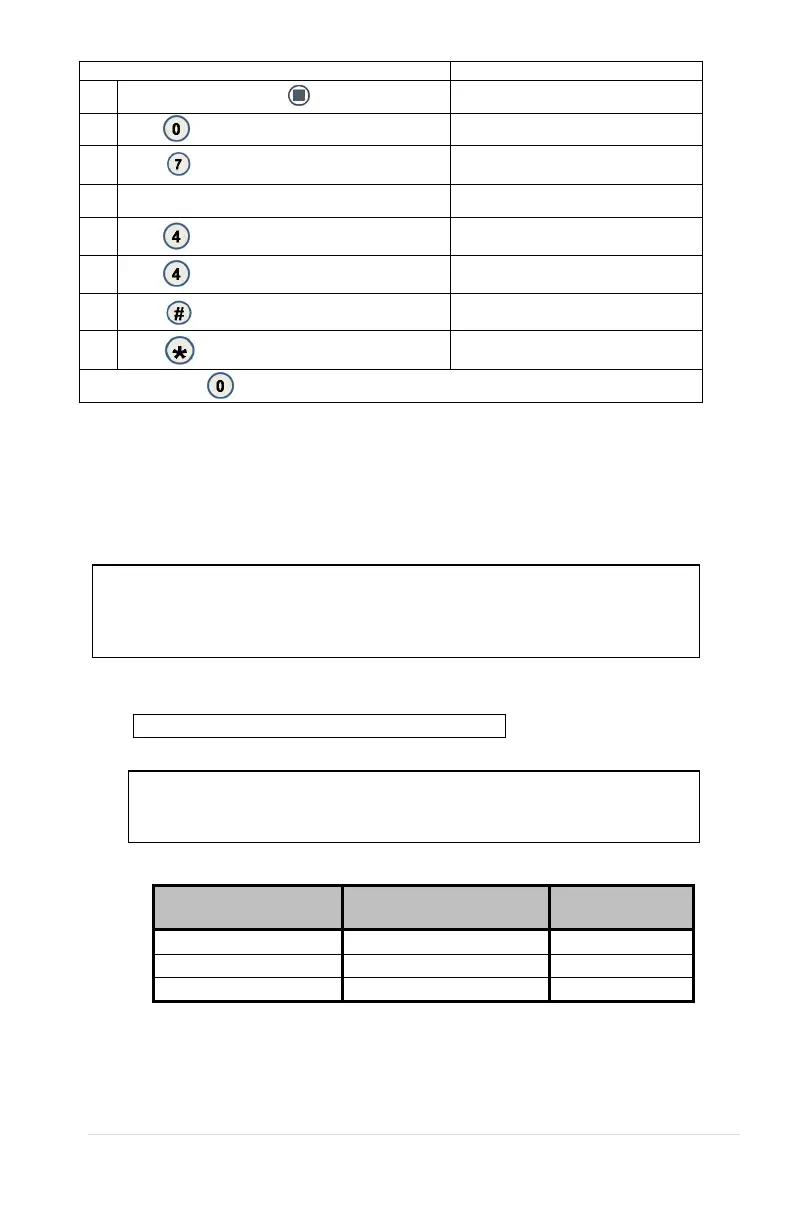
1.
Press Service Mode Button
Motors ( - - )
2.
Press for Diagnostics menu
Diagnostics
3.
Press
for Password menu
Password:
4. Enter Password (default-2314)
Log
5.
Press for Health Safety test
HS Test (Current Setting)
*- exit 4- edit
6.
Press
to toggle ON/OFF
HS Test (Choice Flashing)
*- exit # - save
7.
Press
to save the setting
HS Test (New Setting)
*- exit 4- edit
8.
(Sales Mode)
Press in Sales Mode to see current teperatures and “HS Test” message
REFRIGERATION
To prevent damage to the refrigeration unit when it is turned off or the power is
interrupted, the refrigeration unit will not restart for at least five minutes regardless
of the temperature.
REFRIGERATION TROUBLESHOOTING
CAUTION: Breaking the refrigerant joints or seals on the system
voids the unit warranty. Failure to keep the condenser coil clean
and free of dirt and dust and other similar debris voids the unit
warranty.
Know and understand how the unit operates. Units may vary, but the operation is basically
the same. Never guess at the problem; find the symptom before attempting any repair.
NOTE: Most refrigeration problems are electrical.
WARNING: Wiring diagrams must be followed as shown.
Wrong wiring may cause serious electrical hazard and potential
damage or rupture component electrical parts.
Table 1. Approximate Winding Resistance
Across Terminals
Error! Reference source
not found.



 To Next Page