MULTI- ZONE / FROZEN FOOD VENDOR • 3576 • 4222618A | 37
EVERY 6-MONTHS
CLEAN DOOR AND DELIVERY DOOR SEALS
Clean the door seals. Inspect them for any deformities or cracking.
CLEAN EVAPORATOR COIL
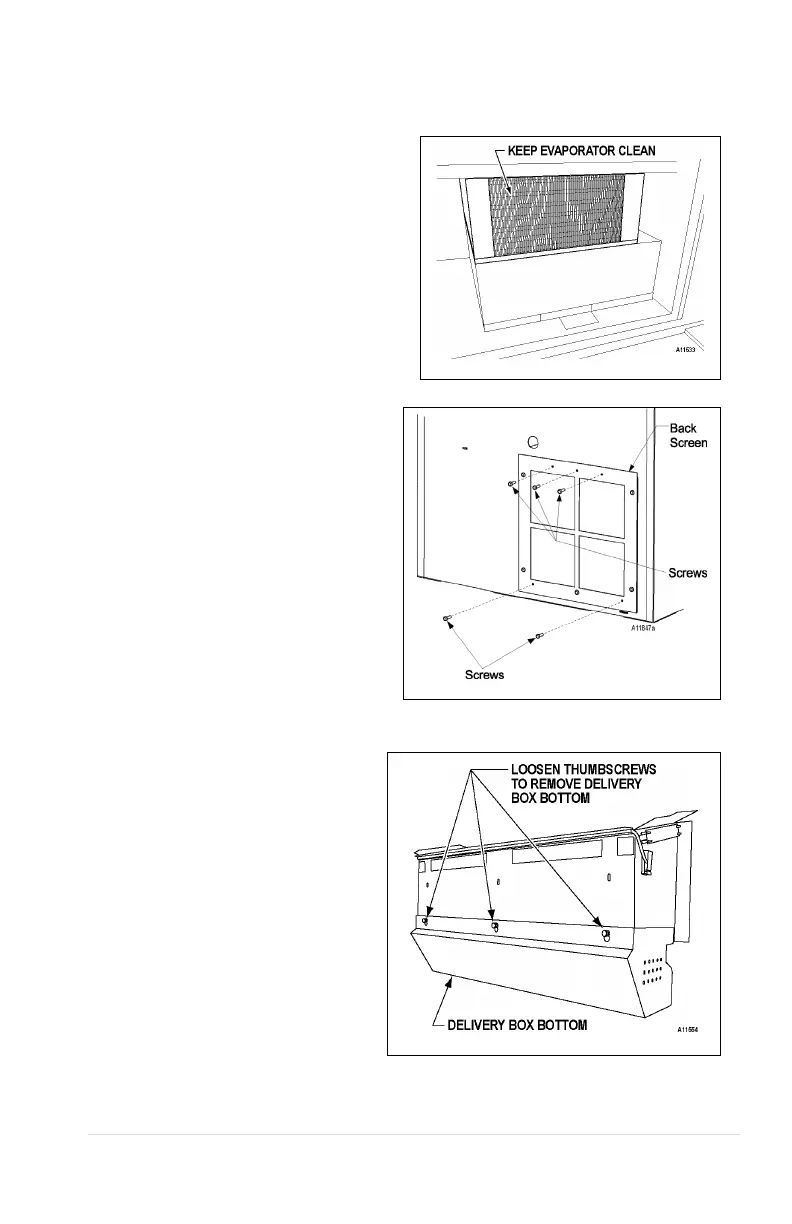
Open the door. Clean the evaporator coil of
refrigeration unit using a soft bristle brush
and/or vacuum cleaner.
Remove the Back Screen Cover from
cabinet back. Clean dust and debris from
screen using a soft br
vacuum cleaner.
NOTE: Remove screws from Back
Screen Cover at the back of the
machine, 3 from top and 2 from
bottom. Fig. 12c.
Figure 12c. Back Screen Cover
CLEAN DELIVERY BOX BOTTOM
Inspect the Delivery Box. Wipe clean
any dirt and de
accumulated.
The bottom half of the Delivery Box can
be removed for thorough cleaning. To
remove the Delivery Box Bottom, loosen
the three (3) thumbnuts located on the
rear of the Delivery Box. Lift up then pull
it out.
Figure 12d. Clean Delivery Box Bottom



 To Next Page