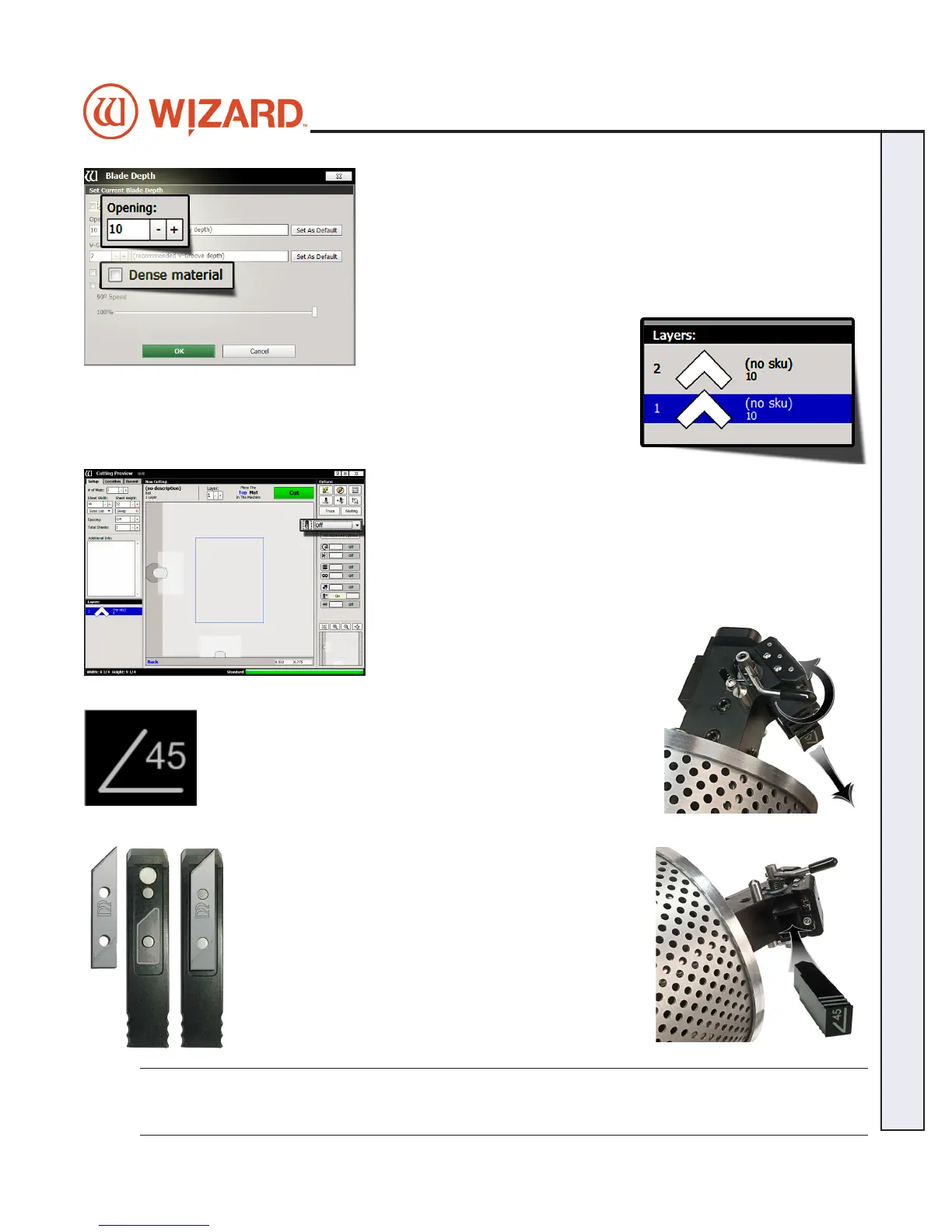
3. On the Blade Depth screen, select the new blade depth number under
Opening.
For this rst mat, leave it at the default setting.
4. If this is dense matboard, check the checkbox for Dense, and conrm
that the Blade Depth is the appropriate setting for this matboard.
For this rst mat, leave Dense unchecked.
5. Click OK.
6. If we had changed the Blade Depth, the new blade depth number would
listed next to the current layer.
NOTE: Returning to Editor then back to Cut Preview reloads the default blade
depth and dense settings.
Not Cutting the Outside
Click on the Outside Cut Options dropdown control and select O
to not cut the outside of the mat. You will be placing a piece of pre-cut
matboard into the machine.
Install a Blade
The 45° cartridge is labeled 45° on the end and is black.
1. Push blade cartridge release down to eject the current blade
cartridge.
2. The blade cartridge displays a diagram of the blade
orientation (shown in contrast). Place new blade into
cartridge with the longest straight side to the right and
the bevel face down, lining up the holes of the blade over
the pins in the cartridge. The blade should t snugly into
the recess space provided for it.
3. Turn cartridge over and reinsert into the head with the
blade facing the CMC board and the notch on the back
of the cartridge facing the head, until it clicks into place.
It can only be inserted one way.
WARNING: Do not run the CMC without the blade cartridge in
place or damage to the blade cartridge release lever could occur.
20-34304-1A GettingStartedManual9000zFrameShop
04/05/19
19
Wizard CMC Model 9000z Hardware and Software Getting Started Manual
Wizard™ CMC Model 9000z Hardware and Software Getting Started Guide


 To Next Page