EE--SSeerriieess WWaallll OOvveenn
EE--SSeerriieess WWaallll OOvveenn
Electronic Control System
3-4
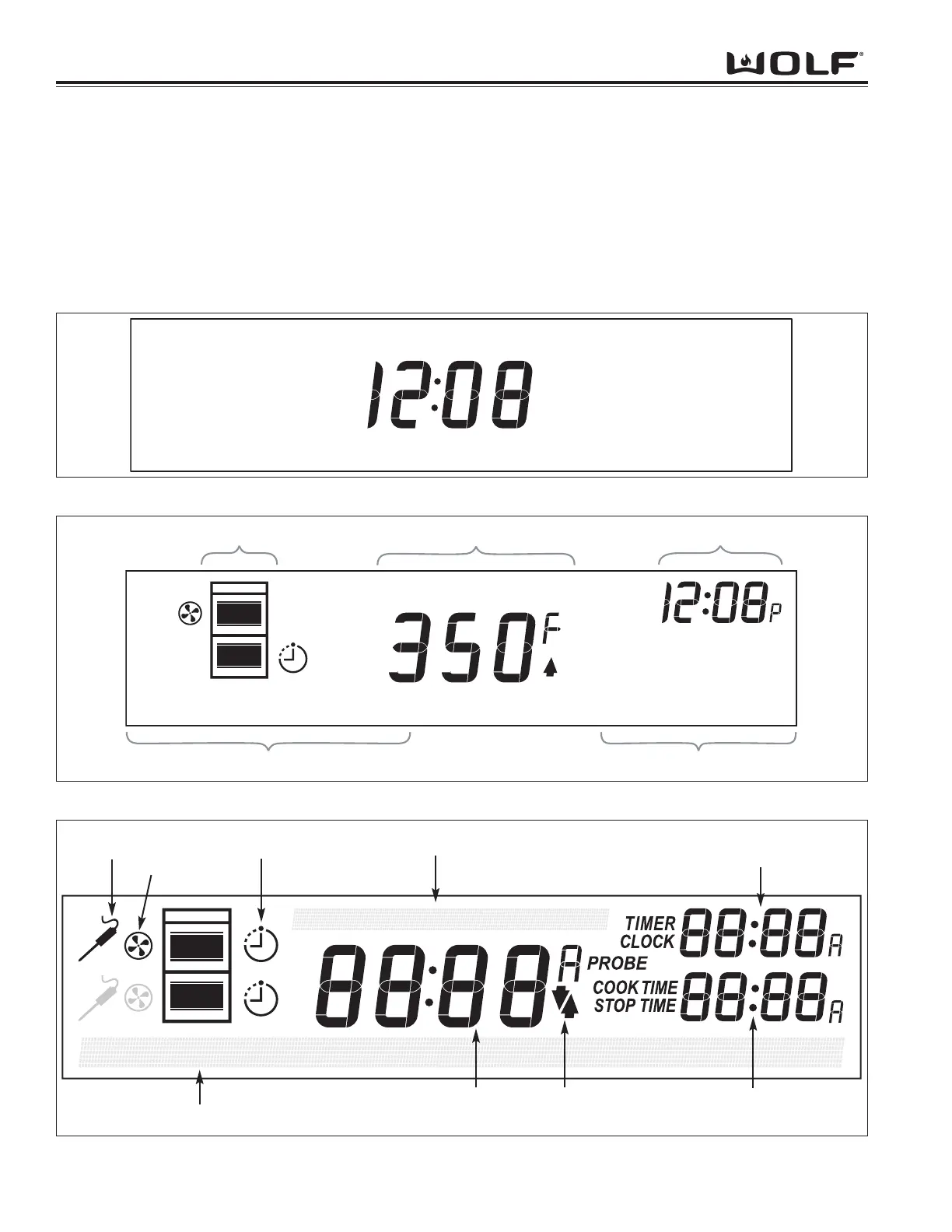
LCD Layout
The LCD shows time-of-day in the center readout when the oven is off.
When the oven(s) are on, the center readout displays the temperature, and the time-of-day is shown in the upper
right. The oven icon cluster on the left indicates which cavities are on, as well as the status of probe, convection,
and cook timers. A 42-character display in the bottom section of the LCD provides user prompting and auxiliary
cooking information on the left, and displays the cook mode on the right.
When both ovens are on, the LCD alternates between displaying Upper cavity information and Lower cavity informa-
tion. The Oven Status icon tells the user which cavity's information is currently on display.
Figure 3-2. LCD with Oven Off
Figure 3-4. LCD with All Crystals On
Upper Meat
Probe Icon
Upper
Convection
Fan Icon
Timed Cook
Icons
Main Temperature
Display (MTD)
Temperature Increasing/
Decreasing Arrows
Upper Auxiliary Time
Display (UATD)
Lower Auxiliary Time Display
(LATE)
Lower Information Line (LILA)
Upper Information Line (URL)



 To Next Page