EasyManua.ls Logo

XENO 4CH - Firmware Upgrade

XENO 4CH
126 pages
Print Icon
To Next Page IconTo Next Page
To Previous Page IconTo Previous Page
Loading...
Users Manual | 78
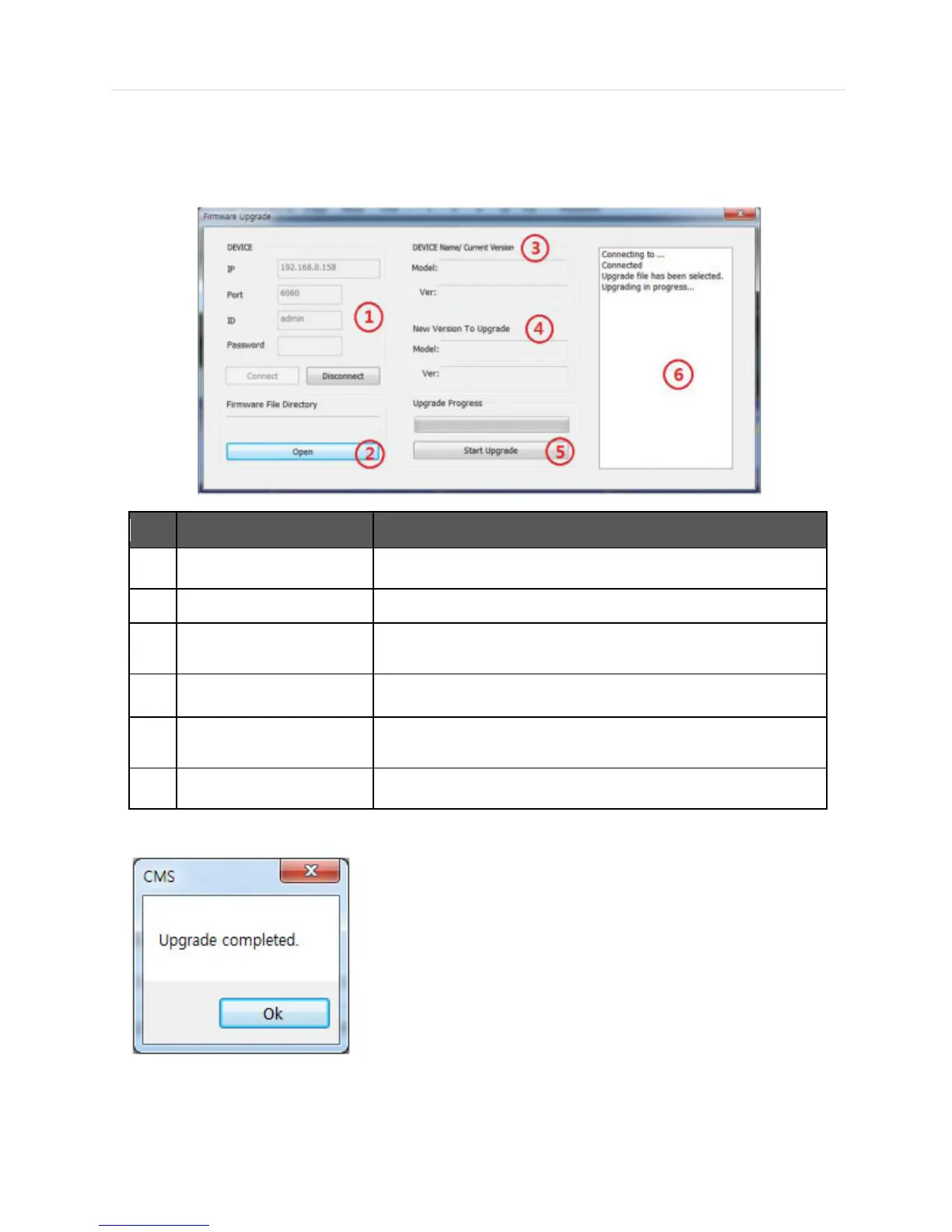
6.5.3 Firmware Upgrade
When you right click on a site in the site list, the quick access menu will be shown.
Select FIRMWARE UPGRADE to run Firmware Upgrade.
No
Item
Description
1
DEVICE Connection Info
Input the information of DEVICE to connect.
2
Firmware File Directory
Decide the firmware file directory to upgrade.
3
DEVICE Name/
Current Version
Displays the current DEVICE Name and Firmware Version.
4
New Version to upgrade
Displays the new DEVICE Name and Firmware Version.
5
Upgrade Progress
Start Upgrade and upgrade progress bar shows the upgrade progress
status.
6
Upgrade Status Window
Displays the upgrade status in text message.
When the backup process is completed, “Backup Completed” message will appear.

Related product manuals