5-11
ARRIVING ON SITE
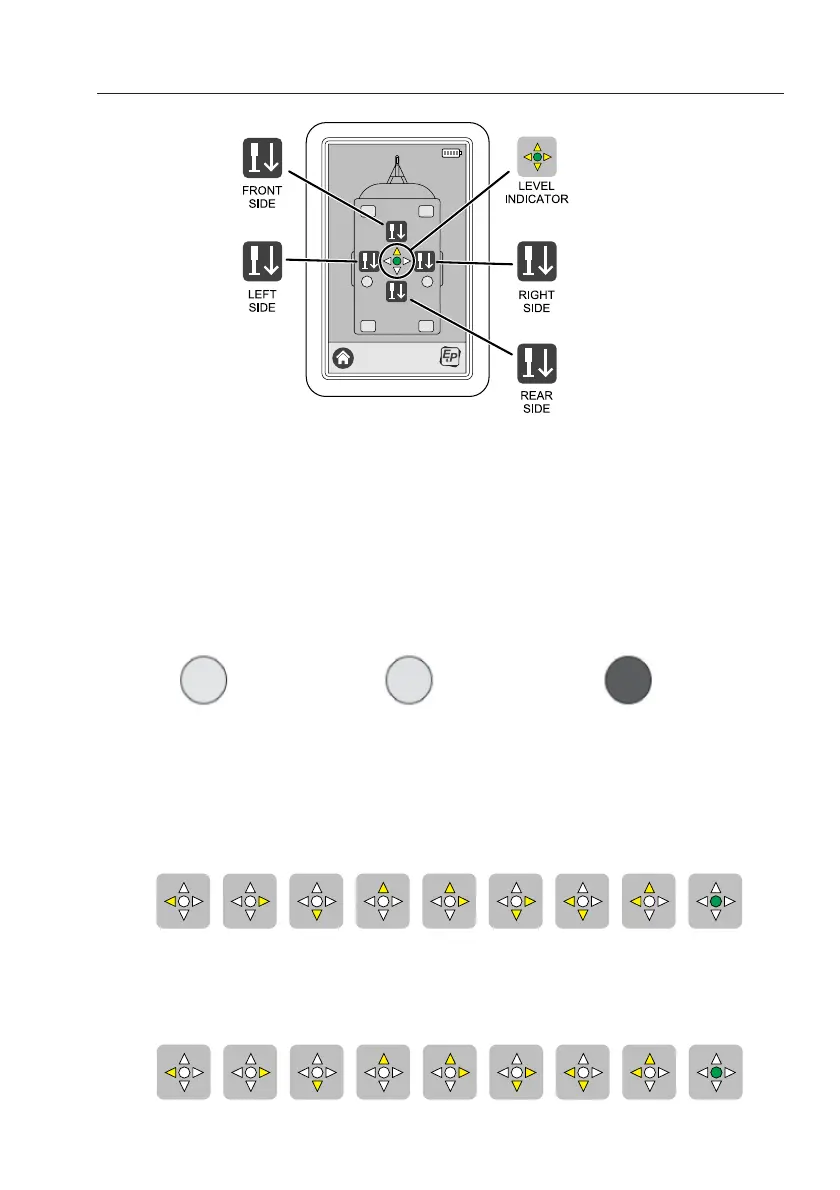
Step 2 Lift the vehicle at the axle by pushing the button “LEFT SIDE” button. The hydraulic
pump starts working, hold the button down until the left axle jack has reached the
ground. Hold the button down a little longer to allow the vehicle to lift approximately 3cm
on the left side. Repeat the same procedure with the right side, by pushing the button
“RIGHT SIDE”.
IMPORTANT: Always level the vehicle on the axle first (left/right side).
During this operation you see the six GREY areas (indicating the hydraulic jacks in
withdrawn position) changing in colour from YELLOW (jacks in operation) to RED (jacks
fully extended to the ground).
Step 3 Push the button “FRONT SIDE” and hold it down until the front jacks have reached the
ground. Hold the button down a little longer to allow the vehicle to lift apr. 3-5 cm on the
front side. The illumination of one or two ORANGE arrows on the indicator LED central
on the touch screen shows the position of the vehicle. In the unlikely event that the
vehicle is already level, then the indicator LED lights up GREEN directly.
Step 4 Push the button “REAR SIDE” and hold it down until the rear jacks have reached the
ground. The illumination of one or two ORANGE arrows on the indicator LED central on
the touch screen shows the position of the vehicle. In the unlikely event that the vehicle
is already level, then the indicator LED lights up GREEN directly.
Jack(s) in withdrawn position
Jack(s) in operation
Jack(s) in extended position



 To Next Page