VX-8DR OPERATING MANUAL 15
SELECTING THE OPERATING BAND
In the factory default configuration, the VX-8DR operates in the “Dual Receive” mode.
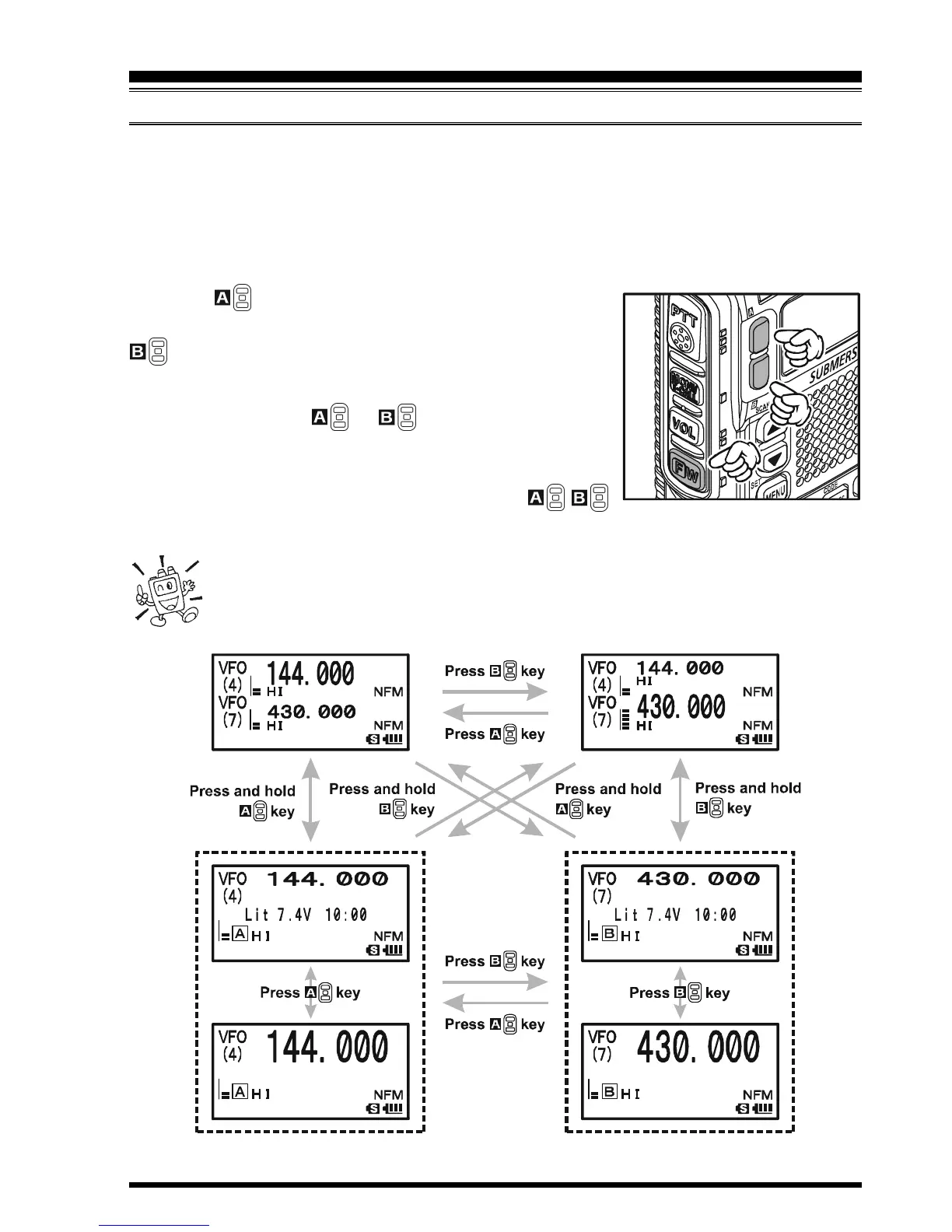
During Dual Receive operation, the “A-Band” frequency will be displayed on the upper
part of the LCD, and the “B-Band” frequency will be displayed on the lower part. The
“Operating” band (the band on which transmission and band/frequency changes are pos-
sible) is shown in large characters, and “Receive only” band is shown in small characters.
Press the key briefly to engage the “A-Band” fre-
quency as the “Operating” band. Alternatively, press the
key briefly to engage the “B-Band” frequency, as de-
scribed previously.
Press and hold in the or key for 1/2 seconds to
switch to Mono Band Operation. During Mono band op-
eration, you may change the display between “double-size
character” and “large character” by pressing the /
key.
When monitoring the receive audio with stereo earphones, the audio from
the “A-Band” is only heard in the left ear, and the audio from the “B-Band”
is only heard in the right ear.
OPERATION


 To Next Page