VX-8DR OPERATING MANUAL66
PREFERENTIAL MEMOR Y SCAN
The VX-8DR also allows you to set up a “Preferential Scan List” of channels which you
can “flag” within the memory system. These channels are designated by a blinking “”
icon when you have selected them, one by one, for the Preferential Scan List. When you
initiate memory scanning on a channel with the blinking “” icon appended, only those
channels bearing the blinking “” icon will be scanned. If you initiate scanning on a
channel which does not have the blinking “” icon appended, you will scan all channels
including those with the blinking “” icon appended.
Here is the procedure for setting up and using the Preferential Scan List:
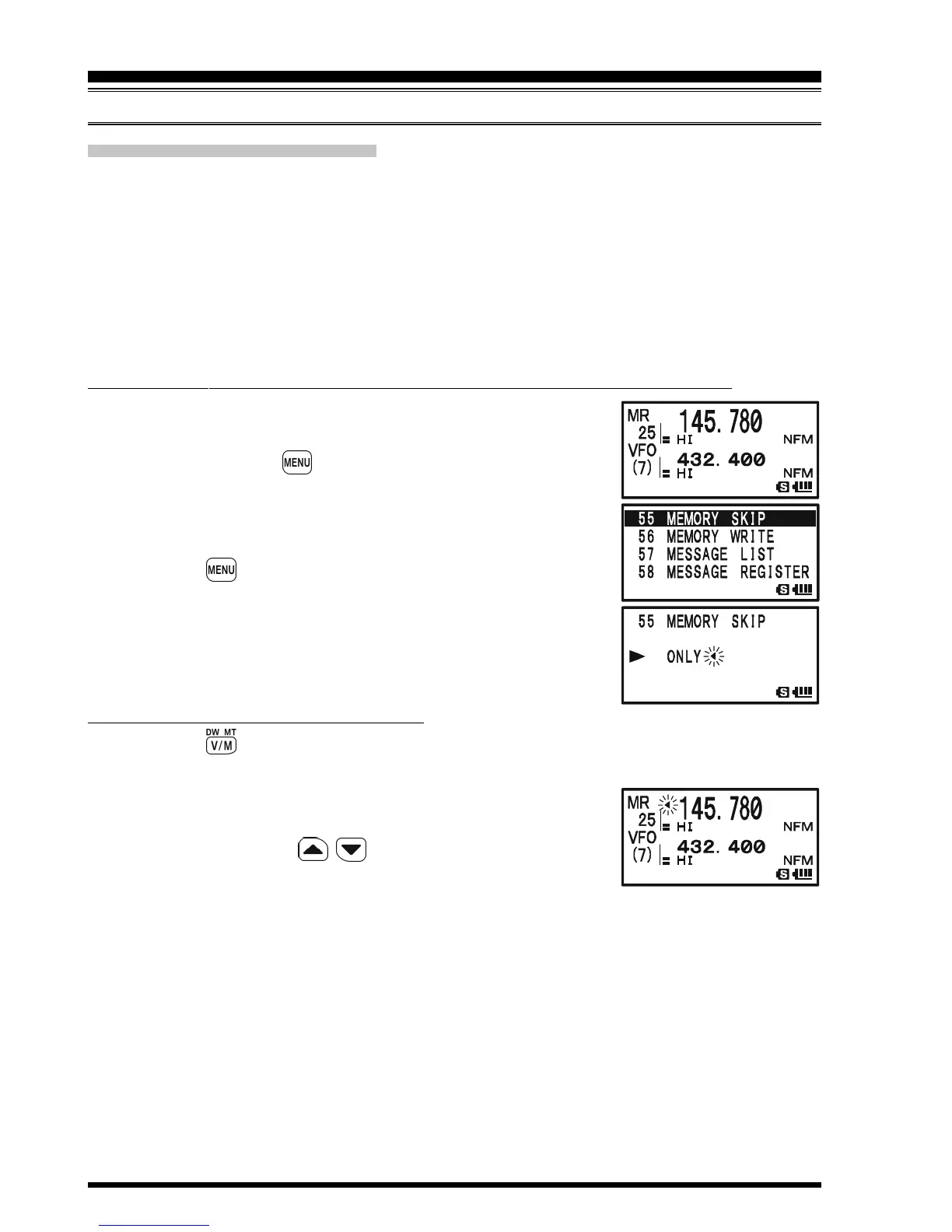
1. Recall the Memory Channel which you wish to add to the
Preferential Scan List.
2. Press and hold the key for one second to enter the Set
Mode.
3. Rotate the DIAL knob to select Set Mode Item 55: MEMORY
SKIP.
4. Press the key briefly to enable adjustment of this Set
Mode Item.
5. Rotate the DIAL knob to select “ONLY”.
6. Press the PTT switch briefly to save the new setting and
exit to normal operation.
To initiate Preferential Memory Scan:
1. Press the key briefly to enter the Memory Recall (“MR”) mode, if you are not
using memories already.
2. Rotate the DIAL knob to select any channel which has a
blinking “” icon appended to the channel number.
3. Press and hold in the / key for one second to initiate
Preferential Memory Scanning. Only the channels which
have a blinking “” icon appended to the channel number will be scanned.
MEMORY SCANNING
SCANNING



 To Next Page