VX-8DR OPERATING MANUAL 81
preset icons. To choose another icon, press the key, then rotate the DIAL knob to
select the desired symbol after having selected the preset icon. When you have com-
pleted selecting the icon, press the key again. You may choose 1 of 46 different
symbols.
14. Press the key briefly to save the new setting.
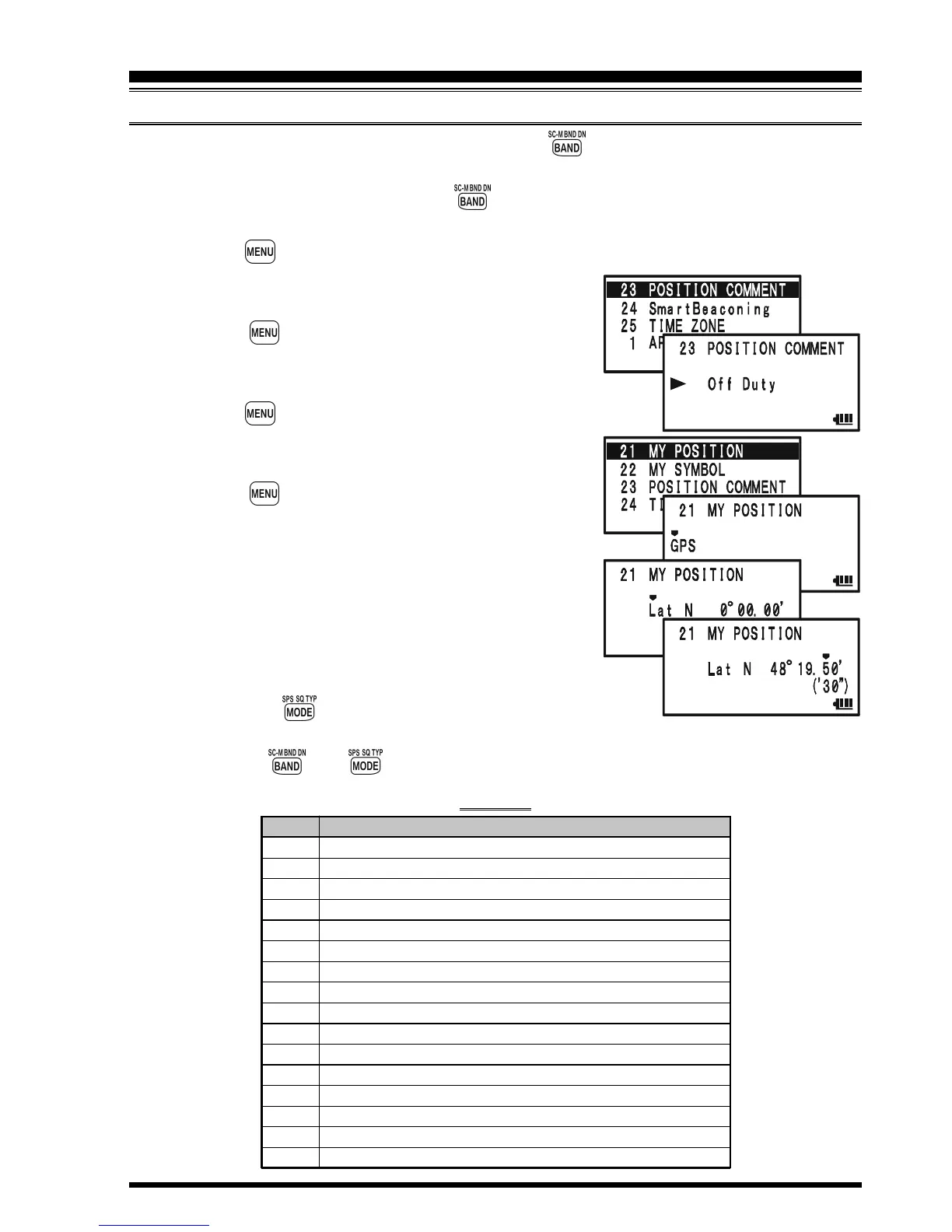
15. Rotate the DIAL knob to select Set Mode Item 23:
POSITION COMMENT.
16. Press the key briefly to enable adjustment of
this Set Mode Item.
17. Rotate the DIAL knob to select the desired comment.
18. Press the key briefly to save the new setting.
19. Rotate the DIAL knob to select Set Mode Item 21:
MY POSITION.
20. Press the key briefly to enable adjustment of
this Set Mode Item.
21. When the optional FGPS-2 GPS Antenna Unit is
connected to the transceiver, select “GPS” by rotat-
ing the DIAL knob and advance to the next step, oth-
erwise, enter your position (Longitude/Latitude)
manually.
1) Select “Lat” by rotating the DIAL knob.
2) Press the key to enable entering of your latitude
using the Decimal system.
3) Use the and keys to navigation to each column and then use the DIAL
APRS
®
OPERATION
PREPARATIONS
SSID
Non
-1
-2
-3
-4
-5
-6
-7
-8
-9
-10
-11
-12
-13
-14
-15
DETAILS
Home Station, Home Station IGate
Digipeater
Digipeater
Digipeater
HF to VHF Gateway
IGate (not Home Station)
Operation via Satellite
Hand-held Transceiver, such as VX-8DR
Maritime Mobile
Mobile
Operation via Internet
APRS touch-tone User (and the Occasional Balloons)
Portable Units, such as Laptops, Camp Sites etc.
Not Used
Trackers
HF Operation
SSID LIST



 To Next Page