VX-8DR OPERATING MANUAL78
You may customize the Time Zone (Time Offset), Display Unit of the GPS screen, and
GPS Datum for your own operating requirements via the APRS/GPS Set Mode.
SETTING THE TIME ZONE
(
TIME OFFSET
)
Sets the time offset between your local time and UTC (Universal Time Coordinated or
GMT: Greenwich Mean Time) shown on the display.
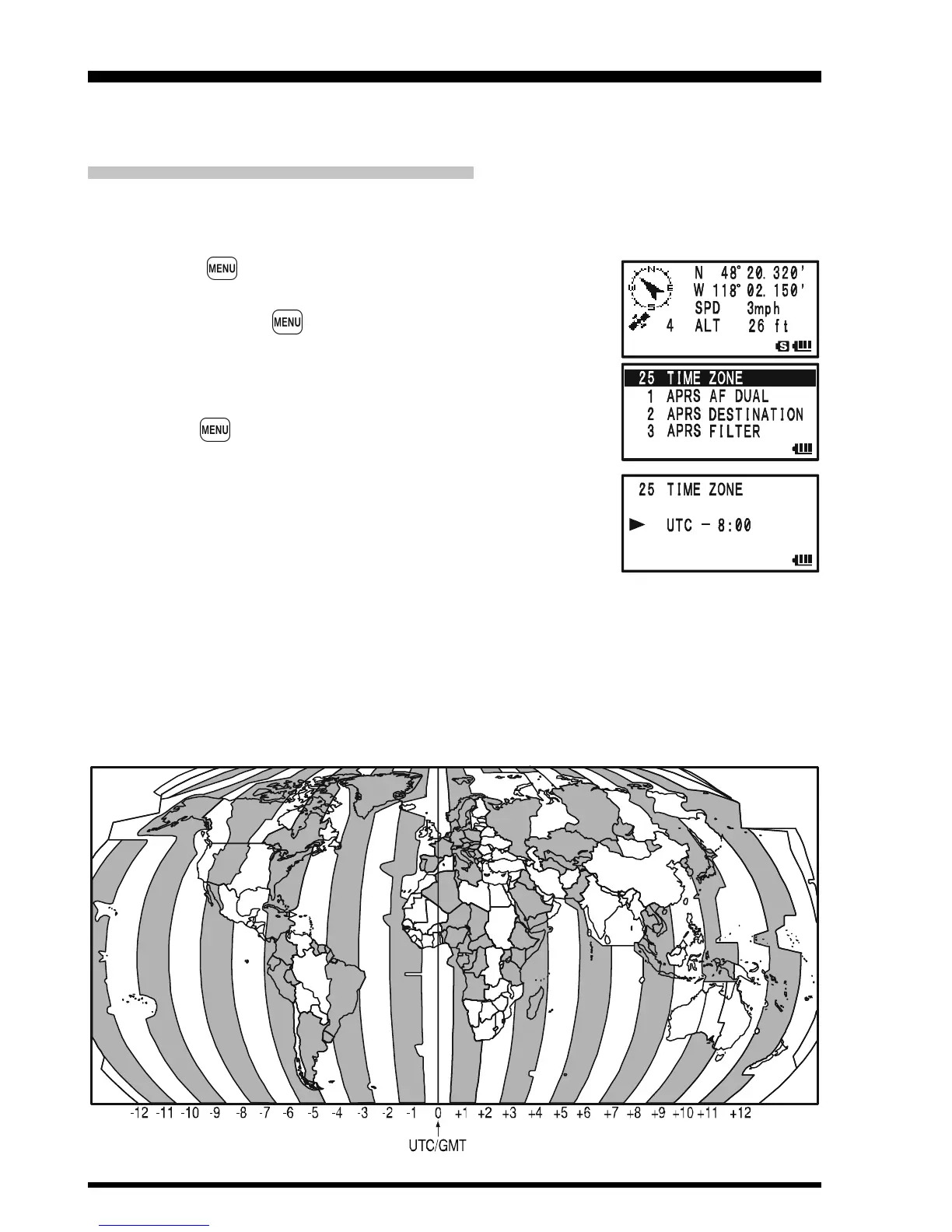
1. Press the key several times until the GPS screen ap-
pears on the display.
2. Press and hold the key for one second to enter the APRS/
GPS Set Mode.
3. Rotate the DIAL knob to select Set Mode Item 25: TIME
ZONE.
4. Press the key briefly to enable selection of this Set Mode
Item.
5. Rotate the DIAL knob to select the time offset from UTC.
See illustration below to find your offset time from UTC. If
“UTC +0:00” is assigned, the time is the same as UTC.
6. Press the PTT switch briefly to save the new setting and
exit from the APRS/GPS Set Mode.
GPS OPERATION



 To Next Page