VX-8DR OPERATING MANUAL72
Installation of the optional BU-1 Bluetooth
®
Adapter Unit will enable, the VX-8DR to
send/receive voice messages with the optional BH-1A or BH-2A Bluetooth
®
Headset
via wireless links.
PAIRING
When using the Bluetooth
®
Headset for the first time, the Bluetooth
®
Headset and the
VX-8DR must be paired.
1. Make sure that the VX-8DR and BH-1A
(
or BH-2A
)
are both off.
2. Press and hold in the
(
PWR
)
switch for 2 seconds to turn the VX-8R on.
3. Press and hold the key for one second to enter the Set Mode.
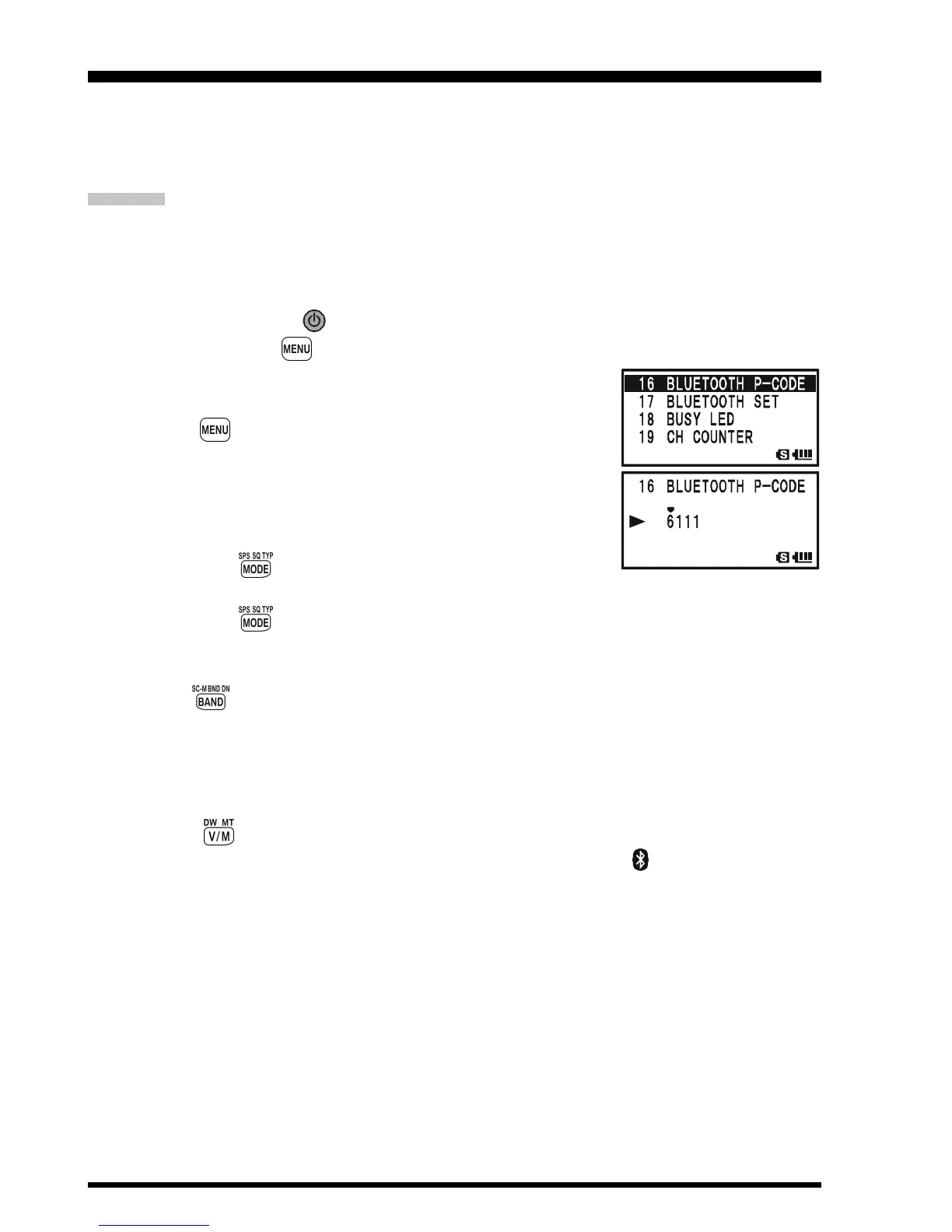
4. Rotate the DIAL knob to select Set Mode Item 16:
BLUETOOTH P-CODE.
5. Press the key briefly to enable selection of this Set Mode
Item.
6. The default PIN code (6111) will appear.
You may change the PIN code, if desired, before continu-
ing with step 7.
1) Press the key to enable changing of the PIN code.
2) Rotate the DIAL knob to set the first digit of the PIN code.
3) Press the key to save the first digit of the PIN code and move on to the next
place.
4) Repeat the previous steps to complete the PIN code. If you make a mistake, press
the key to move back to the incorrect number, then re-enter the correct
number.
7. Bring the BH-1A
(
or BH-2A
)
close to the VX-8DR, then press and hold in the POWER
switch of the BH-1A
(
or BH-2A
)
until the LED indicator blinks red/blue alternately
(approximately five seconds).
8. Press the key to initiate the pairing.
9. If the pairing is successful (requires about 20 to 30 seconds), “ ” icon will appear on
the display of the VX-8DR and the LED indicator of the BH-1A
(
or BH-2A
)
will
blink blue.
10. Press the PTT switch of the VX-8DR to save the new setting and return to normal
operation.
Bluetooth
®
OPERATION



 To Next Page