VX-8DR OPERATING MANUAL 89
MESSAGE GROUP SETTING
The Message Group option allows you to choose to receive only specific types of message
information.
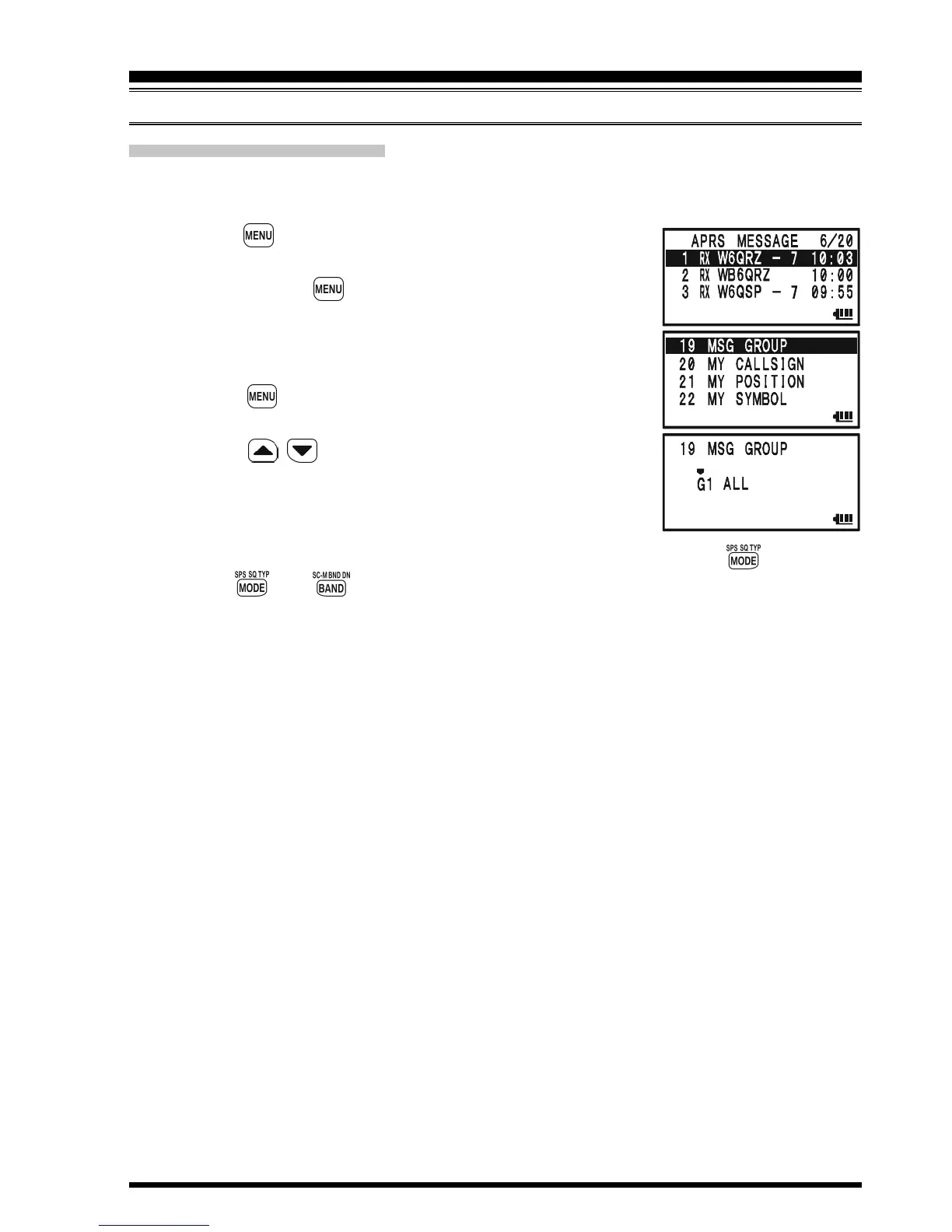
1. Press the key several times until the APRS MESSAGE
screen appears on the display.
2. Press and hold the key for one second to enter the APRS/
GPS Set Mode.
3. Rotate the DIAL knob to select Set Mode Item 19: MSG
GROUP.
4. Press the key briefly to enable adjustment of this Set
Mode Item.
5. Press the / key to select the “Group” you wish to
utilize (G1 ALL, G2 CQ, G3 QST, or G4 YAESU).
6. If you add a new message group code and/or bulletin group
code, select “G5” (for message group code) or “B1” ~ “B3”
(for bulletin group code) by rotating the DIAL knob, then press the key.
7. Use the
and
keys to navigate to each column, then use the DIAL knob to
select the desired characters/numbers in each column. Repeat for each column to
complete the message (up to 9 characters) or bulletin (up to 5 characters).
8. When you have completed your selection, press the PTT switch to save the new
setting and exit to the APRS MESSAGE screen.
APRS
®
OPERATION
RECEIVING AN APRS MESSAGE



 To Next Page