CONTROLS AND FUNCTIONS
II
Display information at
disc
play
TEXT/
TIME
Q
2 3 4 5
6 7 8 9
10
.1
..
1
1112
:
...
2 3 4 5
6 7 8 9
10
••••••••
:1
1112
.:::
...
2 3 4 :;
6 7 8 9
10
..........
1112
..::
..
:::-
2 3 4 5
6 7 8 9
10
1;::1
::;:~
11
12
:1.
::
.......
..
::
...
::::: :::::
::
5DISCS
5DISCS
..
:
•••••••
:I
.....
...
:1.:::.
I.
t
Disc title
t V
....•
..
•1
•••
....•
..
::.
1
~3
4 5
~
1
~
3 4 5
~
5DISCS
1
~
3 4 5
~
5 DISCS
·T·
C)
·"1"·1:::11..
..
1
~3
4 5
~
..
,
..
f··I··I··
:::
I
...
II
....
V
® Total disc play time
@)
Total remaining time
on
the disc
t V
@ Remaining time
of
the track now playing
II
Selecting
time
displays and
the
text
data
You
can select any
of
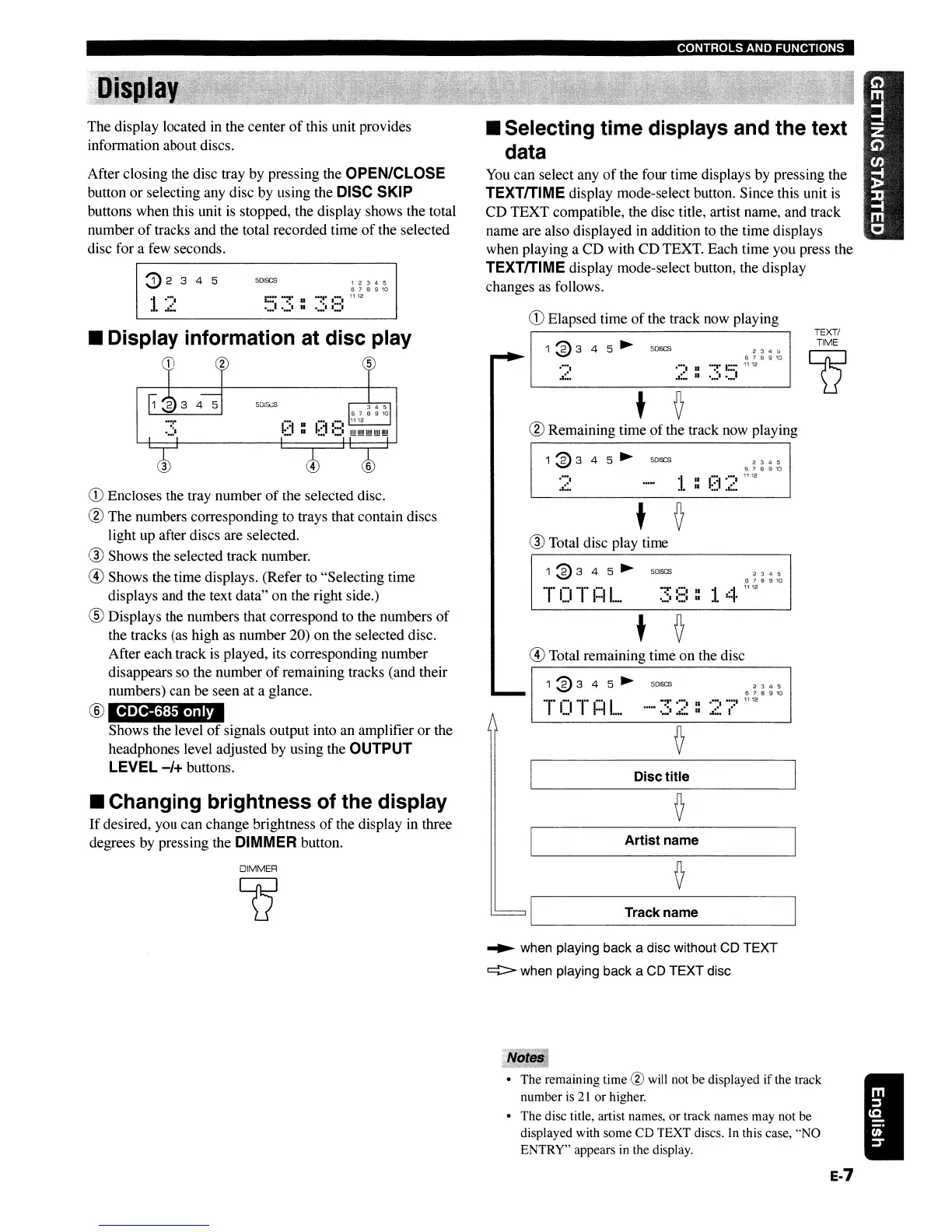
the four time displays by pressing the
TEXTITIME display mode-select button. Since this unit
is
CD TEXT compatible, the disc title, artist name, and track
name are also displayed
in
addition to the time displays
when playing a CD with CD TEXT. Each time you press the
TEXTITIME display mode-select button, the display
changes
as
follows.
CD
Elapsed time
of
the track now playing
1 2 3 4 5
6 7 8 9
10
••
:~
••
:::.
11
12
..........
I:::·
••
:••••
. : .
50lSCS
5DISCS
~2
3 4 5
·1
..
::.
••
•1
•••
CDC-68S
only
CD
Encloses the tray number
of
the selected disc.
@ The numbers corresponding to trays that contain discs
Iight up after discs are selected.
® Shows the selected
tracl<
number.
@)
Shows the time displays. (Refer to "Selecting time
displays and the text data" on the right side.)
® Displays the numbers that correspond to the numbers
of
the tracks (as high as number 20) on the selected disc.
After each track
is
played, its corresponding number
disappears so the number
of
remaining tracks (and their
numbers) can be seen at a glance.
®
Shows the level
of
signals output into an amplifier
or
the
headphones level adjusted by using the
OUTPUT
LEVEL
-/+
buttons.
After closing the disc tray by pressing the
OPEN/CLOSE
button or selecting any disc by using the DISC SKIP
buttons when this unit
is
stopped, the display shows the total
number
of
tracks and the total recorded time
of
the selected
disc for a few seconds.
The display located in the center
of
this unit provides
information about discs.
II
Changing
brightness
of
the display
If
desired, you can change brightness
of
the display in three
degrees by pressing the
DIMMER button.
Artist
name
DIMMER
Track name
~
when playing back a disc without CD TEXT
c:::i> when playing back a CD TEXT disc
• The remaining time
@ will not be displayed if the track
number
is
21
or
higher.
• The disc title, artist names, or track names may not be
displayed with some CD TEXT discs. In this case, "NO
ENTRY" appears in the display.
E-7
CONTROLS AND FUNCTIONS
II
Display information at
disc
play
TEXT/
TIME
Q
2 3 4 5
6 7 8 9
10
.1
..
1
1112
:
...
2 3 4 5
6 7 8 9
10
••••••••
:1
1112
.:::
...
2 3 4 :;
6 7 8 9
10
..........
1112
..::
..
:::-
2 3 4 5
6 7 8 9
10
1;::1
::;:~
11
12
:1.
::
.......
..
::
...
::::: :::::
::
5DISCS
5DISCS
..
:
•••••••
:I
.....
...
:1.:::.
I.
t
Disc title
t V
....•
..
•1
•••
....•
..
::.
1
~3
4 5
~
1
~
3 4 5
~
5DISCS
1
~
3 4 5
~
5 DISCS
·T·
C)
·"1"·1:::11..
..
1
~3
4 5
~
..
,
..
f··I··I··
:::
I
...
II
....
V
® Total disc play time
@)
Total remaining time
on
the disc
t V
@ Remaining time
of
the track now playing
II
Selecting
time
displays and
the
text
data
You
can select any
of
the four time displays by pressing the
TEXTITIME display mode-select button. Since this unit
is
CD TEXT compatible, the disc title, artist name, and track
name are also displayed
in
addition to the time displays
when playing a CD with CD TEXT. Each time you press the
TEXTITIME display mode-select button, the display
changes
as
follows.
CD
Elapsed time
of
the track now playing
1 2 3 4 5
6 7 8 9
10
••
:~
••
:::.
11
12
..........
I:::·
••
:••••
. : .
50lSCS
5DISCS
~2
3 4 5
·1
..
::.
••
•1
•••
CDC-68S
only
CD
Encloses the tray number
of
the selected disc.
@ The numbers corresponding to trays that contain discs
Iight up after discs are selected.
® Shows the selected
tracl<
number.
@)
Shows the time displays. (Refer to "Selecting time
displays and the text data" on the right side.)
® Displays the numbers that correspond to the numbers
of
the tracks (as high as number 20) on the selected disc.
After each track
is
played, its corresponding number
disappears so the number
of
remaining tracks (and their
numbers) can be seen at a glance.
®
Shows the level
of
signals output into an amplifier
or
the
headphones level adjusted by using the
OUTPUT
LEVEL
-/+
buttons.
After closing the disc tray by pressing the
OPEN/CLOSE
button or selecting any disc by using the DISC SKIP
buttons when this unit
is
stopped, the display shows the total
number
of
tracks and the total recorded time
of
the selected
disc for a few seconds.
The display located in the center
of
this unit provides
information about discs.
II
Changing
brightness
of
the display
If
desired, you can change brightness
of
the display in three
degrees by pressing the
DIMMER button.
Artist
name
DIMMER
Track name
~
when playing back a disc without CD TEXT
c:::i> when playing back a CD TEXT disc
• The remaining time
@ will not be displayed if the track
number
is
21
or
higher.
• The disc title, artist names, or track names may not be
displayed with some CD TEXT discs. In this case, "NO
ENTRY" appears in the display.
E-7


 To Next Page