CD
SYNCHRONIZED
RECORDING
9 If desired, select the track to be recorded first.
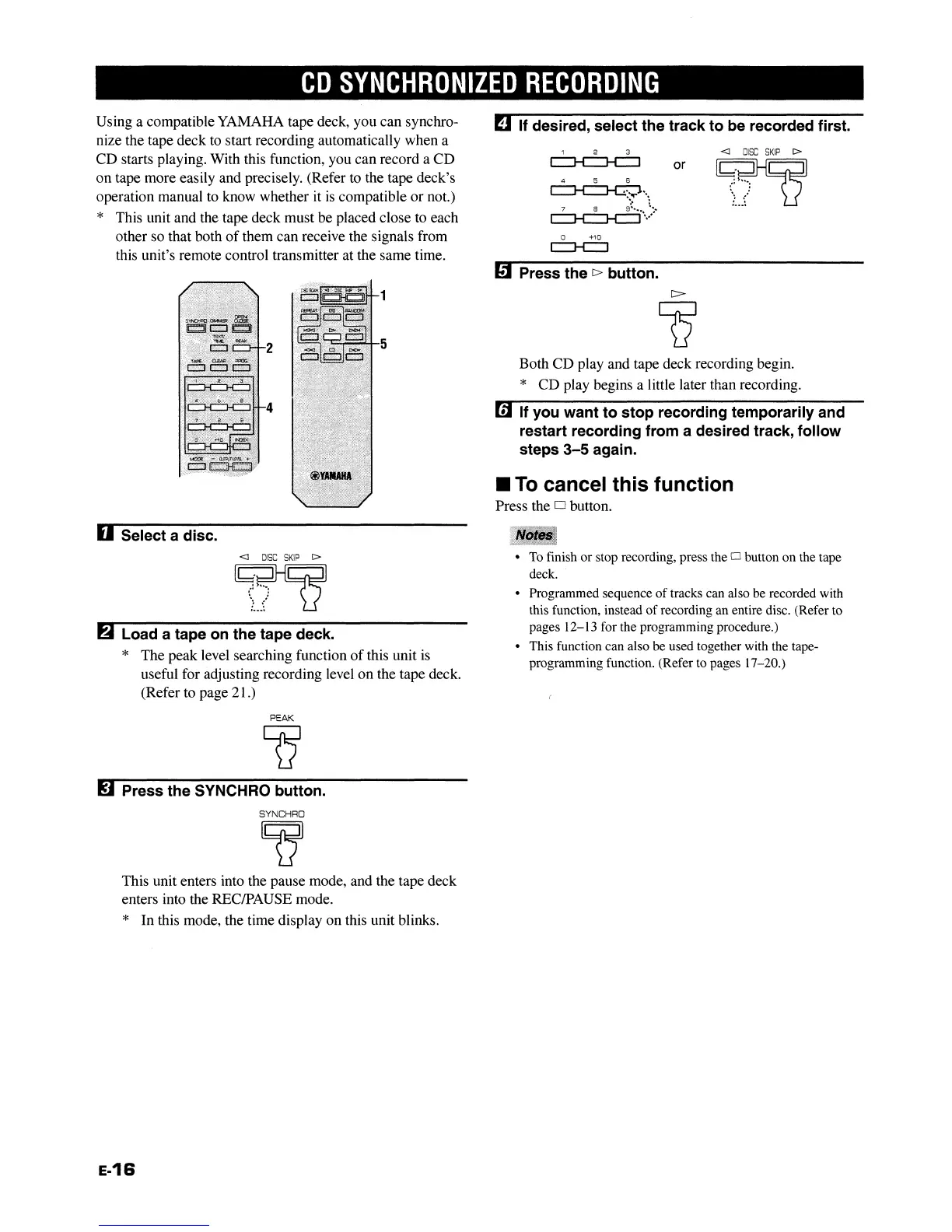
Using a compatible YAMAHA tape deck, you can synchro-
nize the tape deck to start recording automatically when a
CD starts playing. With this function, you can record a CD
on tape more easily and precisely. (Refer to the tape deck's
operation manual to know whether it
is
compatible or not.)
* This unit and the tape deck must be placed close to each
other so that both
of
them can receive the signals from
this unit's remote control transmitter at the same time.
1 2 3
~
or
4 5 6
~"~
7 8
9':""
l.:,
~
...
,
o +10
c:::::J-C:J
mPress the
c>
button.
<1
DISC
SKIP
I>
~
':h'_:
":
/
,....
5
Both CD play and tape deck recording begin.
* CD play begins a little later than recording.
mIf you want to stop recording temporarily and
restart recording from a desired track, follow
steps
3-5
again.
II
To
cancel this function
Press the 0 button.
D Select a disc.
<1
DISC
SKIP
t>
~
':~h_:
',:
~:
._._a
~
Load a tape on the tape deck.
* The peak level searching function
of
this unit
is
useful for adjusting recording level on the tape deck.
(Refer to page 21.)
PEAK
~
~
Press the SYNCHRO button.
SYNCHRO
~
This unit enters into the pause mode, and the tape deck
enters into the RECIPAUSE mode.
* In this mode, the time display on this unit blinks.
e-16
•
To
finish or stop recording, press the 0 button on the tape
deck.
• Programmed sequence
of
tracks can also be recorded with
this function, instead
of
recording an entire disc. (Refer to
pages
12-13 for the programming procedure.)
• This function can also be used together with the tape-
programming function. (Refer to pages
17-20.)
CD
SYNCHRONIZED
RECORDING
9 If desired, select the track to be recorded first.
Using a compatible YAMAHA tape deck, you can synchro-
nize the tape deck to start recording automatically when a
CD starts playing. With this function, you can record a CD
on tape more easily and precisely. (Refer to the tape deck's
operation manual to know whether it
is
compatible or not.)
* This unit and the tape deck must be placed close to each
other so that both
of
them can receive the signals from
this unit's remote control transmitter at the same time.
1 2 3
~
or
4 5 6
~"~
7 8
9':""
l.:,
~
...
,
o +10
c:::::J-C:J
mPress the
c>
button.
<1
DISC
SKIP
I>
~
':h'_:
":
/
,....
5
Both CD play and tape deck recording begin.
* CD play begins a little later than recording.
mIf you want to stop recording temporarily and
restart recording from a desired track, follow
steps
3-5
again.
II
To
cancel this function
Press the 0 button.
D Select a disc.
<1
DISC
SKIP
t>
~
':~h_:
',:
~:
._._a
~
Load a tape on the tape deck.
* The peak level searching function
of
this unit
is
useful for adjusting recording level on the tape deck.
(Refer to page 21.)
PEAK
~
~
Press the SYNCHRO button.
SYNCHRO
~
This unit enters into the pause mode, and the tape deck
enters into the RECIPAUSE mode.
* In this mode, the time display on this unit blinks.
e-16
•
To
finish or stop recording, press the 0 button on the tape
deck.
• Programmed sequence
of
tracks can also be recorded with
this function, instead
of
recording an entire disc. (Refer to
pages
12-13 for the programming procedure.)
• This function can also be used together with the tape-
programming function. (Refer to pages
17-20.)


 To Next Page